
50 lines
2.3 KiB
Markdown
50 lines
2.3 KiB
Markdown
**English** · [Dansk](Parsing-HTML-da) · [Bahasa Melayu](Parsing-HTML-ms)
|
|
|
|
# Parsing HTML
|
|
|
|
Lectures: *Parsing HTML and Making Soup* and *Finding and Selecting Elements*. The sample page is `tests/fixtures/website.html`; the code is `soup_basics.py`.
|
|
|
|
## Step 1: create a soup and read the title
|
|
|
|
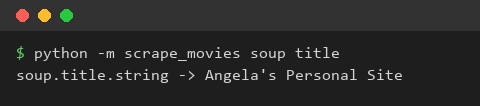
`BeautifulSoup(html, "html.parser")` turns the HTML text into a soup object. `soup.title.string` is the text of the title tag.
|
|
|
|
|
|
|
|
**What we gained:** HTML text becomes an object we can navigate, and a tag is reached with plain attribute access.
|
|
|
|
## Step 2: prettify
|
|
|
|
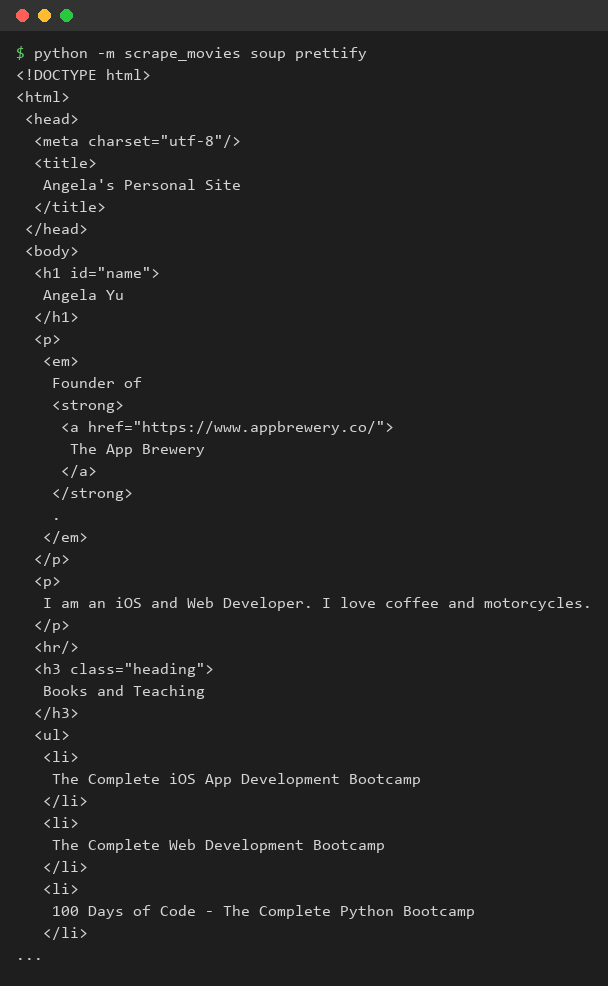
`soup.prettify()` writes the document with one tag per line, which makes the nesting visible.
|
|
|
|
|
|
|
|
**What we gained:** reading the structure first tells us what to ask for.
|
|
|
|
## Step 3: find all tags
|
|
|
|
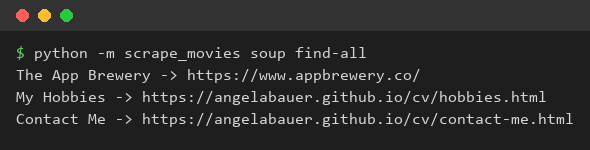
`find_all("a")` returns every anchor. In a loop, `get_text()` gives the text and `get("href")` the address.
|
|
|
|
|
|
|
|
**What we gained:** one call finds many elements, and a loop turns them into data.
|
|
|
|
## Step 4: find by id and by class
|
|
|
|
`find(id="name")` finds one tag by its id. `find_all("h3", class_="heading")` filters by tag and class; the keyword is `class_` because `class` is a Python keyword.
|
|
|
|

|
|
|
|
**What we gained:** attributes narrow a search, and we avoid clashes with reserved words.
|
|
|
|
## Step 5: CSS selectors
|
|
|
|
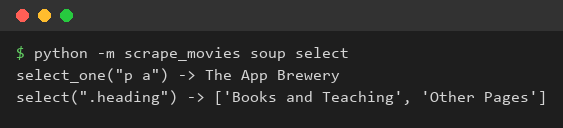
`select_one("p a")` and `select(".heading")` use the same selectors as CSS, so nested elements are reached in one expression.
|
|
|
|
|
|
|
|
**What we gained:** CSS selectors are the shortest way to describe where an element sits in the document.
|
|
|
|
## What we gained
|
|
|
|
We can read an HTML file into BeautifulSoup, look at its structure and pick out single or many elements by tag, id, class or CSS selector.
|