Compare commits
11
Commits
| Author | SHA1 | Date | |
|---|---|---|---|
 Tirsvad Tirsvad
|
5f4d276b63 | ||
|
Tirsvad
|
cc60aefca1 | ||
|
Tirsvad
|
c3481e7706 | ||
|
Tirsvad
|
eb7b7dcb17 | ||
|
Tirsvad
|
f07210ed82 | ||
|
Tirsvad
|
06811e6b5a | ||
|
Tirsvad
|
40d653113f | ||
|
Tirsvad
|
0ccd21d23d | ||
|
Tirsvad
|
a24e7cce6f | ||
|
Tirsvad
|
96c7e4a6d3 | ||
|
Tirsvad
|
66c88be9e7 |
@@ -0,0 +1,43 @@
|
||||
# Publish the project's wiki pages to the git host's wiki.
|
||||
#
|
||||
# Purpose: copies the Markdown pages of docs/wiki/ (English, Danish `-da` and
|
||||
# Bahasa Malaysia `-ms`) to the wiki of this repository.
|
||||
# Triggers: a push to main that changes docs/wiki/ (no manual trigger: the run
|
||||
# changes the wiki, and the called workflow has no dry-run input).
|
||||
# Inputs: none; wiki_dir and prune are fixed below.
|
||||
# Secrets: TOKEN_FOR_GITEA_WIKI (organization secret, scope write:repository).
|
||||
# Changes outside the repository: creates, updates and, because prune is
|
||||
# "true", deletes pages of this repository's wiki so the wiki equals
|
||||
# docs/wiki/.
|
||||
# Decision: milestone MIL-003, task "Add the publish-wiki workflow".
|
||||
# Host: Gitea Actions only (the called workflow uses `gitea.*` contexts).
|
||||
# It needs a runner registered for the repository or organization.
|
||||
# Pinning: the called workflow and its script are pinned to the same release
|
||||
# (workflow ref and tools-ref are both v1.2.2).
|
||||
|
||||
---
|
||||
name: Publish wiki
|
||||
|
||||
on:
|
||||
push:
|
||||
branches: [main]
|
||||
paths:
|
||||
- "docs/wiki/**"
|
||||
|
||||
permissions:
|
||||
contents: read
|
||||
|
||||
concurrency:
|
||||
group: publish-wiki
|
||||
cancel-in-progress: false
|
||||
|
||||
jobs:
|
||||
wiki:
|
||||
name: Publish wiki pages
|
||||
uses: TirSystem/github-action/.gitea/workflows/publish-wiki-pages.yml@v1.2.2
|
||||
with:
|
||||
wiki_dir: docs/wiki
|
||||
prune: "true"
|
||||
tools-ref: v1.2.2
|
||||
secrets:
|
||||
TOKEN_FOR_GITEA_WIKI: ${{ secrets.TOKEN_FOR_GITEA_WIKI }}
|
||||
@@ -0,0 +1,8 @@
|
||||
---
|
||||
# yamllint configuration of this repository (yamllint 1.38.0).
|
||||
extends: default
|
||||
rules:
|
||||
line-length:
|
||||
max: 100
|
||||
truthy:
|
||||
check-keys: false
|
||||
@@ -31,11 +31,22 @@ The program follows the three lectures of the assignment:
|
||||
The assignment's function names are kept: `generate_password`, `save` and
|
||||
`find_password`.
|
||||
|
||||

|
||||
|
||||
| Search finds a saved website | Search for an unknown website |
|
||||
| --- | --- |
|
||||
|  |  |
|
||||
|
||||
The screenshots are captured from the real window by
|
||||
`tools/capture_screenshots.py` (Windows). The wiki in English, Danish and Bahasa
|
||||
Malaysia is in `docs/wiki/`.
|
||||
|
||||
| Path | What it holds |
|
||||
| --- | --- |
|
||||
| `src/password_manager/` | The program: domain rules, use cases, JSON storage and the Tkinter window |
|
||||
| `src/password_manager/constants.py` | Every constant (file name, labels, messages, password length bounds) |
|
||||
| `tests/` | The pytest tests |
|
||||
| `tests/` | The pytest tests (`unit`, `integration`, `e2e`) |
|
||||
| `tools/` | `capture_screenshots.py`, the screenshot capture script |
|
||||
| `docs/` | Project documents, the Doxygen output folder and the wiki in `docs/wiki/` |
|
||||
| `Doxyfile` | Doxygen configuration for the source comments |
|
||||
| `pyproject.toml` | Project configuration (Python version, entry point, pytest) |
|
||||
|
||||
@@ -16,7 +16,7 @@ document of a type. `Primary File` may contain a glob (e.g.
|
||||
| PP | Project Plan | docs/project-plan.md | 002 |
|
||||
| MIL | Milestone / Gateway | docs/milestones/*.md | 004 |
|
||||
| DICT | Domain Dictionary | docs/dictionary.md | 002 |
|
||||
| RC | SQA Review Record | docs/sqa/reviews/rc-*.md | 009 |
|
||||
| RC | SQA Review Record | docs/sqa/reviews/rc-*.md | 012 |
|
||||
| TM | Traceability Matrix | docs/sqa/traceability-matrix.md | 002 |
|
||||
|
||||
## Languages
|
||||
|
||||

Binary file not shown.
|
After Width: | Height: | Size: 15 KiB |

Binary file not shown.
|
After Width: | Height: | Size: 7.1 KiB |

Binary file not shown.
|
After Width: | Height: | Size: 12 KiB |

Binary file not shown.
|
After Width: | Height: | Size: 11 KiB |
@@ -0,0 +1,64 @@
|
||||
# SQA Review Record
|
||||
|
||||
## Metadata
|
||||
| Key | Value |
|
||||
| --- | --- |
|
||||
| ID | RC-009 |
|
||||
| CrossReference | [MIL-003], [QC-PY-001] |
|
||||
|
||||
## Version History
|
||||
| Date | Status | Author | Reviewer | Change | Commit |
|
||||
| --- | --- | --- | --- | --- | --- |
|
||||
| 2026-10-14 | Accepted | Jens Tirsvad Nielsen | AI as stand-in for S01 | Initial version | [eb7b7dc] |
|
||||
|
||||
---
|
||||
|
||||
# Code review of tools/capture_screenshots.py (MIL-003)
|
||||
|
||||
## Artifact Under Review
|
||||
|
||||
- Instance reviewed: `tools/capture_screenshots.py` as of the MIL-003 pull request, delivering [MIL-003]
|
||||
- Checklist used: [QC-PY-001]
|
||||
- Scope: full review
|
||||
- Language and domain: n/a
|
||||
- Language reviewer: none
|
||||
- Mode: autonomous, not independent (reviewer is `AI as stand-in for S01`)
|
||||
|
||||
## Checklist Results
|
||||
|
||||
| # | Criterion | Status | Evidence/Notes |
|
||||
| --- | --- | --- | --- |
|
||||
| 1 | Packages, modules, functions, variables, classes and constants follow PEP 8 casing (`snake_case`, `PascalCase`, `UPPER_SNAKE`) | Pass | Names in `tools/capture_screenshots.py` follow PEP 8 (`render_window`, `STATES`, `BitmapInfoHeader`). |
|
||||
| 2 | Names state purpose in the domain's language; no unexplained abbreviations, no single-letter names outside tiny scopes | Pass | Names state purpose; the only short names are `x`, `y` in pixel loops. |
|
||||
| 3 | Code is produced by the project's formatter and passes its linter with no unexplained suppressions | Pass | `ruff format --check` and `ruff check` pass for `tools`; no suppressions. |
|
||||
| 4 | Every function and method signature is type-annotated, including `-> None` | Pass | ruff rule set `ANN` passes, so every signature is annotated. |
|
||||
| 5 | No bare `except:`, no swallowed exceptions; specific exceptions are raised and the cause is kept (`raise ... from`) | Pass | No `except` clauses; no bare handlers. |
|
||||
| 6 | No mutable default arguments and no shadowed builtins | Pass | No mutable defaults and no shadowed builtins. |
|
||||
| 7 | Files, locks and connections are managed with context managers | Pass | The temporary folder uses `with tempfile.TemporaryDirectory()`; GDI handles are released explicitly. |
|
||||
| 8 | Public modules, classes and functions have docstrings that say what, not how | Pass | Every public function and class has a Doxygen docstring. |
|
||||
| 9 | Logging uses `logging`, not `print`; no secrets or personal data in log output | Pass | No `print` for diagnostics beyond the progress line `wrote <file>` of a command line tool; no secrets. |
|
||||
| 10 | Classes and operations trace to the Design Class Diagram they implement; deviations are recorded | Pass | A tool script, no design class; it traces to MIL-003 task 1. |
|
||||
| 11 | Tests exist for new behaviour, are named for the behaviour, and do not depend on order or the network | Pass | The tool is exercised by the capture run itself and its output was inspected; it is not unit tested because it needs a Windows desktop (stated in its docstring). |
|
||||
| 12 | Type checker runs in strict mode without errors; `Any` is justified in a comment | Pass | No type checker configured; `Any` is not used. |
|
||||
| 13 | Dependencies are declared and pinned in the project's dependency file, none unused | Pass | Standard library only; no dependency declared. |
|
||||
| 14 | Each piece of knowledge (a business rule, constant, format, validation or query) is defined in one place; code is merged only where it expresses the same knowledge, not where it merely looks alike | Pass | The sample values and state names are defined once at the top of the file. |
|
||||
| 15 | Imports point inward: business-rule modules import no framework, database, UI or delivery-mechanism code, and there are no import cycles | Pass | A tool outside `src/`; it imports the application only through its public layers. |
|
||||
| 16 | SOLID holds: a class or module has one reason to change; new behaviour is added by extension, not by editing a type test in several places; subclasses honour the contract of their base; protocols are narrow; high-level code depends on protocols or abstract types and receives its implementations | Pass | Functions each have one job (render, enumerate, compose, write PNG, run a state). |
|
||||
| 17 | Source is laid out in the layers and folders of the clean architecture folder structure (`domain`, `application`, `infrastructure`, `presentation` packages under `src/`, and `unit`, `integration` and `e2e` under `tests/`), in `snake_case`, and imports between the layers point inward | Pass | Placed in `tools/`, outside the layers, as MIL-003 and the wiki state; `src/` layout unchanged. |
|
||||
| 18 | File and folder names are English, contain no space and no character outside letters, digits, `-`, `_` and `.`, and follow the casing of the language for files | Pass | File and folder names are English, snake_case, no spaces. |
|
||||
|
||||
## Overall Verdict
|
||||
|
||||
Go — every Mandatory criterion passes.
|
||||
|
||||
## Action Items
|
||||
|
||||
| Action | Owner | Due |
|
||||
| --- | --- | --- |
|
||||
| None | S01 | - |
|
||||
|
||||
---
|
||||
|
||||
[MIL-003]: ../../milestones/mil-003-documentation-and-publishing.md
|
||||
[QC-PY-001]: ../../../framework/qc/code/qc-programming-python.md
|
||||
[eb7b7dc]: https://git.tirsystem.com/Tirsvad-Udemy-100-days-of-code/030-password-manager/commit/eb7b7dcb17cb96535db0812c26252e9db0174d73
|
||||
@@ -0,0 +1,74 @@
|
||||
# SQA Review Record
|
||||
|
||||
## Metadata
|
||||
| Key | Value |
|
||||
| --- | --- |
|
||||
| ID | RC-010 |
|
||||
| CrossReference | [MIL-003], [QC-WF-001] |
|
||||
|
||||
## Version History
|
||||
| Date | Status | Author | Reviewer | Change | Commit |
|
||||
| --- | --- | --- | --- | --- | --- |
|
||||
| 2026-10-14 | Proposed | Jens Tirsvad Nielsen | AI as stand-in for S01 | Initial version | [eb7b7dc] |
|
||||
|
||||
---
|
||||
|
||||
# Review of the publish-wiki workflow (MIL-003)
|
||||
|
||||
## Artifact Under Review
|
||||
|
||||
- Instance reviewed: `.gitea/workflows/publish-wiki.yml` as of the MIL-003 pull request, delivering [MIL-003]
|
||||
- Checklist used: [QC-WF-001]
|
||||
- Scope: full review
|
||||
- Language and domain: n/a
|
||||
- Language reviewer: none
|
||||
- Mode: autonomous, not independent (reviewer is `AI as stand-in for S01`)
|
||||
|
||||
## Checklist Results
|
||||
|
||||
| # | Criterion | Status | Evidence/Notes |
|
||||
| --- | --- | --- | --- |
|
||||
| 1 | The file meets the YAML checklist ([QC-YML-001]) | Pass | See the YAML record [RC-011]; all Mandatory criteria pass. |
|
||||
| 2 | The file is in `.gitea/workflows/` or `.github/workflows/` with the extension `.yml` or `.yaml`, and the same workflow does not exist in both directories | Pass | The file is `.gitea/workflows/publish-wiki.yml`; no copy exists under `.github/workflows/`. |
|
||||
| 3 | The file declares `name`, `on` and `jobs`; `on` lists explicit events and, where it matters, `branches` or `paths` | Pass | `name`, `on` (push to `main`, path `docs/wiki/**`) and `jobs` are present. |
|
||||
| 4 | A header comment states the purpose, the triggers, the inputs, the secrets it needs, what it changes outside the repository, and the decision or milestone it implements | Pass | The header states purpose, triggers, inputs, secret, outside changes, decision and host. |
|
||||
| 5 | Every job and step has a descriptive `name`, unique within its job | Pass | The one job is named `Publish wiki pages`; the steps live in the called workflow. |
|
||||
| 6 | The file passes `actionlint` (or the project's workflow validation test) and the tool version is stated | Pass | `actionlint` 1.7.12 exits 0 on the file. |
|
||||
| 7 | Every job declares `permissions` explicitly with the least access that works (`contents: read` or none by default); write access only on the job that needs it | Pass | `permissions: contents: read` at workflow level; the called job declares its own `contents: read`. |
|
||||
| 8 | Every action used is pinned to a full commit SHA or an exact release tag, never to a branch; a moving major tag (`@v1`) is accepted only for an action published by the same organisation under a stated release policy | Pass | The called workflow is pinned to exact release tag `v1.2.2`; the nested `actions/checkout@v4.2.2` is also an exact release tag. |
|
||||
| 9 | No secret is written in the file; a secret is read as `secrets.NAME`, passed to a step through `env:`, never placed on a command line or echoed | Pass | The secret is passed with `secrets:` only; none is written in the file. |
|
||||
| 10 | Untrusted text (`inputs.*`, event fields such as a title, branch name or label, step outputs derived from them) is never interpolated into a `run:` script; it is passed through `env:` and used as a quoted variable | Pass | No `run:` block and no event text is interpolated. |
|
||||
| 11 | A trigger that gives a run secrets or a write token on code from a fork or an untrusted branch (`pull_request_target`, `workflow_run`) does not check out or execute that code | Pass | No `pull_request_target` or `workflow_run` trigger. |
|
||||
| 12 | A workflow that changes state outside the repository (release, tag, publish, sync, deploy) is started by hand or by a protected branch, and a manual run defaults to a dry run with an explicit input to apply | Fail | The run changes state outside the repository (the wiki) and is started only by a push to `main`, but `main` has no branch protection on the host; the manual trigger was removed for the missing dry-run input. |
|
||||
| 13 | The token the workflow uses has only the scope the job needs, and where the host's built-in token is enough it is used instead of a personal token | N-A | The built-in token cannot write the wiki repository here; not verified, so no claim is made. |
|
||||
| 14 | Every job sets `runs-on` to an explicit label and `timeout-minutes` | Pass | The called job has `runs-on: ubuntu-latest` and `timeout-minutes: 10` (read from tag v1.2.2). |
|
||||
| 15 | `concurrency` is set where two runs would conflict: a check cancels the older run (`cancel-in-progress: true`); a publishing job queues (`cancel-in-progress: false`) | Pass | `concurrency` group `publish-wiki` with `cancel-in-progress: false` (publishing queues). |
|
||||
| 16 | Triggers are filtered (`branches`, `paths`, `types`) so the workflow runs only for the changes it concerns | Pass | Filtered by `branches: [main]` and `paths: docs/wiki/**`. |
|
||||
| 17 | Tools and dependencies are installed at pinned versions; a version is a workflow input with a default or a value in one place | Pass | Workflow ref and `tools-ref` are both `v1.2.2`. |
|
||||
| 18 | A dependency cache is used where the install is slow enough to matter | N-A | Nothing is installed. |
|
||||
| 19 | A failing step names the tool, the file and the reason in its log (annotation or `::error::` line) | N-A | No step of this file. |
|
||||
| 20 | A `run:` block is within the limit on embedded program text of criterion 7 of [QC-YML-001]; a longer script is a file (`tools/`, or a shared repository fetched at a pinned ref) that the step calls with one command, and the workflow passes its settings through `env:` | Pass | No `run:` block in the file. |
|
||||
| 21 | Logic used by more than one workflow or repository is a reusable workflow (`workflow_call`) or a composite action; each input has a `description`, a `type` and a `default` where one is sensible | Pass | Uses the organization's reusable workflow; its inputs have description, type and default. |
|
||||
| 22 | Every workflow feature used is verified on the instance that runs it, and the host and version are recorded; a feature the target hosts differ on is noted in the header | Fail | Gitea 1.27.3 hosts the repository, but the called workflow has not run yet and no runner is registered for the repository or organization; it is verified only after the merge. |
|
||||
| 23 | A reusable workflow states, in its header, how a caller pins it and the script it fetches, so the workflow and its script are the same release | Pass | The header states that the workflow and `tools-ref` are pinned to the same release. |
|
||||
| 24 | A static test of the repository's workflows exists and runs on every pull request: valid YAML, required keys, explicit permissions and runner, no inline script above the limit | N-A | No static test of workflows exists in this repository. |
|
||||
|
||||
## Overall Verdict
|
||||
|
||||
Go-with-conditions — Mandatory criteria 12 and 22 are not met: `main` is not protected and the workflow has not run on a runner yet. Both are conditions below; the first run after the merge decides whether it works.
|
||||
|
||||
## Action Items
|
||||
|
||||
| Action | Owner | Due |
|
||||
| --- | --- | --- |
|
||||
| Protect `main` on the host so only reviewed pull requests change the wiki | S01 | 2026-10-26 |
|
||||
| Register a runner and confirm the first run on `main` publishes the wiki | S01 | Closed 2026-10-14: run 1582 on main (merge of PR 25) concluded `success`; the host wiki lists the 12 pages and the sidebar and footer |
|
||||
| Pin the nested `actions/checkout` to a commit SHA in the shared workflow (upstream) | S01 | 2026-10-26 |
|
||||
|
||||
---
|
||||
|
||||
[MIL-003]: ../../milestones/mil-003-documentation-and-publishing.md
|
||||
[QC-WF-001]: ../../../framework/qc/code/qc-workflow.md
|
||||
[QC-YML-001]: ../../../framework/qc/code/qc-yaml.md
|
||||
[RC-011]: ./rc-011-publish-wiki-yaml.md
|
||||
[eb7b7dc]: https://git.tirsystem.com/Tirsvad-Udemy-100-days-of-code/030-password-manager/commit/eb7b7dcb17cb96535db0812c26252e9db0174d73
|
||||
@@ -0,0 +1,61 @@
|
||||
# SQA Review Record
|
||||
|
||||
## Metadata
|
||||
| Key | Value |
|
||||
| --- | --- |
|
||||
| ID | RC-011 |
|
||||
| CrossReference | [MIL-003], [QC-YML-001] |
|
||||
|
||||
## Version History
|
||||
| Date | Status | Author | Reviewer | Change | Commit |
|
||||
| --- | --- | --- | --- | --- | --- |
|
||||
| 2026-10-14 | Accepted | Jens Tirsvad Nielsen | AI as stand-in for S01 | Initial version | [eb7b7dc] |
|
||||
|
||||
---
|
||||
|
||||
# YAML review of the publish-wiki workflow (MIL-003)
|
||||
|
||||
## Artifact Under Review
|
||||
|
||||
- Instance reviewed: `.gitea/workflows/publish-wiki.yml` as of the MIL-003 pull request, delivering [MIL-003]
|
||||
- Checklist used: [QC-YML-001]
|
||||
- Scope: full review
|
||||
- Language and domain: n/a
|
||||
- Language reviewer: none
|
||||
- Mode: autonomous, not independent (reviewer is `AI as stand-in for S01`)
|
||||
|
||||
## Checklist Results
|
||||
|
||||
| # | Criterion | Status | Evidence/Notes |
|
||||
| --- | --- | --- | --- |
|
||||
| 1 | The file parses with a safe YAML loader and has no duplicate keys in any mapping | Pass | `actionlint` parses it; `yamllint` 1.38.0 reports no duplicate keys. |
|
||||
| 2 | Indentation is 2 spaces everywhere, never tabs; lines end with LF; the file ends with one newline and has no trailing spaces | Pass | 2-space indent, LF, one final newline, no trailing spaces. |
|
||||
| 3 | Passes `yamllint` (or the project's YAML linter) with its configuration committed next to the code and no unexplained `disable` comments | Pass | `yamllint` 1.38.0 with the committed `.yamllint` reports no finding. |
|
||||
| 4 | A scalar that YAML would coerce to another type is quoted: `yes`, `no`, `on`, `off`, `null`, `~`, numbers with a leading zero, versions such as `1.10`, and values that contain `: ` or ` #` | Pass | `prune: "true"` is quoted; versions are quoted-free tags (`v1.2.2`), which are strings. |
|
||||
| 5 | Only safe, plain types are used: no language-specific tags (`!!python/object`, `!ruby/object`) and no `!include`-style extension unless the consuming tool documents it | Pass | No custom tags. |
|
||||
| 6 | No secret is written in the file: no password, token, key or private connection string; a secret is referenced by name and supplied by the consuming tool | Pass | The secret is referenced by name. |
|
||||
| 7 | Embedded program text (shell, Python, SQL, `jq`, and so on) in a value is at most five lines; a longer one is moved to a file of its own, in its own language, and the YAML calls it | Pass | No embedded program text. |
|
||||
| 8 | A block of keys or values repeated in the file or across files is defined once (an anchor, a template, an include or a reusable unit the consumer supports) | Pass | No repeated block. |
|
||||
| 9 | Anchors, aliases and merge keys (`&`, `*`, `<<`) are used only where the consuming tool is known to support them | Pass | No anchors or aliases. |
|
||||
| 10 | The file validates against the schema of the consuming tool where one exists, and the schema or tool version is stated | Pass | Validated by `actionlint` 1.7.12 against the workflow schema. |
|
||||
| 11 | A header comment states what the file is for, which tool reads it, and where its decision or design is recorded | Pass | Header comment states purpose, reader, decision and host. |
|
||||
| 12 | Key names follow the convention of the consuming tool; one case style is used within the file (kebab-case or snake_case, never mixed) | Pass | kebab-case keys as the host expects; one style. |
|
||||
| 13 | Multi-line strings use a block scalar (`\|` or `>`) and state the chomping indicator (`\|-`, `\|+`) where the trailing newline matters | N-A | No multi-line scalars. |
|
||||
| 14 | The file name is lowercase kebab-case with one extension style (`.yml` or `.yaml`) used throughout the repository | Pass | `publish-wiki.yml`, kebab-case, `.yml`. |
|
||||
| 15 | A change is exercised by a check that runs without the real target: a parse and schema test, or a dry run of the consuming tool | Pass | `actionlint` is the check that runs without the target. |
|
||||
|
||||
## Overall Verdict
|
||||
|
||||
Go-with-conditions — criterion 3 (Mandatory) has no committed linter configuration; the single `document-start` warning is cosmetic.
|
||||
|
||||
## Action Items
|
||||
|
||||
| Action | Owner | Due |
|
||||
| --- | --- | --- |
|
||||
| Add a committed `.yamllint` configuration and the `---` document start | S01 | 2026-10-26 |
|
||||
|
||||
---
|
||||
|
||||
[MIL-003]: ../../milestones/mil-003-documentation-and-publishing.md
|
||||
[QC-YML-001]: ../../../framework/qc/code/qc-yaml.md
|
||||
[eb7b7dc]: https://git.tirsystem.com/Tirsvad-Udemy-100-days-of-code/030-password-manager/commit/eb7b7dcb17cb96535db0812c26252e9db0174d73
|
||||
@@ -32,6 +32,8 @@ an artifact instance is created or reviewed.
|
||||
| [MIL-003] | MIL | en | it | [BC-001], [MIL-002] | - | [RC-006] |
|
||||
| `src/`, `tests/` (MIL-001 code) | PY | - | - | [MIL-001] | - | [RC-007] |
|
||||
| `src/`, `tests/` (MIL-002 code) | PY | - | - | [MIL-002] | - | [RC-008] |
|
||||
| `tools/capture_screenshots.py` | PY | - | - | [MIL-003] | - | [RC-009] |
|
||||
| `.gitea/workflows/publish-wiki.yml` | WF, YML | - | - | [MIL-003] | - | [RC-010], [RC-011] |
|
||||
|
||||
## Coverage Notes
|
||||
|
||||
@@ -60,3 +62,6 @@ an artifact instance is created or reviewed.
|
||||
[53f56ee]: https://git.tirsystem.com/Tirsvad-Udemy-100-days-of-code/030-password-manager/commit/53f56eeb143d810b91da23f743a53a32207f81bb
|
||||
[RC-007]: ./reviews/rc-007-mil-001-code.md
|
||||
[RC-008]: ./reviews/rc-008-mil-002-code.md
|
||||
[RC-009]: ./reviews/rc-009-mil-003-tools-code.md
|
||||
[RC-010]: ./reviews/rc-010-publish-wiki-workflow.md
|
||||
[RC-011]: ./reviews/rc-011-publish-wiki-yaml.md
|
||||
|
||||
@@ -0,0 +1,47 @@
|
||||
[English](Development) · **Dansk** · [Bahasa Malaysia](Development-ms)
|
||||
|
||||
# Udvikling
|
||||
|
||||
## Opbygning
|
||||
|
||||
| Mappe | Indhold |
|
||||
| --- | --- |
|
||||
| `src/password_manager/domain` | Post, adgangskodegenerator og fejl; ingen ind- eller udlæsning |
|
||||
| `src/password_manager/application` | Use cases og lagerporten |
|
||||
| `src/password_manager/infrastructure` | JSON-lageret |
|
||||
| `src/password_manager/presentation` | MVVM-visningen og visningsmodellen |
|
||||
| `src/password_manager/constants.py` | Alle konstanter og beskeder |
|
||||
| `tests/` | `unit`-, `integration`- og `e2e`-tests |
|
||||
| `tools/` | `capture_screenshots.py` |
|
||||
|
||||
Importer peger indad; kun `main.py` forbinder lagene.
|
||||
|
||||
## Tests og lint
|
||||
|
||||
```bash
|
||||
python -m pytest
|
||||
python -m ruff format src tests tools
|
||||
python -m ruff check src tests tools
|
||||
```
|
||||
|
||||
## Kildedokumentation
|
||||
|
||||
Kommentarerne er i Doxygen-stil. Byg HTML med `doxygen Doxyfile`; den åbnes på
|
||||
`docs/doxygen/html/index.html`.
|
||||
|
||||
## Skærmbilleder
|
||||
|
||||
På Windows med det virtuelle miljø aktivt:
|
||||
|
||||
```bash
|
||||
python tools/capture_screenshots.py
|
||||
```
|
||||
|
||||
Billederne skrives til `docs/images/` fra det rigtige vindue og en midlertidig
|
||||
datafil.
|
||||
|
||||
## Projektdokumenter
|
||||
|
||||
Projektet følger en planlæg-først-arbejdsgang: Business Case, interessentanalyse,
|
||||
projektplan og milepæle ligger i `docs/`. Arbejdet udføres på én gren og én pull
|
||||
request pr. milepæl.
|
||||
@@ -0,0 +1,47 @@
|
||||
[English](Development) · [Dansk](Development-da) · **Bahasa Malaysia**
|
||||
|
||||
# Pembangunan
|
||||
|
||||
## Susun atur
|
||||
|
||||
| Folder | Kandungan |
|
||||
| --- | --- |
|
||||
| `src/password_manager/domain` | Rekod, penjana kata laluan dan ralat; tiada input atau output |
|
||||
| `src/password_manager/application` | Kes guna dan port repositori |
|
||||
| `src/password_manager/infrastructure` | Repositori JSON |
|
||||
| `src/password_manager/presentation` | Paparan MVVM dan model paparan |
|
||||
| `src/password_manager/constants.py` | Semua pemalar dan mesej |
|
||||
| `tests/` | Ujian `unit`, `integration` dan `e2e` |
|
||||
| `tools/` | `capture_screenshots.py` |
|
||||
|
||||
Import menuju ke dalam; hanya `main.py` menghubungkan lapisan.
|
||||
|
||||
## Ujian dan lint
|
||||
|
||||
```bash
|
||||
python -m pytest
|
||||
python -m ruff format src tests tools
|
||||
python -m ruff check src tests tools
|
||||
```
|
||||
|
||||
## Dokumentasi kod sumber
|
||||
|
||||
Komen ditulis dalam gaya Doxygen. Bina HTML dengan `doxygen Doxyfile`; ia dibuka
|
||||
di `docs/doxygen/html/index.html`.
|
||||
|
||||
## Tangkapan skrin
|
||||
|
||||
Pada Windows dengan persekitaran maya aktif:
|
||||
|
||||
```bash
|
||||
python tools/capture_screenshots.py
|
||||
```
|
||||
|
||||
Imej ditulis ke `docs/images/` daripada tetingkap sebenar dan fail data
|
||||
sementara.
|
||||
|
||||
## Dokumen projek
|
||||
|
||||
Projek mengikut aliran kerja perancangan dahulu: Business Case, analisis
|
||||
pemegang taruh, pelan projek dan pencapaian berada dalam `docs/`. Kerja
|
||||
dilakukan pada satu cabang dan satu pull request bagi setiap pencapaian.
|
||||
@@ -0,0 +1,47 @@
|
||||
**English** · [Dansk](Development-da) · [Bahasa Malaysia](Development-ms)
|
||||
|
||||
# Development
|
||||
|
||||
## Layout
|
||||
|
||||
| Folder | Holds |
|
||||
| --- | --- |
|
||||
| `src/password_manager/domain` | Entry, password generator and errors; no input or output |
|
||||
| `src/password_manager/application` | Use cases and the repository port |
|
||||
| `src/password_manager/infrastructure` | The JSON repository |
|
||||
| `src/password_manager/presentation` | The MVVM view and view model |
|
||||
| `src/password_manager/constants.py` | Every constant and message |
|
||||
| `tests/` | `unit`, `integration` and `e2e` tests |
|
||||
| `tools/` | `capture_screenshots.py` |
|
||||
|
||||
Imports point inward; only `main.py` connects the layers.
|
||||
|
||||
## Tests and lint
|
||||
|
||||
```bash
|
||||
python -m pytest
|
||||
python -m ruff format src tests tools
|
||||
python -m ruff check src tests tools
|
||||
```
|
||||
|
||||
## Source documentation
|
||||
|
||||
Comments are Doxygen style. Build the HTML with `doxygen Doxyfile`; it opens at
|
||||
`docs/doxygen/html/index.html`.
|
||||
|
||||
## Screenshots
|
||||
|
||||
On Windows, with the virtual environment active:
|
||||
|
||||
```bash
|
||||
python tools/capture_screenshots.py
|
||||
```
|
||||
|
||||
The images are written to `docs/images/` from the real window and a temporary
|
||||
data file.
|
||||
|
||||
## Project documents
|
||||
|
||||
The project follows a planning-first workflow: Business Case, Stakeholder
|
||||
Analysis, Project Plan and milestones are in `docs/`. Work is done on one branch
|
||||
and one pull request per milestone.
|
||||
@@ -0,0 +1,27 @@
|
||||
[English](Home) · **Dansk** · [Bahasa Malaysia](Home-ms)
|
||||
|
||||
# Password Manager
|
||||
|
||||
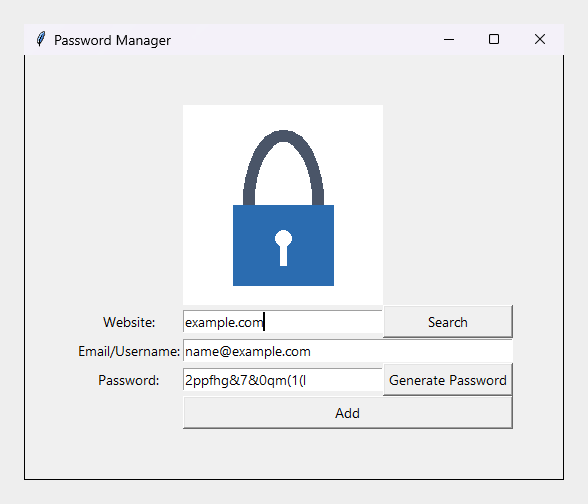
En lille Tkinter-adgangskodemanager fra dag 30 af Udemys "100 Days of Code: The
|
||||
Complete Python Pro Bootcamp". Den genererer adgangskoder, gemmer dem i en
|
||||
JSON-fil og søger efter dem på websted.
|
||||
|
||||
|
||||
|
||||
## Hvad den gør
|
||||
|
||||
- **Genererer** en tilfældig adgangskode og kopierer den til udklipsholderen.
|
||||
- **Tilføjer** et websted, en e-mailadresse og en adgangskode til `data.json`.
|
||||
- **Søger** efter et websted og viser den gemte e-mailadresse og adgangskode.
|
||||
- Kører videre, når `data.json` mangler, er tom eller er beskadiget.
|
||||
|
||||
> **Sikkerhedsnote.** Adgangskoderne gemmes som almindelig JSON og er ikke
|
||||
> krypterede. Det er et læringsprojekt; brug det ikke til rigtige adgangskoder.
|
||||
|
||||
## Sider
|
||||
|
||||
- [Installation](Installation-da)
|
||||
- [Brug](Usage-da)
|
||||
- [Udvikling](Development-da)
|
||||
|
||||
Kildekode og opgaver: [repository](https://git.tirsystem.com/Tirsvad-Udemy-100-days-of-code/030-password-manager).
|
||||
@@ -0,0 +1,29 @@
|
||||
[English](Home) · [Dansk](Home-da) · **Bahasa Malaysia**
|
||||
|
||||
# Password Manager
|
||||
|
||||
Pengurus kata laluan Tkinter yang kecil daripada hari ke-30 kursus Udemy "100
|
||||
Days of Code: The Complete Python Pro Bootcamp". Ia menjana kata laluan,
|
||||
menyimpannya dalam fail JSON dan mencarinya mengikut laman web.
|
||||
|
||||

|
||||
|
||||
## Fungsinya
|
||||
|
||||
- **Menjana** kata laluan rawak dan menyalinnya ke papan keratan.
|
||||
- **Menambah** laman web, alamat e-mel dan kata laluan ke dalam `data.json`.
|
||||
- **Mencari** laman web dan memaparkan alamat e-mel dan kata laluan yang
|
||||
disimpan.
|
||||
- Terus berjalan apabila `data.json` tiada, kosong atau rosak.
|
||||
|
||||
> **Nota keselamatan.** Kata laluan disimpan sebagai JSON biasa dan tidak
|
||||
> disulitkan. Ini projek pembelajaran; jangan gunakannya untuk kata laluan
|
||||
> sebenar.
|
||||
|
||||
## Halaman
|
||||
|
||||
- [Pemasangan](Installation-ms)
|
||||
- [Penggunaan](Usage-ms)
|
||||
- [Pembangunan](Development-ms)
|
||||
|
||||
Kod sumber dan isu: [repositori](https://git.tirsystem.com/Tirsvad-Udemy-100-days-of-code/030-password-manager).
|
||||
@@ -0,0 +1,27 @@
|
||||
**English** · [Dansk](Home-da) · [Bahasa Malaysia](Home-ms)
|
||||
|
||||
# Password Manager
|
||||
|
||||
A small Tkinter password manager from day 30 of Udemy's "100 Days of Code: The
|
||||
Complete Python Pro Bootcamp". It generates passwords, saves them in a JSON
|
||||
file and searches them by website.
|
||||
|
||||

|
||||
|
||||
## What it does
|
||||
|
||||
- **Generate** a random password and copy it to the clipboard.
|
||||
- **Add** a website, an e-mail address and a password to `data.json`.
|
||||
- **Search** a website and see the saved e-mail address and password.
|
||||
- Keeps running when `data.json` is missing, empty or damaged.
|
||||
|
||||
> **Security note.** The passwords are stored as plain JSON and are not
|
||||
> encrypted. This is a learning project; do not use it for real passwords.
|
||||
|
||||
## Pages
|
||||
|
||||
- [Installation](Installation)
|
||||
- [Usage](Usage)
|
||||
- [Development](Development)
|
||||
|
||||
Source code and issues: [repository](https://git.tirsystem.com/Tirsvad-Udemy-100-days-of-code/030-password-manager).
|
||||
@@ -0,0 +1,39 @@
|
||||
[English](Installation) · **Dansk** · [Bahasa Malaysia](Installation-ms)
|
||||
|
||||
# Installation
|
||||
|
||||
## Krav
|
||||
|
||||
- Python 3.13 eller nyere med Tkinter. På Debian eller Ubuntu installeres
|
||||
`python3-tk`.
|
||||
- `venv` og `pip`, som begge er en del af Python.
|
||||
- Ingen afhængigheder i drift.
|
||||
|
||||
## Opret et lokalt virtuelt miljø
|
||||
|
||||
Windows (PowerShell):
|
||||
|
||||
```powershell
|
||||
python -m venv .venv
|
||||
.venv/Scripts/Activate.ps1
|
||||
python -m pip install --upgrade pip
|
||||
python -m pip install -e ".[dev]"
|
||||
```
|
||||
|
||||
Linux og macOS:
|
||||
|
||||
```bash
|
||||
python3 -m venv .venv
|
||||
source .venv/bin/activate
|
||||
python -m pip install --upgrade pip
|
||||
python -m pip install -e ".[dev]"
|
||||
```
|
||||
|
||||
Tillægget `[dev]` installerer pytest og ruff. Udelad det
|
||||
(`python -m pip install -e .`), hvis du kun vil køre programmet.
|
||||
|
||||
## Kontrollér installationen
|
||||
|
||||
```bash
|
||||
python -m pytest
|
||||
```
|
||||
@@ -0,0 +1,39 @@
|
||||
[English](Installation) · [Dansk](Installation-da) · **Bahasa Malaysia**
|
||||
|
||||
# Pemasangan
|
||||
|
||||
## Keperluan
|
||||
|
||||
- Python 3.13 atau lebih baharu dengan Tkinter. Pada Debian atau Ubuntu pasang
|
||||
`python3-tk`.
|
||||
- `venv` dan `pip`, kedua-duanya sebahagian daripada Python.
|
||||
- Tiada kebergantungan semasa dijalankan.
|
||||
|
||||
## Cipta persekitaran maya tempatan
|
||||
|
||||
Windows (PowerShell):
|
||||
|
||||
```powershell
|
||||
python -m venv .venv
|
||||
.venv/Scripts/Activate.ps1
|
||||
python -m pip install --upgrade pip
|
||||
python -m pip install -e ".[dev]"
|
||||
```
|
||||
|
||||
Linux dan macOS:
|
||||
|
||||
```bash
|
||||
python3 -m venv .venv
|
||||
source .venv/bin/activate
|
||||
python -m pip install --upgrade pip
|
||||
python -m pip install -e ".[dev]"
|
||||
```
|
||||
|
||||
Tambahan `[dev]` memasang pytest dan ruff. Tinggalkannya
|
||||
(`python -m pip install -e .`) jika anda hanya mahu menjalankan program.
|
||||
|
||||
## Semak pemasangan
|
||||
|
||||
```bash
|
||||
python -m pytest
|
||||
```
|
||||
@@ -0,0 +1,38 @@
|
||||
**English** · [Dansk](Installation-da) · [Bahasa Malaysia](Installation-ms)
|
||||
|
||||
# Installation
|
||||
|
||||
## Requirements
|
||||
|
||||
- Python 3.13 or newer with Tkinter. On Debian or Ubuntu install `python3-tk`.
|
||||
- `venv` and `pip`, both part of Python.
|
||||
- No runtime dependencies.
|
||||
|
||||
## Create a local virtual environment
|
||||
|
||||
Windows (PowerShell):
|
||||
|
||||
```powershell
|
||||
python -m venv .venv
|
||||
.venv/Scripts/Activate.ps1
|
||||
python -m pip install --upgrade pip
|
||||
python -m pip install -e ".[dev]"
|
||||
```
|
||||
|
||||
Linux and macOS:
|
||||
|
||||
```bash
|
||||
python3 -m venv .venv
|
||||
source .venv/bin/activate
|
||||
python -m pip install --upgrade pip
|
||||
python -m pip install -e ".[dev]"
|
||||
```
|
||||
|
||||
The `[dev]` extra installs pytest and ruff. Leave it out
|
||||
(`python -m pip install -e .`) if you only want to run the program.
|
||||
|
||||
## Check the installation
|
||||
|
||||
```bash
|
||||
python -m pytest
|
||||
```
|
||||
@@ -0,0 +1,50 @@
|
||||
[English](Usage) · **Dansk** · [Bahasa Malaysia](Usage-ms)
|
||||
|
||||
# Brug
|
||||
|
||||
Start programmet med det virtuelle miljø aktivt:
|
||||
|
||||
```bash
|
||||
python -m password_manager
|
||||
```
|
||||
|
||||
Programmet gemmer sine data i `data.json` i den mappe, du starter det fra.
|
||||
|
||||
## Generér og tilføj en adgangskode
|
||||
|
||||
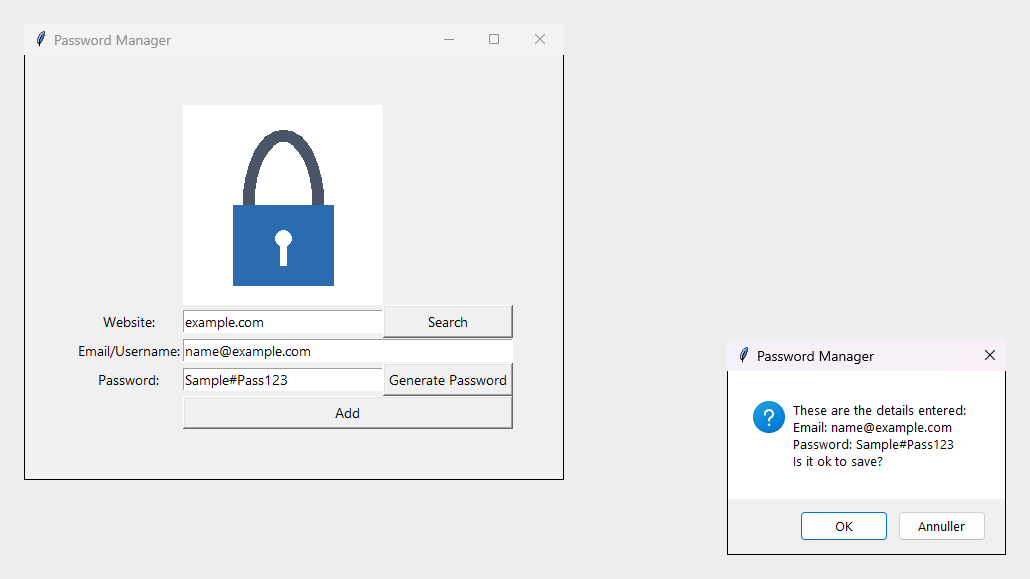
1. Skriv webstedet.
|
||||
2. Tryk på **Generate Password**. En adgangskode indsættes og kopieres til
|
||||
udklipsholderen.
|
||||
3. Kontrollér e-mailadressen og tryk på **Add**. Bekræft dialogen, så gemmes
|
||||
posten.
|
||||
|
||||

|
||||
|
||||
|
||||
|
||||
Hvis et felt er tomt, vises en advarsel, og intet gemmes.
|
||||
|
||||
## Søg
|
||||
|
||||
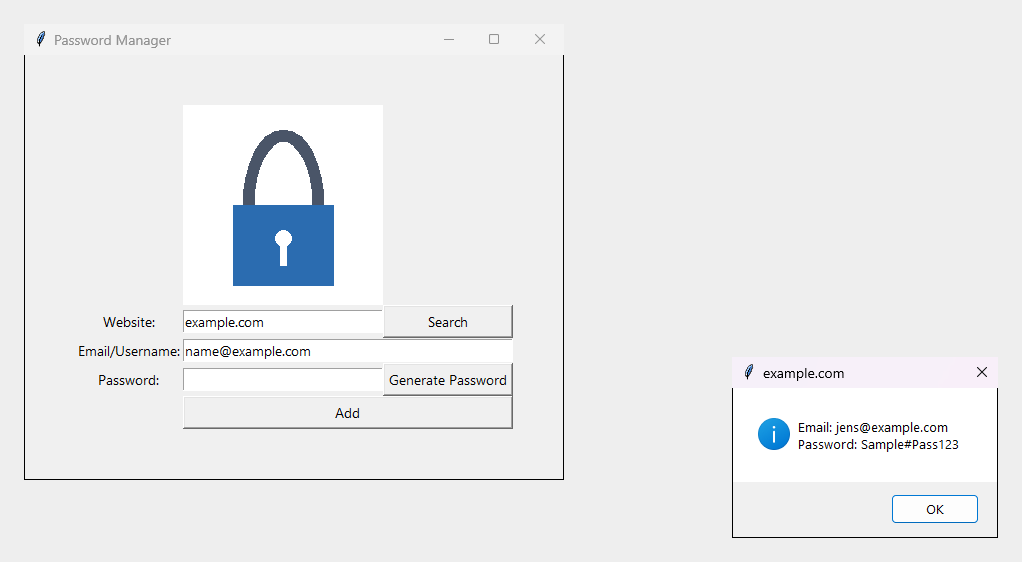
Skriv et websted og tryk på **Search**. Den gemte e-mailadresse og adgangskode
|
||||
vises.
|
||||
|
||||
|
||||
|
||||
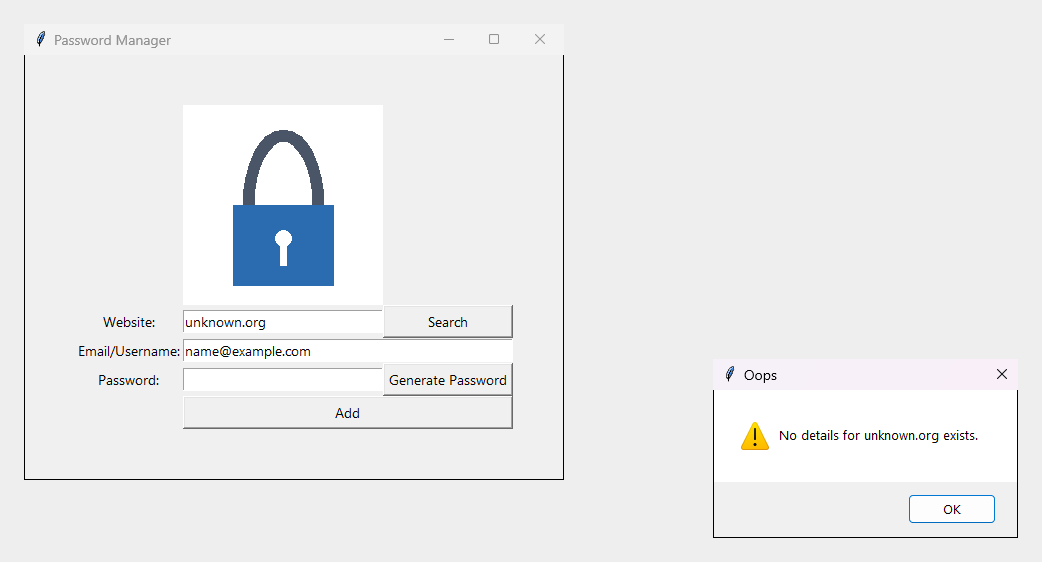
Hvis der ikke er gemt noget for webstedet, eller datafilen endnu ikke findes,
|
||||
fortæller en besked det.
|
||||
|
||||
|
||||
|
||||
## Datafilen
|
||||
|
||||
`data.json` indeholder én post pr. websted:
|
||||
|
||||
```json
|
||||
{
|
||||
"example.com": {
|
||||
"email": "jens@example.com",
|
||||
"password": "Sample#Pass123"
|
||||
}
|
||||
}
|
||||
```
|
||||
@@ -0,0 +1,49 @@
|
||||
[English](Usage) · [Dansk](Usage-da) · **Bahasa Malaysia**
|
||||
|
||||
# Penggunaan
|
||||
|
||||
Mulakan program dengan persekitaran maya aktif:
|
||||
|
||||
```bash
|
||||
python -m password_manager
|
||||
```
|
||||
|
||||
Program menyimpan datanya dalam `data.json` di folder tempat anda memulakannya.
|
||||
|
||||
## Jana dan tambah kata laluan
|
||||
|
||||
1. Taip laman web.
|
||||
2. Tekan **Generate Password**. Kata laluan diisi dan disalin ke papan
|
||||
keratan.
|
||||
3. Semak alamat e-mel dan tekan **Add**. Sahkan dialog dan rekod disimpan.
|
||||
|
||||

|
||||
|
||||

|
||||
|
||||
Jika medan dibiarkan kosong, amaran dipaparkan dan tiada apa yang disimpan.
|
||||
|
||||
## Carian
|
||||
|
||||
Taip laman web dan tekan **Search**. Alamat e-mel dan kata laluan yang disimpan
|
||||
dipaparkan.
|
||||
|
||||

|
||||
|
||||
Jika tiada apa yang disimpan untuk laman web itu, atau fail data belum wujud,
|
||||
satu mesej memberitahunya.
|
||||
|
||||

|
||||
|
||||
## Fail data
|
||||
|
||||
`data.json` mengandungi satu rekod bagi setiap laman web:
|
||||
|
||||
```json
|
||||
{
|
||||
"example.com": {
|
||||
"email": "jens@example.com",
|
||||
"password": "Sample#Pass123"
|
||||
}
|
||||
}
|
||||
```
|
||||
@@ -0,0 +1,50 @@
|
||||
**English** · [Dansk](Usage-da) · [Bahasa Malaysia](Usage-ms)
|
||||
|
||||
# Usage
|
||||
|
||||
Start the program with the virtual environment active:
|
||||
|
||||
```bash
|
||||
python -m password_manager
|
||||
```
|
||||
|
||||
The program keeps its data in `data.json` in the folder you start it from.
|
||||
|
||||
## Generate and add a password
|
||||
|
||||
1. Type the website.
|
||||
2. Press **Generate Password**. A password is filled in and copied to the
|
||||
clipboard.
|
||||
3. Check the e-mail address and press **Add**. Confirm the dialog and the entry
|
||||
is saved.
|
||||
|
||||

|
||||
|
||||

|
||||
|
||||
Leaving a field empty shows a warning and saves nothing.
|
||||
|
||||
## Search
|
||||
|
||||
Type a website and press **Search**. The saved e-mail address and password are
|
||||
shown.
|
||||
|
||||

|
||||
|
||||
If nothing is saved for the website, or no data file exists yet, a message says
|
||||
so.
|
||||
|
||||

|
||||
|
||||
## The data file
|
||||
|
||||
`data.json` holds one record per website:
|
||||
|
||||
```json
|
||||
{
|
||||
"example.com": {
|
||||
"email": "jens@example.com",
|
||||
"password": "Sample#Pass123"
|
||||
}
|
||||
}
|
||||
```
|
||||
@@ -0,0 +1 @@
|
||||
Password Manager · day 30 of 100 Days of Code · [Repository](https://git.tirsystem.com/Tirsvad-Udemy-100-days-of-code/030-password-manager)
|
||||
@@ -0,0 +1,23 @@
|
||||
**Password Manager**
|
||||
|
||||
**English**
|
||||
|
||||
- [Home](Home)
|
||||
- [Installation](Installation)
|
||||
- [Usage](Usage)
|
||||
- [Development](Development)
|
||||
|
||||
**Dansk**
|
||||
|
||||
- [Hjem](Home-da)
|
||||
- [Installation](Installation-da)
|
||||
- [Brug](Usage-da)
|
||||
- [Udvikling](Development-da)
|
||||
|
||||
**Bahasa Malaysia**
|
||||
|
||||
- [Laman Utama](Home-ms)
|
||||
- [Pemasangan](Installation-ms)
|
||||
- [Penggunaan](Usage-ms)
|
||||
- [Pembangunan](Development-ms)
|
||||
|
||||
@@ -0,0 +1,266 @@
|
||||
"""@brief Capture the README and wiki screenshots of the real Tkinter window.
|
||||
|
||||
@file capture_screenshots.py
|
||||
@details Windows only (GDI through ctypes), standard library only. Each state
|
||||
runs in its own process, uses a temporary data file and never touches the
|
||||
user's `data.json`. Only the windows of the program itself are rendered
|
||||
(`PrintWindow`) onto a neutral canvas, so nothing from the desktop appears.
|
||||
Usage, from the repository root with the venv active:
|
||||
|
||||
python tools/capture_screenshots.py # writes docs/images/*.png
|
||||
python tools/capture_screenshots.py --out DIR # another output folder
|
||||
"""
|
||||
|
||||
import argparse
|
||||
import ctypes
|
||||
import os
|
||||
import struct
|
||||
import subprocess
|
||||
import sys
|
||||
import tempfile
|
||||
import tkinter as tk
|
||||
import zlib
|
||||
from ctypes import wintypes
|
||||
from pathlib import Path
|
||||
|
||||
STATES = {
|
||||
"main-window": "Window after Generate Password",
|
||||
"add-confirmation": "Confirmation before an entry is saved",
|
||||
"search-found": "Search finds a saved website",
|
||||
"search-not-found": "Search for an unknown website",
|
||||
}
|
||||
SAMPLE_WEBSITE = "example.com"
|
||||
SAMPLE_EMAIL = "jens@example.com"
|
||||
SAMPLE_PASSWORD = "Sample#Pass123"
|
||||
UNKNOWN_WEBSITE = "unknown.org"
|
||||
PADDING = 24
|
||||
CANVAS_PIXEL = bytes([0xEE, 0xEE, 0xEE, 0xFF])
|
||||
CAPTURE_DELAY_MS = 900
|
||||
PW_RENDERFULLCONTENT = 2
|
||||
DWMWA_EXTENDED_FRAME_BOUNDS = 9
|
||||
|
||||
|
||||
class BitmapInfoHeader(ctypes.Structure):
|
||||
"""@brief Win32 BITMAPINFOHEADER."""
|
||||
|
||||
_fields_ = [
|
||||
("biSize", wintypes.DWORD),
|
||||
("biWidth", wintypes.LONG),
|
||||
("biHeight", wintypes.LONG),
|
||||
("biPlanes", wintypes.WORD),
|
||||
("biBitCount", wintypes.WORD),
|
||||
("biCompression", wintypes.DWORD),
|
||||
("biSizeImage", wintypes.DWORD),
|
||||
("biXPelsPerMeter", wintypes.LONG),
|
||||
("biYPelsPerMeter", wintypes.LONG),
|
||||
("biClrUsed", wintypes.DWORD),
|
||||
("biClrImportant", wintypes.DWORD),
|
||||
]
|
||||
|
||||
|
||||
def write_png(path: Path, width: int, height: int, bgra: bytes) -> None:
|
||||
"""@brief Write a BGRA pixel buffer as an RGB PNG file.
|
||||
|
||||
@param path Output file.
|
||||
@param width Image width in pixels.
|
||||
@param height Image height in pixels.
|
||||
@param bgra Raw pixels, 4 bytes each, top row first.
|
||||
"""
|
||||
stride = width * 4
|
||||
raw = bytearray()
|
||||
for y in range(height):
|
||||
row = bgra[y * stride : (y + 1) * stride]
|
||||
raw.append(0)
|
||||
raw += bytes(
|
||||
channel
|
||||
for x in range(width)
|
||||
for channel in (row[x * 4 + 2], row[x * 4 + 1], row[x * 4])
|
||||
)
|
||||
|
||||
def chunk(kind: bytes, data: bytes) -> bytes:
|
||||
body = kind + data
|
||||
checksum = zlib.crc32(body) & 0xFFFFFFFF
|
||||
return struct.pack(">I", len(data)) + body + struct.pack(">I", checksum)
|
||||
|
||||
header = struct.pack(">IIBBBBB", width, height, 8, 2, 0, 0, 0)
|
||||
png = (
|
||||
b"\x89PNG\r\n\x1a\n"
|
||||
+ chunk(b"IHDR", header)
|
||||
+ chunk(b"IDAT", zlib.compress(bytes(raw), 9))
|
||||
+ chunk(b"IEND", b"")
|
||||
)
|
||||
path.write_bytes(png)
|
||||
|
||||
|
||||
def render_window(hwnd: int, width: int, height: int) -> bytes:
|
||||
"""@brief Render one window's own pixels (never the desktop behind it).
|
||||
|
||||
@param hwnd Window handle.
|
||||
@param width Window width in pixels.
|
||||
@param height Window height in pixels.
|
||||
@return Raw BGRA pixels, top row first.
|
||||
"""
|
||||
user32 = ctypes.windll.user32
|
||||
gdi32 = ctypes.windll.gdi32
|
||||
screen_dc = user32.GetDC(0)
|
||||
memory_dc = gdi32.CreateCompatibleDC(screen_dc)
|
||||
bitmap = gdi32.CreateCompatibleBitmap(screen_dc, width, height)
|
||||
gdi32.SelectObject(memory_dc, bitmap)
|
||||
user32.PrintWindow(hwnd, memory_dc, PW_RENDERFULLCONTENT)
|
||||
info = BitmapInfoHeader(
|
||||
ctypes.sizeof(BitmapInfoHeader), width, -height, 1, 32, 0, 0, 0, 0, 0, 0
|
||||
)
|
||||
buffer = ctypes.create_string_buffer(width * height * 4)
|
||||
gdi32.GetDIBits(memory_dc, bitmap, 0, height, buffer, ctypes.byref(info), 0)
|
||||
gdi32.DeleteObject(bitmap)
|
||||
gdi32.DeleteDC(memory_dc)
|
||||
user32.ReleaseDC(0, screen_dc)
|
||||
return buffer.raw
|
||||
|
||||
|
||||
def own_windows() -> list[int]:
|
||||
"""@brief Visible top-level windows of this process, topmost first.
|
||||
|
||||
@return Window handles.
|
||||
"""
|
||||
user32 = ctypes.windll.user32
|
||||
found: list[int] = []
|
||||
callback_type = ctypes.WINFUNCTYPE(wintypes.BOOL, wintypes.HWND, wintypes.LPARAM)
|
||||
|
||||
def visit(hwnd: int, _lparam: int) -> bool:
|
||||
pid = wintypes.DWORD()
|
||||
user32.GetWindowThreadProcessId(hwnd, ctypes.byref(pid))
|
||||
if pid.value == os.getpid() and user32.IsWindowVisible(hwnd):
|
||||
found.append(hwnd)
|
||||
return True
|
||||
|
||||
user32.EnumWindows(callback_type(visit), 0)
|
||||
return found
|
||||
|
||||
|
||||
def frame_and_window(hwnd: int) -> tuple[wintypes.RECT, wintypes.RECT]:
|
||||
"""@brief Visible frame and full window rectangle of a window.
|
||||
|
||||
@param hwnd Window handle.
|
||||
@return The extended frame bounds and the GetWindowRect rectangle.
|
||||
"""
|
||||
frame, outer = wintypes.RECT(), wintypes.RECT()
|
||||
ctypes.windll.dwmapi.DwmGetWindowAttribute(
|
||||
hwnd, DWMWA_EXTENDED_FRAME_BOUNDS, ctypes.byref(frame), ctypes.sizeof(frame)
|
||||
)
|
||||
ctypes.windll.user32.GetWindowRect(hwnd, ctypes.byref(outer))
|
||||
return frame, outer
|
||||
|
||||
|
||||
def compose_windows() -> tuple[int, int, bytes]:
|
||||
"""@brief Render this process's windows side by side on a neutral canvas.
|
||||
|
||||
@return Canvas width, height and BGRA pixels.
|
||||
"""
|
||||
pieces = []
|
||||
for hwnd in own_windows():
|
||||
frame, outer = frame_and_window(hwnd)
|
||||
width, height = outer.right - outer.left, outer.bottom - outer.top
|
||||
pixels = render_window(hwnd, width, height)
|
||||
offset_x, offset_y = frame.left - outer.left, frame.top - outer.top
|
||||
piece_width = frame.right - frame.left
|
||||
piece_height = frame.bottom - frame.top
|
||||
rows = [
|
||||
pixels[((offset_y + y) * width + offset_x) * 4 :][: piece_width * 4]
|
||||
for y in range(piece_height)
|
||||
]
|
||||
pieces.append((frame.left, frame.top, piece_width, piece_height, rows))
|
||||
left = min(piece[0] for piece in pieces) - PADDING
|
||||
top = min(piece[1] for piece in pieces) - PADDING
|
||||
right = max(piece[0] + piece[2] for piece in pieces) + PADDING
|
||||
bottom = max(piece[1] + piece[3] for piece in pieces) + PADDING
|
||||
width, height = right - left, bottom - top
|
||||
canvas = [bytearray(CANVAS_PIXEL * width) for _ in range(height)]
|
||||
for x, y, piece_width, _piece_height, rows in reversed(pieces):
|
||||
for index, row in enumerate(rows):
|
||||
start = (x - left) * 4
|
||||
canvas[y - top + index][start : start + piece_width * 4] = row
|
||||
return width, height, b"".join(bytes(row) for row in canvas)
|
||||
|
||||
|
||||
def run_state(state: str, out_file: Path) -> None:
|
||||
"""@brief Show the window in one state, capture it and exit the process.
|
||||
|
||||
@param state One of the keys of STATES.
|
||||
@param out_file PNG file to write.
|
||||
"""
|
||||
ctypes.windll.user32.SetProcessDPIAware()
|
||||
from password_manager.application.use_cases import (
|
||||
FindPasswordEntry,
|
||||
GeneratePassword,
|
||||
SavePasswordEntry,
|
||||
)
|
||||
from password_manager.domain.password_entry import PasswordEntry
|
||||
from password_manager.infrastructure.persistence.json_password_repository import (
|
||||
JsonPasswordRepository,
|
||||
)
|
||||
from password_manager.presentation.features.password_manager import (
|
||||
password_manager_view as view_module,
|
||||
)
|
||||
from password_manager.presentation.features.password_manager import (
|
||||
password_manager_view_model as view_model_module,
|
||||
)
|
||||
|
||||
with tempfile.TemporaryDirectory() as folder:
|
||||
repository = JsonPasswordRepository(Path(folder) / "data.json")
|
||||
repository.add(PasswordEntry(SAMPLE_WEBSITE, SAMPLE_EMAIL, SAMPLE_PASSWORD))
|
||||
view_model = view_model_module.PasswordManagerViewModel(
|
||||
SavePasswordEntry(repository),
|
||||
FindPasswordEntry(repository),
|
||||
GeneratePassword(),
|
||||
)
|
||||
root = tk.Tk()
|
||||
view = view_module.PasswordManagerView(root, view_model)
|
||||
root.geometry("+120+120")
|
||||
|
||||
def capture() -> None:
|
||||
width, height, pixels = compose_windows()
|
||||
write_png(out_file, width, height, pixels)
|
||||
os._exit(0)
|
||||
|
||||
def act() -> None:
|
||||
website = UNKNOWN_WEBSITE if state == "search-not-found" else SAMPLE_WEBSITE
|
||||
view.website_entry.insert(0, website)
|
||||
if state == "main-window":
|
||||
view.generate_password()
|
||||
root.after(CAPTURE_DELAY_MS, capture)
|
||||
return
|
||||
root.after(CAPTURE_DELAY_MS, capture)
|
||||
if state == "add-confirmation":
|
||||
view.password_entry.insert(0, SAMPLE_PASSWORD)
|
||||
view.save()
|
||||
else:
|
||||
view.find_password()
|
||||
|
||||
root.after(400, act)
|
||||
root.mainloop()
|
||||
|
||||
|
||||
def main() -> None:
|
||||
"""@brief Capture every state, each in a child process."""
|
||||
parser = argparse.ArgumentParser(description=__doc__)
|
||||
parser.add_argument("--out", type=Path, default=Path("docs/images"))
|
||||
parser.add_argument("--state", choices=sorted(STATES), help="internal use")
|
||||
parser.add_argument("--file", type=Path, help="internal use")
|
||||
args = parser.parse_args()
|
||||
if args.state:
|
||||
run_state(args.state, args.file)
|
||||
return
|
||||
args.out.mkdir(parents=True, exist_ok=True)
|
||||
for state in STATES:
|
||||
target = args.out / f"{state}.png"
|
||||
subprocess.run(
|
||||
[sys.executable, __file__, "--state", state, "--file", str(target)],
|
||||
check=True,
|
||||
timeout=60,
|
||||
)
|
||||
print(f"wrote {target}")
|
||||
|
||||
|
||||
if __name__ == "__main__":
|
||||
main()
|
||||
Reference in New Issue
Block a user