1
Step 2 Click the Cookie
Tirsvad edited this page 2026-10-28 11:07:56 +01:00
English · Dansk · Bahasa Malaysia
Lecture step 2: click the cookie as fast as possible
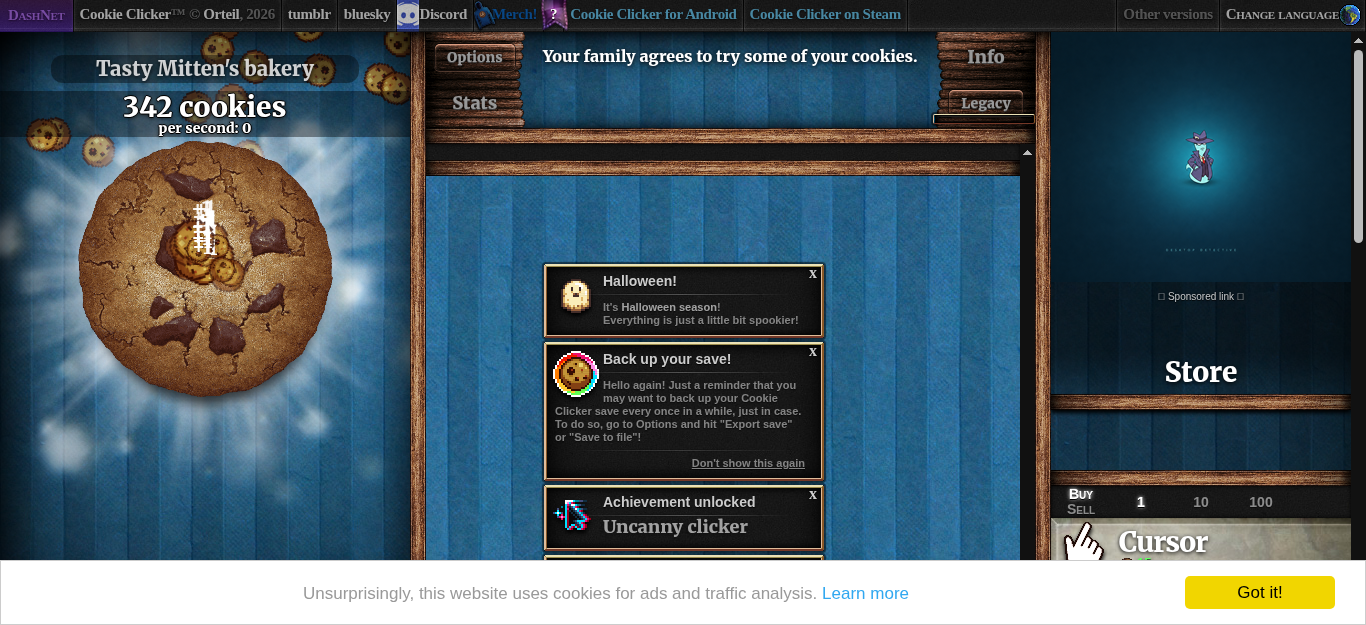
What the assignment asks
Create a bot with Selenium and Python that clicks the cookie as fast as possible. It must dismiss the language selection by itself before it starts.
What we built
open_gameloads the page.dismiss_languagewaits until the English button is visible, clicks it, and then waits until the big cookie is visible. The game needs a few seconds to start after the language is chosen, so the bot polls (every 0.2 seconds, at most 20 seconds) instead of sleeping for a fixed time.click_cookieclicks#bigCookieonce. If a banner or a re-render blocks the click for a moment, the bot tries again on the next round.- A loop calls
click_cookieuntil the time is up. In a 15 second run in the container the bot clicked 344 times, and the screenshot above shows 342 cookies.
cookie-clicker-bot --headless --duration 15 --screenshot step-2.png
What we gained in this step
- Wait for a condition, not for a time. A fixed
sleepis either too short (the bot fails) or too long (the bot wastes time). Polling for "the cookie is visible" is both faster and safer. - Keep the browser behind a port. The loop knows only
GamePort(open_game,dismiss_language,click_cookie, ...). The Selenium code lives in one adapter, so the loop is tested with a fake game in a few milliseconds. - Time a loop with a clock you can replace.
click_and_buytakes the clock as a parameter; the tests give it a fake clock and check the number of clicks exactly.