1
Step 1 Get to Know the Game
Tirsvad edited this page 2026-10-28 11:07:53 +01:00
English · Dansk · Bahasa Malaysia
Lecture step 1: get to know the game
What the assignment asks
Open the new version of Cookie Clicker (ozh.github.io/cookieclicker) and learn how it works before writing any code.
What we found
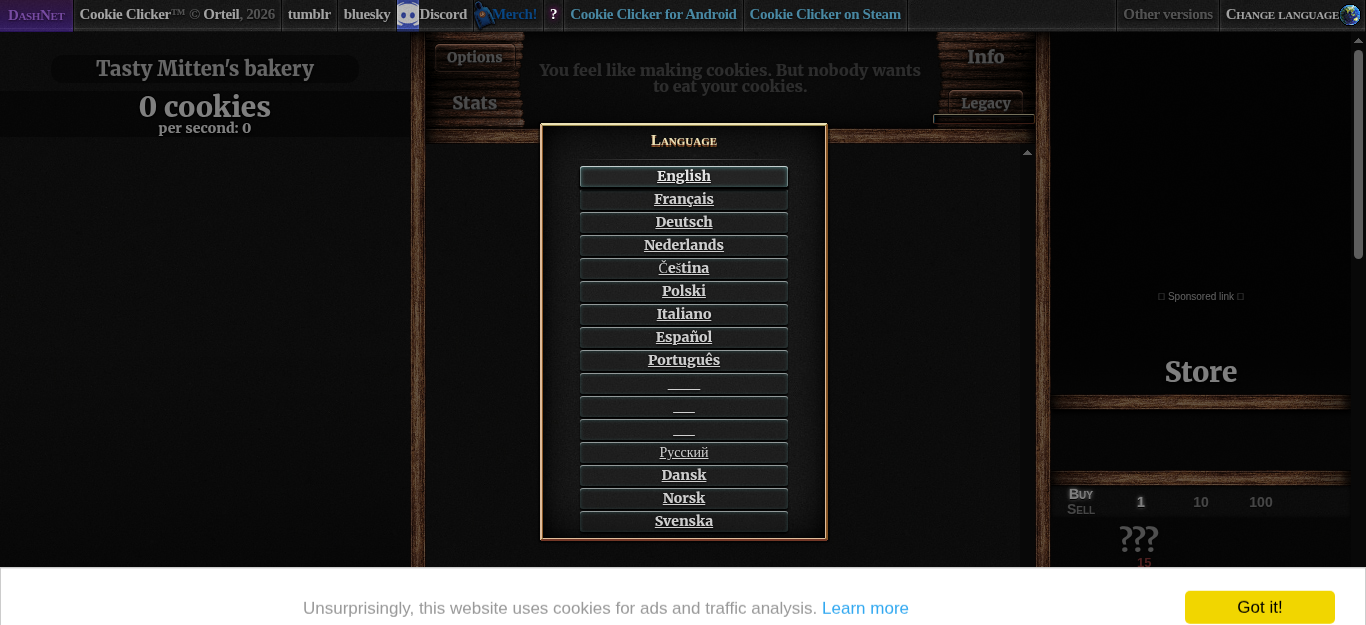
We opened the page in a headless Chromium inside a Docker container and looked at its HTML. The parts the bot needs:
| What | Where on the page |
|---|---|
| English on the language selection | #langSelect-EN |
| The big cookie | #bigCookie |
| The cookie count and the cookies per second | #cookies (and #cookiesPerSecond inside it) |
| The store | #products, with #product0 (Cursor), #product1 (Grandma), #product2 (Farm) and so on |
| A product's name and price | .productName and .price inside the product |
| Can I afford it? | the product has the class unlocked enabled (a product you cannot afford yet is unlocked disabled; a hidden one is locked disabled) |
Also good to know:
- The game asks for a language the first time the page loads. The bot must pick one by itself.
- The count is written as text:
3 cookies,5,000 cookies, and for large numbers on two lines,1.235andmillion cookies. - A cookie banner ("Got it!") sits at the bottom of the page. The bot never clicks it, because it is a consent banner that belongs to the person playing; the bot works around it (see Step 4).
All of these ids and selectors are written once, in constants.py.
What we gained in this step
- Read the page before coding. A short look at the real HTML saved hours of guessing; every selector in the bot came from this step.
- Keep selectors in one place. If the game changes an id, one line in
constants.pyis the fix. - Run the browser in a container. The same Docker image that runs the bot takes the screenshots, so nothing opens on your own desktop and every run starts from the same clean browser.