 Tirsvad
f2b81f44c5
Tirsvad
f2b81f44c5
README with the five lecture step screenshots and the option table, Doxygen
builds without warnings, wiki pages for the home page and the five steps in
three languages (screenshots and what each step taught), sidebar and footer.

Closes #29
Closes #30
Closes #31
Closes #32
Closes #33
2.1 KiB
2.1 KiB
English · Dansk · Bahasa Malaysia
Lecture step 1: get to know the game
What the assignment asks
Open the new version of Cookie Clicker (ozh.github.io/cookieclicker) and learn how it works before writing any code.
What we found
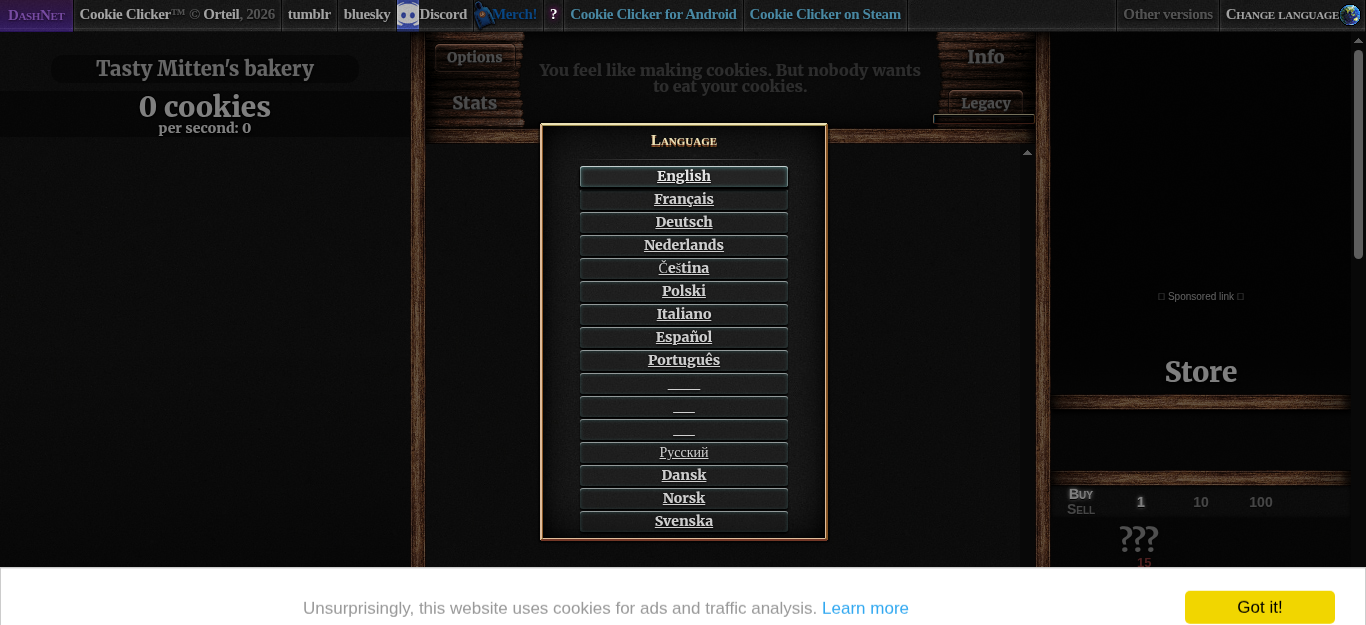
We opened the page in a headless Chromium inside a Docker container and looked at its HTML. The parts the bot needs:
| What | Where on the page |
|---|---|
| English on the language selection | #langSelect-EN |
| The big cookie | #bigCookie |
| The cookie count and the cookies per second | #cookies (and #cookiesPerSecond inside it) |
| The store | #products, with #product0 (Cursor), #product1 (Grandma), #product2 (Farm) and so on |
| A product's name and price | .productName and .price inside the product |
| Can I afford it? | the product has the class unlocked enabled (a product you cannot afford yet is unlocked disabled; a hidden one is locked disabled) |
Also good to know:
- The game asks for a language the first time the page loads. The bot must pick one by itself.
- The count is written as text:
3 cookies,5,000 cookies, and for large numbers on two lines,1.235andmillion cookies. - A cookie banner ("Got it!") sits at the bottom of the page. The bot never clicks it, because it is a consent banner that belongs to the person playing; the bot works around it (see Step 4).
All of these ids and selectors are written once, in constants.py.
What we gained in this step
- Read the page before coding. A short look at the real HTML saved hours of guessing; every selector in the bot came from this step.
- Keep selectors in one place. If the game changes an id, one line in
constants.pyis the fix. - Run the browser in a container. The same Docker image that runs the bot takes the screenshots, so nothing opens on your own desktop and every run starts from the same clean browser.