Compare commits
2
Commits
| Author | SHA1 | Date | |
|---|---|---|---|
 Tirsvad Tirsvad
|
f2b81f44c5 | ||
|
Tirsvad
|
1bfa8f6c4d |
@@ -23,6 +23,18 @@ The bot follows the five steps of the lecture:
|
||||
4. After 5 minutes stop and print `cookies/second`.
|
||||
5. Tweak the strategy (check interval, buy one or buy all affordable).
|
||||
|
||||
### The five steps in pictures
|
||||
|
||||
| Step | Screenshot |
|
||||
| --- | --- |
|
||||
| 1. Get to know the game |  |
|
||||
| 2. Click the cookie |  |
|
||||
| 3. Buy the most expensive affordable upgrade |  |
|
||||
| 4. Stop after 5 minutes, print cookies/second |  |
|
||||
| 5. Tweak the strategy |  |
|
||||
|
||||
What each step taught is explained in the [wiki][documentation], in English, Danish and Bahasa Malaysia (the same pages are in `docs/wiki/`).
|
||||
|
||||
The repository is organised like this:
|
||||
|
||||
| Folder or file | What it is for |
|
||||
@@ -83,11 +95,23 @@ or, without installing the command:
|
||||
python -m cookie_clicker_bot
|
||||
```
|
||||
|
||||
To keep your desktop free, run it in the Docker container (headless Chromium):
|
||||
The bot plays for 5 minutes, then prints one line on standard output, for example `cookies/second: 18.9`. What it did (clicks, purchases, time) is logged on standard error. Options:
|
||||
|
||||
| Option | What it does | Default |
|
||||
| --- | --- | --- |
|
||||
| `--duration SECONDS` | How long to play | 300 |
|
||||
| `--interval SECONDS` | Time between upgrade checks (greater than 0) | 5 |
|
||||
| `--buy-all` | Buy every affordable upgrade, most expensive first, instead of one | off |
|
||||
| `--headless` | Run Chromium without a window | off (on in Docker) |
|
||||
| `--screenshot PATH` | Save a screenshot when the run ends | none |
|
||||
| `--screenshot-start PATH` | Save a screenshot before the first click | none |
|
||||
|
||||
To keep your desktop free, run it in the Docker container (headless Chromium). Options go after the image name:
|
||||
|
||||
```bash
|
||||
docker build -t cookie-clicker-bot .
|
||||
docker run --rm cookie-clicker-bot
|
||||
docker run --rm cookie-clicker-bot --headless --interval 10
|
||||
```
|
||||
|
||||
## 🧪 Tests
|
||||
|
||||
@@ -1,92 +1,92 @@
|
||||
# Traceability Matrix
|
||||
|
||||
## Metadata
|
||||
| Key | Value |
|
||||
| --- | --- |
|
||||
| ID | TM-001 |
|
||||
| CrossReference | [BC-001] |
|
||||
|
||||
## Version History
|
||||
| Date | Status | Author | Reviewer | Change | Commit |
|
||||
| --- | --- | --- | --- | --- | --- |
|
||||
| 2026-10-28 | Accepted | Jens Tirsvad Nielsen | AI as stand-in for S02 | Initial version: baseline artifacts | [cadc5ef] |
|
||||
|
||||
---
|
||||
|
||||
## Purpose
|
||||
|
||||
Tracks backward/forward links between artifact instances so that the Business Case's
|
||||
cross-artifact traceability success criterion is measurable. A row is added or
|
||||
updated whenever an artifact instance is created or reviewed.
|
||||
|
||||
## Purpose
|
||||
|
||||
Tracks backward and forward links between artifact instances so that the Business Case's traceability can be read in one place. A row is added or updated whenever an artifact is created or reviewed. Rows for code and tests are added by the milestones that create them.
|
||||
|
||||
## Traceability Table
|
||||
|
||||
| Artifact Instance | Type | Language | Domain | Upstream (Backward Link) | Downstream (Forward Link) | Last Reviewed (RC-ID) |
|
||||
| --- | --- | --- | --- | --- | --- | --- |
|
||||
| [BC-001] | Business Case | en | it | - | [SA-001], [PP-001] | RC-001 |
|
||||
| [SA-001] | Stakeholder Analysis | en | it | [BC-001] | [PP-001] | RC-002 |
|
||||
| [PP-001] | Project Plan | en | it | [BC-001], [SA-001] | [MIL-001] to [MIL-007] | - (accepted by S01 in chat; no checklist) |
|
||||
| [DICT-001] | Domain Dictionary | en | it | [BC-001], [SA-001] | - | RC-003 |
|
||||
| [ADR-0001] | ADR | - | - | [BC-001] | [PP-001] | RC-004 |
|
||||
| [ADR-0002] | ADR | - | - | [BC-001], [SA-001] | code in MIL-002 onward | RC-005 |
|
||||
| [ADR-0003] | ADR | - | - | [BC-001] | [MIL-002], [MIL-003] | RC-006 |
|
||||
| [MIL-001] | Milestone | en | it | [BC-001], [PP-001] | [MIL-002] | RC-007 |
|
||||
| [MIL-002] | Milestone | en | it | [BC-001], [PP-001] | [MIL-003] | RC-008 |
|
||||
| [MIL-003] | Milestone | en | it | [BC-001], [PP-001] | [MIL-004] | RC-009 |
|
||||
| [MIL-004] | Milestone | en | it | [BC-001], [PP-001] | [MIL-005] | RC-010 |
|
||||
| [MIL-005] | Milestone | en | it | [BC-001], [PP-001] | [MIL-006] | RC-011 |
|
||||
| [MIL-006] | Milestone | en | it | [BC-001], [PP-001] | [MIL-007] | RC-012 |
|
||||
| [MIL-007] | Milestone | en | it | [BC-001], [PP-001] | - | RC-013 |
|
||||
| Source and tests of [MIL-002] | Python source code | - | - | [MIL-002], [ADR-0002] | - | RC-014 |
|
||||
| Source and tests of [MIL-003] | Python source code | - | - | [MIL-003], [ADR-0002] | - | RC-015 |
|
||||
| Source and tests of [MIL-004] | Python source code | - | - | [MIL-004], [ADR-0002] | - | RC-016 |
|
||||
| Source and tests of [MIL-005] | Python source code | - | - | [MIL-005], [ADR-0002] | - | RC-017 |
|
||||
| Source and tests of [MIL-006] | Python source code | - | - | [MIL-006], [ADR-0002] | - | RC-018 |
|
||||
|
||||
## Concern Coverage
|
||||
|
||||
| Concern (CN-ID) | Views that answer it | Decisions (ADR) | Quality check (TP) | Status |
|
||||
| --- | --- | --- | --- | --- |
|
||||
| CN-001 | [BC-001], [MIL-003], [MIL-004], [MIL-005] | [ADR-0002] | Unit tests per gateway | Planned |
|
||||
| CN-002 | [PP-001], [MIL-001] | [ADR-0001] | Review records | Covered |
|
||||
| CN-003 | [MIL-006] | - | Unit tests per gateway | Planned |
|
||||
| CN-004 | [MIL-002], [MIL-003] | [ADR-0002] | Code review | Planned |
|
||||
| CN-005 | [MIL-002], [MIL-007] | - | Clean clone walk-through | Planned |
|
||||
| CN-006 | [MIL-007] | - | Wiki check | Planned |
|
||||
| CN-007 | [MIL-001], [MIL-007] | - | Repository API check | Planned |
|
||||
| CN-008 | [MIL-002] | [ADR-0002] | pyproject check | Planned |
|
||||
| CN-009 | [MIL-001] | - | Review of .gitignore and history | Planned |
|
||||
|
||||
## Open Inconsistencies
|
||||
|
||||
| # | Views | Inconsistency | Found in (RC-ID) | Status | Resolved in |
|
||||
| --- | --- | --- | --- | --- | --- |
|
||||
| - | - | None found | - | Closed | - |
|
||||
|
||||
## Coverage Notes
|
||||
|
||||
- No test plan (`TP`), architecture description (`AD`) or design artifacts exist: ADR-0001 skips stories and use cases, and the code is small. Quality checks in Concern Coverage name the check used instead.
|
||||
- `-` in Upstream means foundational, in Downstream that nothing is built on it yet, and in Last Reviewed that no `RC-*` exists.
|
||||
- Status `Planned` means a milestone will answer the concern; it is not a gap.
|
||||
|
||||
---
|
||||
|
||||
[BC-001]: ../business-case.md
|
||||
[SA-001]: ../stakeholder-analysis.md
|
||||
[PP-001]: ../project-plan.md
|
||||
[DICT-001]: ../dictionary.md
|
||||
[ADR-0001]: ../adr/adr-0001-skip-stories-use-cases.md
|
||||
[ADR-0002]: ../adr/adr-0002-light-clean-architecture.md
|
||||
[ADR-0003]: ../adr/adr-0003-docker-headless-browser.md
|
||||
[MIL-001]: ../milestones/mil-001-baseline.md
|
||||
[MIL-002]: ../milestones/mil-002-scaffold.md
|
||||
[MIL-003]: ../milestones/mil-003-click-bot.md
|
||||
[MIL-004]: ../milestones/mil-004-buy-upgrades.md
|
||||
[MIL-005]: ../milestones/mil-005-timed-run.md
|
||||
[MIL-006]: ../milestones/mil-006-strategy.md
|
||||
[MIL-007]: ../milestones/mil-007-documentation.md
|
||||
[cadc5ef]: https://git.tirsystem.com/Tirsvad-Udemy-100-days-of-code/048-the-coockie-factory-new/commit/cadc5eff21d9afc09799d4bc2e3f6ac17ab2612a
|
||||
# Traceability Matrix
|
||||
|
||||
## Metadata
|
||||
| Key | Value |
|
||||
| --- | --- |
|
||||
| ID | TM-001 |
|
||||
| CrossReference | [BC-001] |
|
||||
|
||||
## Version History
|
||||
| Date | Status | Author | Reviewer | Change | Commit |
|
||||
| --- | --- | --- | --- | --- | --- |
|
||||
| 2026-10-28 | Accepted | Jens Tirsvad Nielsen | AI as stand-in for S02 | Initial version: baseline artifacts | [cadc5ef] |
|
||||
|
||||
---
|
||||
|
||||
## Purpose
|
||||
|
||||
Tracks backward/forward links between artifact instances so that the Business Case's
|
||||
cross-artifact traceability success criterion is measurable. A row is added or
|
||||
updated whenever an artifact instance is created or reviewed.
|
||||
|
||||
## Purpose
|
||||
|
||||
Tracks backward and forward links between artifact instances so that the Business Case's traceability can be read in one place. A row is added or updated whenever an artifact is created or reviewed. Rows for code and tests are added by the milestones that create them.
|
||||
|
||||
## Traceability Table
|
||||
|
||||
| Artifact Instance | Type | Language | Domain | Upstream (Backward Link) | Downstream (Forward Link) | Last Reviewed (RC-ID) |
|
||||
| --- | --- | --- | --- | --- | --- | --- |
|
||||
| [BC-001] | Business Case | en | it | - | [SA-001], [PP-001] | RC-001 |
|
||||
| [SA-001] | Stakeholder Analysis | en | it | [BC-001] | [PP-001] | RC-002 |
|
||||
| [PP-001] | Project Plan | en | it | [BC-001], [SA-001] | [MIL-001] to [MIL-007] | - (accepted by S01 in chat; no checklist) |
|
||||
| [DICT-001] | Domain Dictionary | en | it | [BC-001], [SA-001] | - | RC-003 |
|
||||
| [ADR-0001] | ADR | - | - | [BC-001] | [PP-001] | RC-004 |
|
||||
| [ADR-0002] | ADR | - | - | [BC-001], [SA-001] | code in MIL-002 onward | RC-005 |
|
||||
| [ADR-0003] | ADR | - | - | [BC-001] | [MIL-002], [MIL-003] | RC-006 |
|
||||
| [MIL-001] | Milestone | en | it | [BC-001], [PP-001] | [MIL-002] | RC-007 |
|
||||
| [MIL-002] | Milestone | en | it | [BC-001], [PP-001] | [MIL-003] | RC-008 |
|
||||
| [MIL-003] | Milestone | en | it | [BC-001], [PP-001] | [MIL-004] | RC-009 |
|
||||
| [MIL-004] | Milestone | en | it | [BC-001], [PP-001] | [MIL-005] | RC-010 |
|
||||
| [MIL-005] | Milestone | en | it | [BC-001], [PP-001] | [MIL-006] | RC-011 |
|
||||
| [MIL-006] | Milestone | en | it | [BC-001], [PP-001] | [MIL-007] | RC-012 |
|
||||
| [MIL-007] | Milestone | en | it | [BC-001], [PP-001] | - | RC-013 |
|
||||
| Source and tests of [MIL-002] | Python source code | - | - | [MIL-002], [ADR-0002] | - | RC-014 |
|
||||
| Source and tests of [MIL-003] | Python source code | - | - | [MIL-003], [ADR-0002] | - | RC-015 |
|
||||
| Source and tests of [MIL-004] | Python source code | - | - | [MIL-004], [ADR-0002] | - | RC-016 |
|
||||
| Source and tests of [MIL-005] | Python source code | - | - | [MIL-005], [ADR-0002] | - | RC-017 |
|
||||
| Source and tests of [MIL-006] | Python source code | - | - | [MIL-006], [ADR-0002] | - | RC-018 |
|
||||
|
||||
## Concern Coverage
|
||||
|
||||
| Concern (CN-ID) | Views that answer it | Decisions (ADR) | Quality check (TP) | Status |
|
||||
| --- | --- | --- | --- | --- |
|
||||
| CN-001 | [BC-001], [MIL-003], [MIL-004], [MIL-005] | [ADR-0002] | Unit tests per gateway | Covered |
|
||||
| CN-002 | [PP-001], [MIL-001] | [ADR-0001] | Review records | Covered |
|
||||
| CN-003 | [MIL-006] | - | Unit tests per gateway | Covered |
|
||||
| CN-004 | [MIL-002], [MIL-003] | [ADR-0002] | Code review | Covered |
|
||||
| CN-005 | [MIL-002], [MIL-007] | - | Clean clone walk-through | Covered |
|
||||
| CN-006 | [MIL-007] | - | Wiki check | Covered |
|
||||
| CN-007 | [MIL-001], [MIL-007] | - | Repository API check | Covered |
|
||||
| CN-008 | [MIL-002] | [ADR-0002] | pyproject check | Covered |
|
||||
| CN-009 | [MIL-001] | - | Review of .gitignore and history | Covered |
|
||||
|
||||
## Open Inconsistencies
|
||||
|
||||
| # | Views | Inconsistency | Found in (RC-ID) | Status | Resolved in |
|
||||
| --- | --- | --- | --- | --- | --- |
|
||||
| - | - | None found | - | Closed | - |
|
||||
|
||||
## Coverage Notes
|
||||
|
||||
- No test plan (`TP`), architecture description (`AD`) or design artifacts exist: ADR-0001 skips stories and use cases, and the code is small. Quality checks in Concern Coverage name the check used instead.
|
||||
- `-` in Upstream means foundational, in Downstream that nothing is built on it yet, and in Last Reviewed that no `RC-*` exists.
|
||||
- Every concern is covered once MIL-007 is merged; the quality check column names the check that was run.
|
||||
|
||||
---
|
||||
|
||||
[BC-001]: ../business-case.md
|
||||
[SA-001]: ../stakeholder-analysis.md
|
||||
[PP-001]: ../project-plan.md
|
||||
[DICT-001]: ../dictionary.md
|
||||
[ADR-0001]: ../adr/adr-0001-skip-stories-use-cases.md
|
||||
[ADR-0002]: ../adr/adr-0002-light-clean-architecture.md
|
||||
[ADR-0003]: ../adr/adr-0003-docker-headless-browser.md
|
||||
[MIL-001]: ../milestones/mil-001-baseline.md
|
||||
[MIL-002]: ../milestones/mil-002-scaffold.md
|
||||
[MIL-003]: ../milestones/mil-003-click-bot.md
|
||||
[MIL-004]: ../milestones/mil-004-buy-upgrades.md
|
||||
[MIL-005]: ../milestones/mil-005-timed-run.md
|
||||
[MIL-006]: ../milestones/mil-006-strategy.md
|
||||
[MIL-007]: ../milestones/mil-007-documentation.md
|
||||
[cadc5ef]: https://git.tirsystem.com/Tirsvad-Udemy-100-days-of-code/048-the-coockie-factory-new/commit/cadc5eff21d9afc09799d4bc2e3f6ac17ab2612a
|
||||
|
||||
@@ -0,0 +1,46 @@
|
||||
[English](Home) · **Dansk** · [Bahasa Malaysia](Home-ms)
|
||||
|
||||
# Cookie Clicker Bot
|
||||
|
||||
En Selenium-bot, der spiller [Cookie Clicker](https://ozh.github.io/cookieclicker/) for dig: den klikker på den store cookie, køber den dyreste opgradering, den har råd til, hvert 5. sekund og udskriver cookies pr. sekund efter 5 minutter. Det er dag 48 i Udemys *100 Days of Code: The Complete Python Pro Bootcamp*.
|
||||
|
||||
## De fem trin i lektionen
|
||||
|
||||
| Trin | Hvad botten lærer | Side |
|
||||
| --- | --- | --- |
|
||||
| 1 | Lær spillet og dets side at kende | [Step 1](Step-1-Get-to-Know-the-Game-da) |
|
||||
| 2 | Luk sprogvalget og klik på cookien | [Step 2](Step-2-Click-the-Cookie-da) |
|
||||
| 3 | Køb den dyreste opgradering, der er råd til, hvert 5. sekund | [Step 3](Step-3-Buy-Upgrades-da) |
|
||||
| 4 | Stop efter 5 minutter og udskriv cookies pr. sekund | [Step 4](Step-4-Five-Minute-Run-da) |
|
||||
| 5 | Justér strategien og sammenlign kørsler | [Step 5](Step-5-Improve-the-Strategy-da) |
|
||||
|
||||
Hver side viser et skærmbillede af spillet på det pågældende trin og forklarer, hvad vi fik ud af det.
|
||||
|
||||
## Kør den
|
||||
|
||||
```bash
|
||||
python -m venv .venv
|
||||
python -m pip install --upgrade pip
|
||||
python -m pip install -e ".[dev]"
|
||||
cookie-clicker-bot
|
||||
```
|
||||
|
||||
For at holde dit skrivebord frit kan du køre den i Docker (headless Chromium): `docker build -t cookie-clicker-bot .` og `docker run --rm cookie-clicker-bot`. Repositoriets README har den fulde vejledning til Windows, Linux og macOS samt til testene.
|
||||
|
||||
## Resultater
|
||||
|
||||
| Kørsel | cookies/second |
|
||||
| --- | --- |
|
||||
| Lektionens trin 4: tjek hvert 5. sekund, køb én (alene på computeren) | 18.9 |
|
||||
| Lektionens trin 5: tjek hvert 10. sekund, køb én (bedste i sammenligningen) | 18.2 |
|
||||
|
||||
Rækkerne stammer fra forskellige forhold; [Step 5](Step-5-Improve-the-Strategy-da) forklarer, hvordan de blev målt.
|
||||
|
||||
## Sådan er koden organiseret
|
||||
|
||||
- `domain/`: reglerne (fortolkning af sidens tekst, valg af opgradering) uden Selenium.
|
||||
- `application/`: spillets løkke, som taler med spillet gennem en port.
|
||||
- `infrastructure/`: Selenium-adapteren og Chromium-fabrikken.
|
||||
- `constants.py`: alle konstanter.
|
||||
|
||||
Testene bruger en falsk driver, så de kører på et sekund og kræver ingen browser.
|
||||
@@ -0,0 +1,46 @@
|
||||
[English](Home) · [Dansk](Home-da) · **Bahasa Malaysia**
|
||||
|
||||
# Cookie Clicker Bot
|
||||
|
||||
Bot Selenium yang bermain [Cookie Clicker](https://ozh.github.io/cookieclicker/) untuk anda: ia mengklik kuki besar, membeli naik taraf termahal yang mampu dibeli setiap 5 saat dan mencetak kuki sesaat selepas 5 minit. Ini ialah hari ke-48 kursus Udemy *100 Days of Code: The Complete Python Pro Bootcamp*.
|
||||
|
||||
## Lima langkah kuliah
|
||||
|
||||
| Langkah | Apa yang dipelajari bot | Halaman |
|
||||
| --- | --- | --- |
|
||||
| 1 | Mengenali permainan dan halamannya | [Langkah 1](Step-1-Get-to-Know-the-Game-ms) |
|
||||
| 2 | Menutup pemilihan bahasa dan mengklik kuki | [Langkah 2](Step-2-Click-the-Cookie-ms) |
|
||||
| 3 | Setiap 5 saat, beli naik taraf termahal yang mampu dibeli | [Langkah 3](Step-3-Buy-Upgrades-ms) |
|
||||
| 4 | Berhenti selepas 5 minit dan cetak kuki sesaat | [Langkah 4](Step-4-Five-Minute-Run-ms) |
|
||||
| 5 | Ubah suai strategi dan bandingkan larian | [Langkah 5](Step-5-Improve-the-Strategy-ms) |
|
||||
|
||||
Setiap halaman menunjukkan tangkapan skrin permainan pada langkah tersebut dan menerangkan apa yang kita peroleh di dalamnya.
|
||||
|
||||
## Jalankannya
|
||||
|
||||
```bash
|
||||
python -m venv .venv
|
||||
python -m pip install --upgrade pip
|
||||
python -m pip install -e ".[dev]"
|
||||
cookie-clicker-bot
|
||||
```
|
||||
|
||||
Untuk memastikan desktop anda bebas, jalankannya dalam Docker (Chromium tanpa kepala): `docker build -t cookie-clicker-bot .` dan `docker run --rm cookie-clicker-bot`. README repositori mengandungi arahan lengkap untuk Windows, Linux dan macOS, serta untuk ujian.
|
||||
|
||||
## Keputusan
|
||||
|
||||
| Larian | cookies/second |
|
||||
| --- | --- |
|
||||
| Langkah kuliah 4: semak setiap 5 saat, beli satu (bersendirian pada komputer) | 18.9 |
|
||||
| Langkah kuliah 5: semak setiap 10 saat, beli satu (terbaik dalam perbandingan) | 18.2 |
|
||||
|
||||
Baris-baris ini datang daripada keadaan yang berbeza; [Langkah 5](Step-5-Improve-the-Strategy-ms) menerangkan cara ia diukur.
|
||||
|
||||
## Cara kod disusun
|
||||
|
||||
- `domain/`: peraturan (menghurai teks halaman, memilih naik taraf), tanpa Selenium.
|
||||
- `application/`: gelung permainan, yang berhubung dengan permainan melalui port.
|
||||
- `infrastructure/`: penyesuai Selenium dan kilang Chromium.
|
||||
- `constants.py`: semua pemalar.
|
||||
|
||||
Ujian menggunakan pemacu palsu, jadi ia berjalan dalam sesaat dan tidak memerlukan pelayar.
|
||||
@@ -0,0 +1,46 @@
|
||||
**English** · [Dansk](Home-da) · [Bahasa Malaysia](Home-ms)
|
||||
|
||||
# Cookie Clicker Bot
|
||||
|
||||
A Selenium bot that plays [Cookie Clicker](https://ozh.github.io/cookieclicker/) for you: it clicks the big cookie, buys the most expensive upgrade it can afford every 5 seconds and prints the cookies per second after 5 minutes. It is day 48 of Udemy's *100 Days of Code: The Complete Python Pro Bootcamp*.
|
||||
|
||||
## The five lecture steps
|
||||
|
||||
| Step | What the bot learns | Page |
|
||||
| --- | --- | --- |
|
||||
| 1 | Get to know the game and its page | [Step 1](Step-1-Get-to-Know-the-Game) |
|
||||
| 2 | Dismiss the language selection and click the cookie | [Step 2](Step-2-Click-the-Cookie) |
|
||||
| 3 | Every 5 seconds buy the most expensive affordable upgrade | [Step 3](Step-3-Buy-Upgrades) |
|
||||
| 4 | Stop after 5 minutes and print the cookies per second | [Step 4](Step-4-Five-Minute-Run) |
|
||||
| 5 | Tweak the strategy and compare runs | [Step 5](Step-5-Improve-the-Strategy) |
|
||||
|
||||
Each page shows a screenshot of the game at that step and explains what we gained in it.
|
||||
|
||||
## Run it
|
||||
|
||||
```bash
|
||||
python -m venv .venv
|
||||
python -m pip install --upgrade pip
|
||||
python -m pip install -e ".[dev]"
|
||||
cookie-clicker-bot
|
||||
```
|
||||
|
||||
To keep your desktop free, run it in Docker (headless Chromium): `docker build -t cookie-clicker-bot .` and `docker run --rm cookie-clicker-bot`. The README of the repository has the full instructions for Windows, Linux and macOS, and for the tests.
|
||||
|
||||
## Results
|
||||
|
||||
| Run | cookies/second |
|
||||
| --- | --- |
|
||||
| Lecture step 4: check every 5 seconds, buy one (alone on the computer) | 18.9 |
|
||||
| Lecture step 5: check every 10 seconds, buy one (best of the comparison) | 18.2 |
|
||||
|
||||
The rows come from different conditions; [Step 5](Step-5-Improve-the-Strategy) explains how they were measured.
|
||||
|
||||
## How the code is organised
|
||||
|
||||
- `domain/`: the rules (parsing the page text, choosing the upgrade), with no Selenium.
|
||||
- `application/`: the game loop, which talks to the game through a port.
|
||||
- `infrastructure/`: the Selenium adapter and the Chromium factory.
|
||||
- `constants.py`: every constant.
|
||||
|
||||
The tests use a fake driver, so they run in a second and need no browser.
|
||||
@@ -0,0 +1,36 @@
|
||||
[English](Step-1-Get-to-Know-the-Game) · **Dansk** · [Bahasa Malaysia](Step-1-Get-to-Know-the-Game-ms)
|
||||
|
||||
# Lektionens trin 1: lær spillet at kende
|
||||
|
||||
|
||||
|
||||
## Hvad opgaven går ud på
|
||||
|
||||
Åbn den nye version af Cookie Clicker (ozh.github.io/cookieclicker) og lær, hvordan den fungerer, før du skriver kode.
|
||||
|
||||
## Hvad vi fandt
|
||||
|
||||
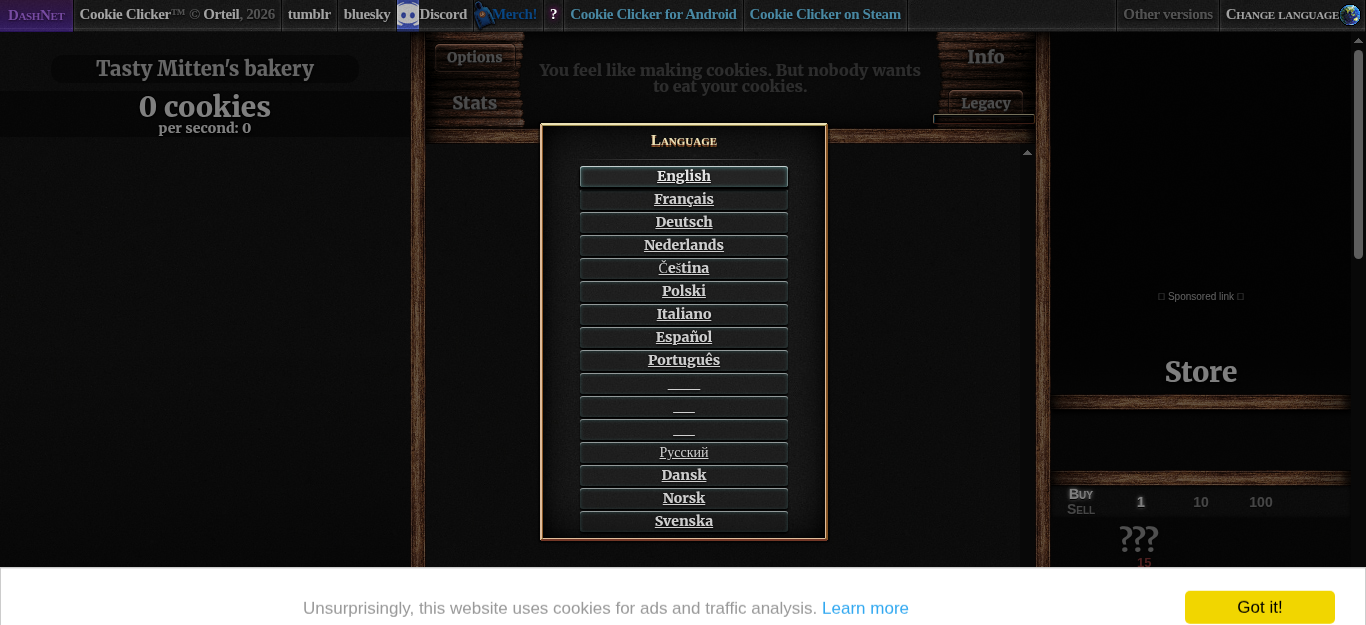
Vi åbnede siden i en headless Chromium i en Docker-container og kiggede på dens HTML. Det, botten har brug for:
|
||||
|
||||
| Hvad | Hvor på siden |
|
||||
| --- | --- |
|
||||
| Engelsk i sprogvalget | `#langSelect-EN` |
|
||||
| Den store cookie | `#bigCookie` |
|
||||
| Antal cookies og cookies pr. sekund | `#cookies` (og `#cookiesPerSecond` inde i den) |
|
||||
| Butikken | `#products`, med `#product0` (Cursor), `#product1` (Grandma), `#product2` (Farm) osv. |
|
||||
| Et produkts navn og pris | `.productName` og `.price` inde i produktet |
|
||||
| Har jeg råd? | produktet har klassen `unlocked enabled` (et produkt, du endnu ikke har råd til, er `unlocked disabled`; et skjult er `locked disabled`) |
|
||||
|
||||
Godt at vide:
|
||||
|
||||
- Spillet beder om et sprog, første gang siden indlæses. Botten skal vælge et af sig selv.
|
||||
- Antallet er skrevet som tekst: `3 cookies`, `5,000 cookies`, og for store tal på to linjer, `1.235` og `million cookies`.
|
||||
- Et cookie-banner ("Got it!") sidder nederst på siden. Botten klikker aldrig på det, fordi det er et samtykkebanner, der tilhører den, der spiller; botten arbejder uden om det (se [Step 4](Step-4-Five-Minute-Run-da)).
|
||||
|
||||
Alle disse id'er og selektorer står ét sted, i `constants.py`.
|
||||
|
||||
## Hvad vi fik ud af dette trin
|
||||
|
||||
- **Læs siden, før du koder.** Et kort kig på den rigtige HTML sparede timers gætværk; hver eneste selektor i botten stammer fra dette trin.
|
||||
- **Hav selektorerne ét sted.** Hvis spillet ændrer et id, er rettelsen én linje i `constants.py`.
|
||||
- **Kør browseren i en container.** Det samme Docker-image, der kører botten, tager skærmbillederne, så der åbner intet på dit eget skrivebord, og hver kørsel starter fra den samme rene browser.
|
||||
@@ -0,0 +1,36 @@
|
||||
[English](Step-1-Get-to-Know-the-Game) · [Dansk](Step-1-Get-to-Know-the-Game-da) · **Bahasa Malaysia**
|
||||
|
||||
# Langkah kuliah 1: mengenali permainan
|
||||
|
||||

|
||||
|
||||
## Apa yang diminta oleh tugasan
|
||||
|
||||
Buka versi baharu Cookie Clicker (ozh.github.io/cookieclicker) dan fahami cara ia berfungsi sebelum menulis sebarang kod.
|
||||
|
||||
## Apa yang kami temui
|
||||
|
||||
Kami membuka halaman itu dalam Chromium tanpa kepala di dalam bekas Docker dan melihat HTML-nya. Bahagian yang diperlukan oleh bot:
|
||||
|
||||
| Apa | Di mana pada halaman |
|
||||
| --- | --- |
|
||||
| Bahasa Inggeris pada pemilihan bahasa | `#langSelect-EN` |
|
||||
| Kuki besar | `#bigCookie` |
|
||||
| Bilangan kuki dan kuki sesaat | `#cookies` (dan `#cookiesPerSecond` di dalamnya) |
|
||||
| Kedai | `#products`, dengan `#product0` (Cursor), `#product1` (Grandma), `#product2` (Farm) dan seterusnya |
|
||||
| Nama dan harga produk | `.productName` dan `.price` di dalam produk |
|
||||
| Mampukah saya membelinya? | produk itu mempunyai kelas `unlocked enabled` (produk yang belum mampu dibeli ialah `unlocked disabled`; yang tersembunyi ialah `locked disabled`) |
|
||||
|
||||
Juga baik untuk diketahui:
|
||||
|
||||
- Permainan meminta bahasa apabila halaman dimuatkan buat kali pertama. Bot mesti memilih satu sendiri.
|
||||
- Bilangan ditulis sebagai teks: `3 cookies`, `5,000 cookies`, dan untuk nombor besar pada dua baris, `1.235` dan `million cookies`.
|
||||
- Sepanduk kuki ("Got it!") berada di bahagian bawah halaman. Bot tidak pernah mengkliknya, kerana ia ialah sepanduk persetujuan yang menjadi hak orang yang bermain; bot mengatasinya dengan cara lain (lihat [Langkah 4](Step-4-Five-Minute-Run-ms)).
|
||||
|
||||
Semua id dan pemilih ini ditulis sekali sahaja, dalam `constants.py`.
|
||||
|
||||
## Apa yang kita peroleh dalam langkah ini
|
||||
|
||||
- **Baca halaman sebelum menulis kod.** Meninjau sebentar HTML sebenar menjimatkan berjam-jam meneka; setiap pemilih dalam bot datang daripada langkah ini.
|
||||
- **Simpan pemilih di satu tempat.** Jika permainan menukar sesuatu id, satu baris dalam `constants.py` ialah pembetulannya.
|
||||
- **Jalankan pelayar dalam bekas.** Imej Docker yang sama yang menjalankan bot mengambil tangkapan skrin, jadi tiada apa yang terbuka pada desktop anda sendiri dan setiap larian bermula daripada pelayar bersih yang sama.
|
||||
@@ -0,0 +1,36 @@
|
||||
**English** · [Dansk](Step-1-Get-to-Know-the-Game-da) · [Bahasa Malaysia](Step-1-Get-to-Know-the-Game-ms)
|
||||
|
||||
# Lecture step 1: get to know the game
|
||||
|
||||

|
||||
|
||||
## What the assignment asks
|
||||
|
||||
Open the new version of Cookie Clicker (ozh.github.io/cookieclicker) and learn how it works before writing any code.
|
||||
|
||||
## What we found
|
||||
|
||||
We opened the page in a headless Chromium inside a Docker container and looked at its HTML. The parts the bot needs:
|
||||
|
||||
| What | Where on the page |
|
||||
| --- | --- |
|
||||
| English on the language selection | `#langSelect-EN` |
|
||||
| The big cookie | `#bigCookie` |
|
||||
| The cookie count and the cookies per second | `#cookies` (and `#cookiesPerSecond` inside it) |
|
||||
| The store | `#products`, with `#product0` (Cursor), `#product1` (Grandma), `#product2` (Farm) and so on |
|
||||
| A product's name and price | `.productName` and `.price` inside the product |
|
||||
| Can I afford it? | the product has the class `unlocked enabled` (a product you cannot afford yet is `unlocked disabled`; a hidden one is `locked disabled`) |
|
||||
|
||||
Also good to know:
|
||||
|
||||
- The game asks for a language the first time the page loads. The bot must pick one by itself.
|
||||
- The count is written as text: `3 cookies`, `5,000 cookies`, and for large numbers on two lines, `1.235` and `million cookies`.
|
||||
- A cookie banner ("Got it!") sits at the bottom of the page. The bot never clicks it, because it is a consent banner that belongs to the person playing; the bot works around it (see [Step 4](Step-4-Five-Minute-Run)).
|
||||
|
||||
All of these ids and selectors are written once, in `constants.py`.
|
||||
|
||||
## What we gained in this step
|
||||
|
||||
- **Read the page before coding.** A short look at the real HTML saved hours of guessing; every selector in the bot came from this step.
|
||||
- **Keep selectors in one place.** If the game changes an id, one line in `constants.py` is the fix.
|
||||
- **Run the browser in a container.** The same Docker image that runs the bot takes the screenshots, so nothing opens on your own desktop and every run starts from the same clean browser.
|
||||
@@ -0,0 +1,26 @@
|
||||
[English](Step-2-Click-the-Cookie) · **Dansk** · [Bahasa Malaysia](Step-2-Click-the-Cookie-ms)
|
||||
|
||||
# Lektionens trin 2: klik på cookien så hurtigt som muligt
|
||||
|
||||
|
||||
|
||||
## Hvad opgaven går ud på
|
||||
|
||||
Lav en bot med Selenium og Python, der klikker på cookien så hurtigt som muligt. Den skal selv lukke sprogvalget, før den går i gang.
|
||||
|
||||
## Hvad vi byggede
|
||||
|
||||
- `open_game` indlæser siden.
|
||||
- `dismiss_language` venter, til den engelske knap er synlig, klikker på den og venter derefter, til den store cookie er synlig. Spillet skal bruge nogle sekunder på at starte, efter sproget er valgt, så botten poller (hvert 0,2 sekund, højst 20 sekunder) i stedet for at sove i fast tid.
|
||||
- `click_cookie` klikker én gang på `#bigCookie`. Hvis et banner eller en gentegning blokerer klikket et øjeblik, prøver botten igen i næste runde.
|
||||
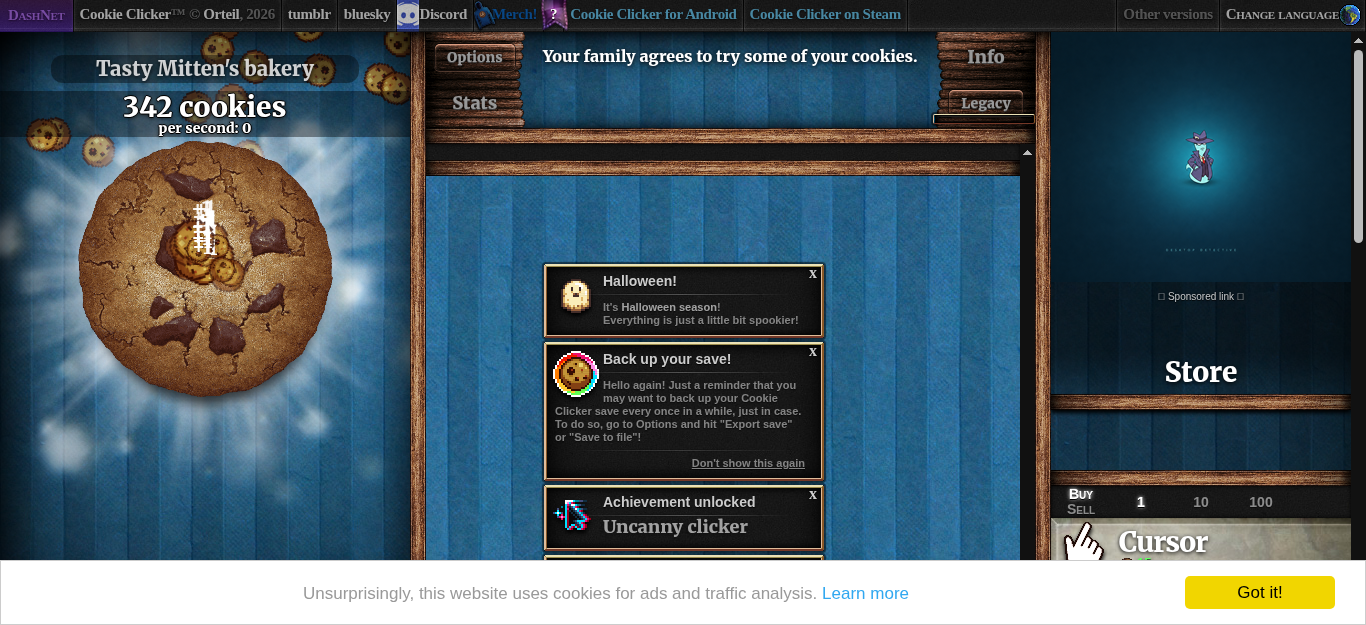
- En løkke kalder `click_cookie`, indtil tiden er gået. I en kørsel på 15 sekunder i containeren klikkede botten 344 gange, og skærmbilledet ovenfor viser 342 cookies.
|
||||
|
||||
```bash
|
||||
cookie-clicker-bot --headless --duration 15 --screenshot step-2.png
|
||||
```
|
||||
|
||||
## Hvad vi fik ud af dette trin
|
||||
|
||||
- **Vent på en betingelse, ikke på et tidsrum.** En fast `sleep` er enten for kort (botten fejler) eller for lang (botten spilder tid). At polle efter "cookien er synlig" er både hurtigere og sikrere.
|
||||
- **Hold browseren bag en port.** Løkken kender kun `GamePort` (`open_game`, `dismiss_language`, `click_cookie`, ...). Selenium-koden bor i én adapter, så løkken testes med et falsk spil på få millisekunder.
|
||||
- **Tidsstyr en løkke med et ur, du kan udskifte.** `click_and_buy` tager uret som parameter; testene giver den et falsk ur og kontrollerer antallet af klik helt præcist.
|
||||
@@ -0,0 +1,26 @@
|
||||
[English](Step-2-Click-the-Cookie) · [Dansk](Step-2-Click-the-Cookie-da) · **Bahasa Malaysia**
|
||||
|
||||
# Langkah kuliah 2: klik kuki secepat mungkin
|
||||
|
||||

|
||||
|
||||
## Apa yang diminta oleh tugasan
|
||||
|
||||
Cipta bot dengan Selenium dan Python yang mengklik kuki secepat mungkin. Ia mesti menutup pemilihan bahasa sendiri sebelum bermula.
|
||||
|
||||
## Apa yang kami bina
|
||||
|
||||
- `open_game` memuatkan halaman.
|
||||
- `dismiss_language` menunggu sehingga butang bahasa Inggeris kelihatan, mengkliknya, kemudian menunggu sehingga kuki besar kelihatan. Permainan memerlukan beberapa saat untuk bermula selepas bahasa dipilih, jadi bot membuat pengundian (setiap 0.2 saat, paling lama 20 saat) dan bukannya tidur untuk masa yang tetap.
|
||||
- `click_cookie` mengklik `#bigCookie` sekali. Jika sepanduk atau pemaparan semula menghalang klik seketika, bot mencuba lagi pada pusingan seterusnya.
|
||||
- Satu gelung memanggil `click_cookie` sehingga masa tamat. Dalam larian 15 saat di dalam bekas, bot mengklik sebanyak 344 kali, dan tangkapan skrin di atas menunjukkan 342 kuki.
|
||||
|
||||
```bash
|
||||
cookie-clicker-bot --headless --duration 15 --screenshot step-2.png
|
||||
```
|
||||
|
||||
## Apa yang kita peroleh dalam langkah ini
|
||||
|
||||
- **Tunggu sesuatu keadaan, bukan sesuatu masa.** `sleep` yang tetap sama ada terlalu pendek (bot gagal) atau terlalu lama (bot membazir masa). Mengundi untuk "kuki kelihatan" adalah lebih pantas dan lebih selamat.
|
||||
- **Letakkan pelayar di belakang port.** Gelung hanya mengenali `GamePort` (`open_game`, `dismiss_language`, `click_cookie`, ...). Kod Selenium berada dalam satu penyesuai, jadi gelung diuji dengan permainan palsu dalam beberapa milisaat.
|
||||
- **Catat masa gelung dengan jam yang boleh digantikan.** `click_and_buy` menerima jam sebagai parameter; ujian memberikannya jam palsu dan menyemak bilangan klik dengan tepat.
|
||||
@@ -0,0 +1,26 @@
|
||||
**English** · [Dansk](Step-2-Click-the-Cookie-da) · [Bahasa Malaysia](Step-2-Click-the-Cookie-ms)
|
||||
|
||||
# Lecture step 2: click the cookie as fast as possible
|
||||
|
||||

|
||||
|
||||
## What the assignment asks
|
||||
|
||||
Create a bot with Selenium and Python that clicks the cookie as fast as possible. It must dismiss the language selection by itself before it starts.
|
||||
|
||||
## What we built
|
||||
|
||||
- `open_game` loads the page.
|
||||
- `dismiss_language` waits until the English button is visible, clicks it, and then waits until the big cookie is visible. The game needs a few seconds to start after the language is chosen, so the bot polls (every 0.2 seconds, at most 20 seconds) instead of sleeping for a fixed time.
|
||||
- `click_cookie` clicks `#bigCookie` once. If a banner or a re-render blocks the click for a moment, the bot tries again on the next round.
|
||||
- A loop calls `click_cookie` until the time is up. In a 15 second run in the container the bot clicked 344 times, and the screenshot above shows 342 cookies.
|
||||
|
||||
```bash
|
||||
cookie-clicker-bot --headless --duration 15 --screenshot step-2.png
|
||||
```
|
||||
|
||||
## What we gained in this step
|
||||
|
||||
- **Wait for a condition, not for a time.** A fixed `sleep` is either too short (the bot fails) or too long (the bot wastes time). Polling for "the cookie is visible" is both faster and safer.
|
||||
- **Keep the browser behind a port.** The loop knows only `GamePort` (`open_game`, `dismiss_language`, `click_cookie`, ...). The Selenium code lives in one adapter, so the loop is tested with a fake game in a few milliseconds.
|
||||
- **Time a loop with a clock you can replace.** `click_and_buy` takes the clock as a parameter; the tests give it a fake clock and check the number of clicks exactly.
|
||||
@@ -0,0 +1,23 @@
|
||||
[English](Step-3-Buy-Upgrades) · **Dansk** · [Bahasa Malaysia](Step-3-Buy-Upgrades-ms)
|
||||
|
||||
# Lektionens trin 3: køb den dyreste opgradering, der er råd til
|
||||
|
||||
|
||||
|
||||
## Hvad opgaven går ud på
|
||||
|
||||
Hvert 5. sekund skal botten se på ruden til højre, finde de opgraderinger, der er råd til, og købe den dyreste. Med 105 cookies er der for eksempel råd til både Cursor (15) og Grandma (100), så botten køber Grandma. Hintene peger på `split`, `strip` og `replace` til at omdanne sidens tekst til tal.
|
||||
|
||||
## Hvad vi byggede
|
||||
|
||||
- `parse_amount` og `parse_cookie_count` omdanner sidens tekst til tal. De fjerner ordet `cookies`, dropper alt efter `per second`, fjerner tusindtalskommaerne med `replace` og forstår ord som `1.4 million`. Eksempler: `5,000 cookies` giver 5000; `1.235` og `million cookies` på to linjer giver 1.235.000.
|
||||
- `SeleniumGame.upgrades` læser hvert synligt produkt: dets id, navn og pris.
|
||||
- `choose_most_expensive_affordable(upgrades, cookies)` er en ren funktion: blandt de opgraderinger, hvis pris ikke overstiger antallet af cookies, returnerer den den dyreste eller ingenting. Den er testet med eksemplet ovenfor (105 cookies giver Grandma).
|
||||
- `click_and_buy` bliver ved med at klikke, og når `check_interval_seconds` (som standard 5) er gået, læser den antallet, vælger og køber.
|
||||
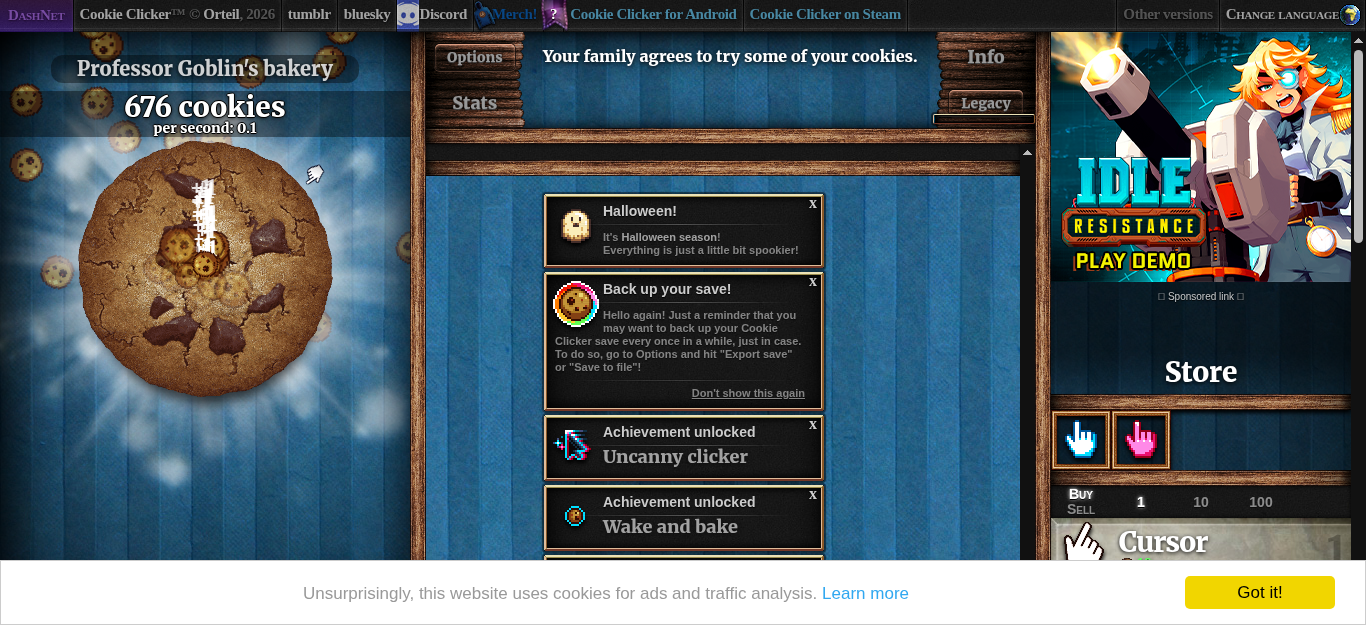
- I en kørsel på 45 sekunder i containeren købte botten 8 opgraderinger, og skærmbilledet viser de Cursors og Grandmas, den ejer.
|
||||
|
||||
## Hvad vi fik ud af dette trin
|
||||
|
||||
- **Det svære er teksten, ikke klikket.** Det samme tal optræder som `120`, `5,000`, `1.4 million` og på to linjer. Fortolkningen er en lille ren funktion med mange testcases, så den er sikker at ændre.
|
||||
- **Hold reglen væk fra browseren.** "Køb den dyreste opgradering, der er råd til" er én funktion, der intet ved om Selenium. Derfor kunne trin 5 tilføje en anden regel uden at røre browserkoden.
|
||||
- **Tæl ikke et køb, du ikke har foretaget.** Den første version loggede et køb, hver gang den klikkede. En rigtig kørsel viste, at klikket ikke altid nåede produktet, så `buy` melder nu, om det gjorde, og kun rigtige køb tælles (se [Step 4](Step-4-Five-Minute-Run-da)).
|
||||
@@ -0,0 +1,23 @@
|
||||
[English](Step-3-Buy-Upgrades) · [Dansk](Step-3-Buy-Upgrades-da) · **Bahasa Malaysia**
|
||||
|
||||
# Langkah kuliah 3: beli naik taraf termahal yang mampu dibeli
|
||||
|
||||

|
||||
|
||||
## Apa yang diminta oleh tugasan
|
||||
|
||||
Setiap 5 saat, lihat anak tetingkap sebelah kanan, cari naik taraf yang mampu dibeli, dan beli yang paling mahal. Contohnya, dengan 105 kuki, Cursor (15) dan Grandma (100) kedua-duanya mampu dibeli, jadi bot membeli Grandma. Petunjuk menyebut `split`, `strip` dan `replace` untuk menukar teks halaman kepada nombor.
|
||||
|
||||
## Apa yang kami bina
|
||||
|
||||
- `parse_amount` dan `parse_cookie_count` menukar teks halaman kepada nombor. Ia membuang perkataan `cookies`, menggugurkan segala-galanya selepas `per second`, membuang koma ribuan dengan `replace`, dan memahami perkataan seperti `1.4 million`. Contoh: `5,000 cookies` menghasilkan 5000; `1.235` dan `million cookies` pada dua baris menghasilkan 1,235,000.
|
||||
- `SeleniumGame.upgrades` membaca setiap produk yang kelihatan: id, nama dan harganya.
|
||||
- `choose_most_expensive_affordable(upgrades, cookies)` ialah fungsi tulen: antara naik taraf yang harganya tidak melebihi bilangan kuki, pulangkan yang paling mahal, atau tiada apa-apa. Ia diuji dengan contoh di atas (105 kuki menghasilkan Grandma).
|
||||
- `click_and_buy` terus mengklik, dan apabila `check_interval_seconds` (5 secara lalai) telah berlalu, ia membaca bilangan kuki, memilih, dan membeli.
|
||||
- Dalam larian bekas selama 45 saat, bot membeli 8 naik taraf, dan tangkapan skrin menunjukkan Cursor dan Grandma yang dimilikinya.
|
||||
|
||||
## Apa yang kita peroleh dalam langkah ini
|
||||
|
||||
- **Bahagian yang sukar ialah teks, bukan kliknya.** Nombor yang sama muncul sebagai `120`, `5,000`, `1.4 million` dan pada dua baris. Penghuraian ialah fungsi tulen kecil dengan banyak kes ujian, jadi selamat untuk diubah.
|
||||
- **Jauhkan peraturan daripada pelayar.** "Beli naik taraf termahal yang mampu dibeli" ialah satu fungsi yang tidak tahu apa-apa tentang Selenium. Itulah sebabnya langkah 5 boleh menambah peraturan kedua tanpa menyentuh kod pelayar.
|
||||
- **Jangan kira pembelian yang tidak anda buat.** Versi pertama mencatat pembelian setiap kali ia mengklik. Larian sebenar menunjukkan klik itu tidak selalu sampai ke produk, jadi `buy` kini memberitahu sama ada ia berjaya, dan hanya pembelian sebenar dikira (lihat [Langkah 4](Step-4-Five-Minute-Run-ms)).
|
||||
@@ -0,0 +1,23 @@
|
||||
**English** · [Dansk](Step-3-Buy-Upgrades-da) · [Bahasa Malaysia](Step-3-Buy-Upgrades-ms)
|
||||
|
||||
# Lecture step 3: buy the most expensive affordable upgrade
|
||||
|
||||

|
||||
|
||||
## What the assignment asks
|
||||
|
||||
Every 5 seconds, look at the right-hand pane, find the upgrades you can afford, and buy the most expensive one. For example, with 105 cookies both Cursor (15) and Grandma (100) are affordable, so the bot buys Grandma. The hints point to `split`, `strip` and `replace` for turning the page text into numbers.
|
||||
|
||||
## What we built
|
||||
|
||||
- `parse_amount` and `parse_cookie_count` turn page text into numbers. They remove the word `cookies`, drop everything after `per second`, take away the thousands commas with `replace`, and understand words such as `1.4 million`. Examples: `5,000 cookies` gives 5000; `1.235` and `million cookies` on two lines gives 1,235,000.
|
||||
- `SeleniumGame.upgrades` reads every visible product: its id, its name and its price.
|
||||
- `choose_most_expensive_affordable(upgrades, cookies)` is a pure function: of the upgrades whose price is not above the cookies, return the most expensive one, or nothing. It is tested with the example above (105 cookies gives Grandma).
|
||||
- `click_and_buy` keeps clicking, and when `check_interval_seconds` (5 by default) have passed it reads the count, chooses, and buys.
|
||||
- In a 45 second container run the bot bought 8 upgrades, and the screenshot shows the Cursors and Grandmas it owns.
|
||||
|
||||
## What we gained in this step
|
||||
|
||||
- **The hard part is the text, not the click.** The same number appears as `120`, `5,000`, `1.4 million` and on two lines. Parsing is a small pure function with many test cases, so it is safe to change.
|
||||
- **Keep the rule away from the browser.** "Buy the most expensive affordable upgrade" is one function that knows nothing about Selenium. That is why step 5 could add a second rule without touching the browser code.
|
||||
- **Do not count a purchase you did not make.** The first version logged a purchase whenever it clicked. A real run showed the click did not always reach the product, so `buy` now says whether it did, and only real purchases are counted (see [Step 4](Step-4-Five-Minute-Run)).
|
||||
@@ -0,0 +1,33 @@
|
||||
[English](Step-4-Five-Minute-Run) · **Dansk** · [Bahasa Malaysia](Step-4-Five-Minute-Run-ms)
|
||||
|
||||
# Lektionens trin 4: stop efter fem minutter og udskriv cookies pr. sekund
|
||||
|
||||
|
||||
|
||||
## Hvad opgaven går ud på
|
||||
|
||||
Efter 5 minutter stopper botten og udskriver `cookies/second`.
|
||||
|
||||
## Hvad vi byggede
|
||||
|
||||
- `click_and_buy` kører til en deadline målt med et monotont ur (`time.monotonic`), så kørslen varer præcis `RUN_DURATION_SECONDS` (300) og driver ikke, hvis et klik er langsomt.
|
||||
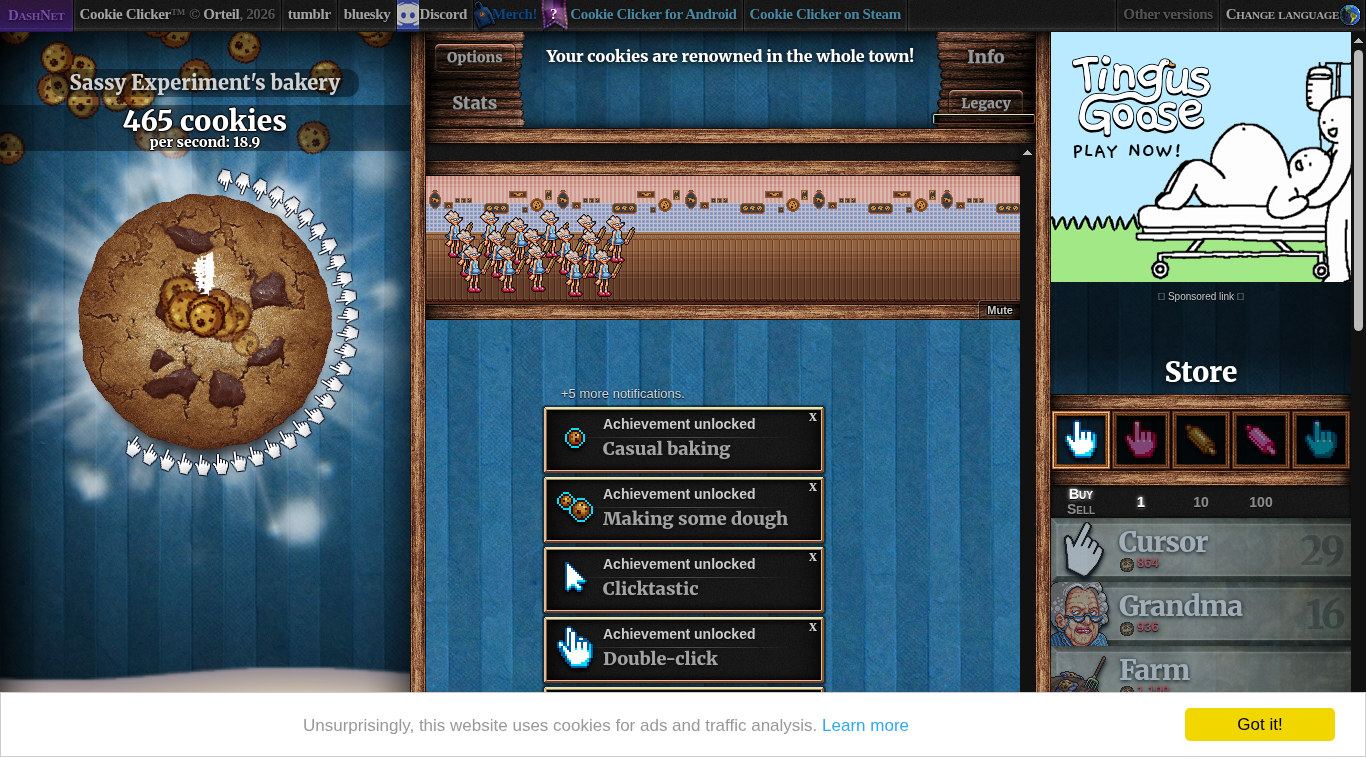
- `SeleniumGame.cookies_per_second` læser spillets eget tal fra `#cookiesPerSecond` (for eksempel `per second: 18.9`), og `parse_cookies_per_second` omdanner det til et tal, også værdier som `1.2 million`.
|
||||
- `format_result` bygger linjen `cookies/second: 18.9`. Programmet udskriver præcis denne ene linje på standard output; loggen (klik, køb, forløbet tid) går til standard error, så `cookie-clicker-bot > result.txt` kun beholder resultatet.
|
||||
|
||||
## Vores første resultat
|
||||
|
||||
En fuld kørsel i Docker-containeren med opgavens regler (tjek hvert 5. sekund, køb det dyreste produkt, der er råd til):
|
||||
|
||||
| Mål | Værdi |
|
||||
| --- | --- |
|
||||
| Varighed | 300,0 sekunder |
|
||||
| Klik | 7.666 |
|
||||
| Købte produkter | 45 (29 Cursor, 16 Grandma) |
|
||||
| Resultat | `cookies/second: 18.9` |
|
||||
|
||||
## Hvad vi fik ud af dette trin
|
||||
|
||||
- **En tidsstyret løkke, der ikke driver.** Et monotont ur og en deadline er mere pålidelige end at tælle sleeps.
|
||||
- **Adskilt output til mennesker og til programmer.** Logning går til standard error og resultatet til standard output.
|
||||
- **To rigtige fejl fundet ved en rigtig kørsel.** Spillet gentegner siden, efter sproget er valgt, så et element kan blive forældet mellem det øjeblik, man finder det, og det øjeblik, man bruger det; løsningen er at slå det op igen. Et cookie-banner dækker en del af butikken, så et klik på et produkt kan blive opfanget; botten klikker så med JavaScript og tæller kun et køb, når klikket gik igennem. Enhedstests med en falsk driver afslørede ingen af problemerne, og derfor har hvert trin en containerkørsel og et skærmbillede.
|
||||
- **Et udgangspunkt.** 18,9 cookies pr. sekund er det tal, trin 5 forsøger at slå.
|
||||
@@ -0,0 +1,33 @@
|
||||
[English](Step-4-Five-Minute-Run) · [Dansk](Step-4-Five-Minute-Run-da) · **Bahasa Malaysia**
|
||||
|
||||
# Langkah kuliah 4: berhenti selepas lima minit dan cetak kuki sesaat
|
||||
|
||||

|
||||
|
||||
## Apa yang diminta oleh tugasan
|
||||
|
||||
Selepas 5 minit bot berhenti dan mencetak `cookies/second`.
|
||||
|
||||
## Apa yang kami bina
|
||||
|
||||
- `click_and_buy` berjalan sehingga tarikh akhir yang diukur dengan jam monotonik (`time.monotonic`), jadi larian berlangsung tepat `RUN_DURATION_SECONDS` (300) dan tidak tersasar jika sesuatu klik perlahan.
|
||||
- `SeleniumGame.cookies_per_second` membaca angka permainan itu sendiri daripada `#cookiesPerSecond` (contohnya `per second: 18.9`), dan `parse_cookies_per_second` menukarnya kepada nombor, termasuk nilai seperti `1.2 million`.
|
||||
- `format_result` membina baris `cookies/second: 18.9`. Program mencetak tepat satu baris ini pada output standard; log (klik, pembelian, masa berlalu) pergi ke ralat standard, jadi `cookie-clicker-bot > result.txt` hanya menyimpan keputusan.
|
||||
|
||||
## Keputusan pertama kami
|
||||
|
||||
Larian penuh dalam bekas Docker dengan peraturan tugasan (semak setiap 5 saat, beli produk termahal yang mampu dibeli):
|
||||
|
||||
| Ukuran | Nilai |
|
||||
| --- | --- |
|
||||
| Tempoh | 300.0 saat |
|
||||
| Klik | 7,666 |
|
||||
| Produk dibeli | 45 (29 Cursor, 16 Grandma) |
|
||||
| Keputusan | `cookies/second: 18.9` |
|
||||
|
||||
## Apa yang kita peroleh dalam langkah ini
|
||||
|
||||
- **Gelung bermasa yang tidak tersasar.** Jam monotonik dan tarikh akhir lebih boleh dipercayai daripada mengira tidur.
|
||||
- **Output berasingan untuk manusia dan untuk program.** Pencatatan log pergi ke ralat standard dan keputusan ke output standard.
|
||||
- **Dua pepijat sebenar ditemui oleh larian sebenar.** Permainan memaparkan semula selepas bahasa dipilih, jadi sesuatu elemen boleh menjadi basi antara ketika ia ditemui dan ketika ia digunakan; pembetulannya ialah mencari semula. Sepanduk kuki menutup sebahagian kedai, jadi klik pada produk boleh dipintas; bot kemudian mengklik dengan JavaScript dan hanya mengira pembelian apabila klik itu berjaya. Ujian unit dengan pemacu palsu tidak menunjukkan sebarang masalah ini, itulah sebabnya setiap langkah mempunyai larian bekas dan tangkapan skrin.
|
||||
- **Garis dasar.** 18.9 kuki sesaat ialah nombor yang cuba dikalahkan oleh langkah 5.
|
||||
@@ -0,0 +1,44 @@
|
||||
[English](Step-5-Improve-the-Strategy) · **Dansk** · [Bahasa Malaysia](Step-5-Improve-the-Strategy-ms)
|
||||
|
||||
# Lektionens trin 5: justér algoritmen
|
||||
|
||||
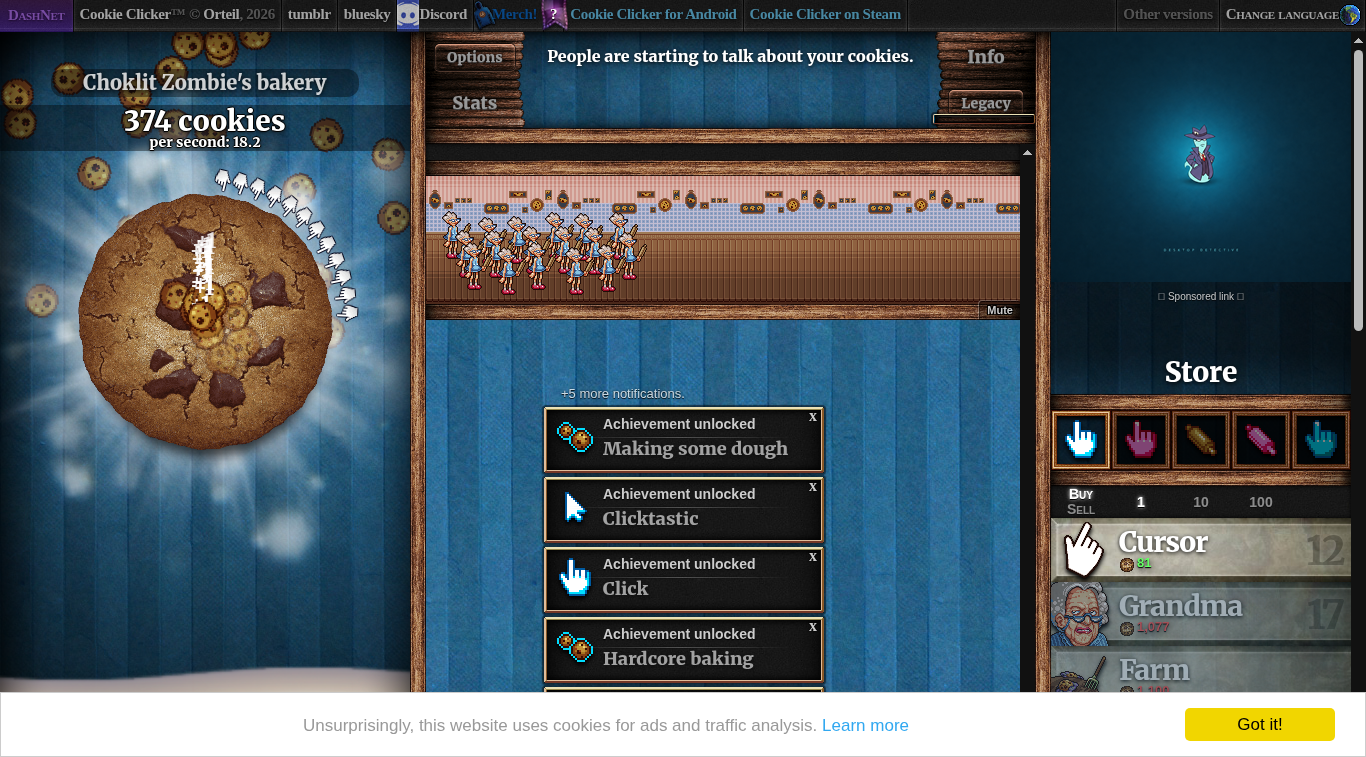
|
||||
|
||||
## Hvad opgaven går ud på
|
||||
|
||||
Prøv et andet tjekinterval (hvert sekund, hvert 10. sekund) eller køb alle opgraderinger, der er råd til, og se, om cookies pr. sekund stiger.
|
||||
|
||||
## Hvad vi byggede
|
||||
|
||||
- `--interval SECONDS` sætter tiden mellem tjek af opgraderinger. Den skal være større end 0; standarden forbliver 5 sekunder.
|
||||
- `--buy-all` køber alle opgraderinger, der stadig kan være inden for de cookies, du har, den dyreste først (`choose_affordable_upgrades`). Uden den køber botten én opgradering, den dyreste, der er råd til (`choose_most_expensive_affordable`).
|
||||
- Begge regler er rene funktioner i domænepakken, så de enhedstestes uden en browser. Strategien er en værdi (`BuyStrategy`), ikke et flag spredt rundt i koden.
|
||||
|
||||
```bash
|
||||
cookie-clicker-bot --interval 10
|
||||
cookie-clicker-bot --interval 1 --buy-all
|
||||
```
|
||||
|
||||
## Hvad vi målte
|
||||
|
||||
Hver række er en fuld kørsel på 300 sekunder i en Docker-container. Fem containere kørte samtidig på én computer, i to hold, så tallene er gode til at sammenligne rækkerne med hinanden, men en kørsel alene er hurtigere (vores solo-udgangspunkt fra lektionens trin 4 var 18,9).
|
||||
|
||||
| Tjek hvert | Strategi | Hold 1 | Hold 2 |
|
||||
| --- | --- | --- | --- |
|
||||
| 1 sekund | køb én | 13.5 | 13.5 |
|
||||
| 1 sekund | køb alle | 13.5 | 13.5 |
|
||||
| 5 sekunder (opgaven) | køb én | 15.5 | 15.5 |
|
||||
| 5 sekunder | køb alle | styrtede ned, se nedenfor | 14.5 |
|
||||
| 10 sekunder | køb én | **18.2** | **18.2** |
|
||||
|
||||
Det bedste resultat er intervallet på 10 sekunder med køb én. Hvorfor:
|
||||
|
||||
- At tjekke oftere er ikke bedre. Hvert tjek læser siden og tager tid fra klikningen, og det dyreste produkt, der er råd til, er som regel kun lidt bedre end det billigere, man kunne have købt et øjeblik før.
|
||||
- Køb alle gør ingen forskel tidligt i spillet: der er kun råd til Cursor og Grandma, og det køber botten alligevel. Det ville få betydning senere, når antallet af cookies rummer flere produkter på én gang.
|
||||
|
||||
## Hvad vi fik ud af dette trin
|
||||
|
||||
- **Små, rene regler er nemme at sammenligne.** Fordi valget af opgradering ikke rører Selenium, er en ny strategi en ny funktion plus en test.
|
||||
- **Mål, gæt ikke.** Det resultat, vi forventede (flere tjek, flere cookies), var det modsatte af, hvad kørslerne viste.
|
||||
- **En anden rigtig fejl.** Det første hold styrtede ned i én container: spillet omskriver tælleren i hvert billede, og en computer under belastning fik vores ene genforsøg til at fejle. Læsningen forsøger nu fem gange med en kort pause. En test med en falsk driver, der bliver forældet fire gange, viser det.
|
||||
- **Retfærdige sammenligninger kræver de samme forhold.** Vi kørte rækkerne samtidig og rapporterer to hold, fordi en enkelt kørsel kan være heldig.
|
||||
@@ -0,0 +1,44 @@
|
||||
[English](Step-5-Improve-the-Strategy) · [Dansk](Step-5-Improve-the-Strategy-da) · **Bahasa Malaysia**
|
||||
|
||||
# Langkah kuliah 5: ubah suai algoritma
|
||||
|
||||

|
||||
|
||||
## Apa yang diminta oleh tugasan
|
||||
|
||||
Cuba selang semakan lain (setiap saat, setiap 10 saat) atau beli semua naik taraf yang mampu dibeli, dan lihat sama ada kuki sesaat meningkat.
|
||||
|
||||
## Apa yang kami bina
|
||||
|
||||
- `--interval SECONDS` menetapkan masa antara semakan naik taraf. Ia mesti lebih besar daripada 0; nilai lalai kekal 5 saat.
|
||||
- `--buy-all` membeli setiap naik taraf yang masih muat dalam kuki yang anda ada, yang paling mahal dahulu (`choose_affordable_upgrades`). Tanpanya bot membeli satu naik taraf, iaitu yang termahal yang mampu dibeli (`choose_most_expensive_affordable`).
|
||||
- Kedua-dua peraturan ialah fungsi tulen dalam pakej domain, jadi ia diuji unit tanpa pelayar. Strategi ialah satu nilai (`BuyStrategy`), bukan bendera yang tersebar di seluruh kod.
|
||||
|
||||
```bash
|
||||
cookie-clicker-bot --interval 10
|
||||
cookie-clicker-bot --interval 1 --buy-all
|
||||
```
|
||||
|
||||
## Apa yang kami ukur
|
||||
|
||||
Setiap baris ialah larian penuh 300 saat dalam bekas Docker. Lima bekas berjalan serentak pada satu komputer, dalam dua kelompok, jadi nombor ini sesuai untuk membandingkan baris antara satu sama lain tetapi larian bersendirian adalah lebih pantas (garis dasar solo kami pada langkah kuliah 4 ialah 18.9).
|
||||
|
||||
| Semak setiap | Strategi | Kelompok 1 | Kelompok 2 |
|
||||
| --- | --- | --- | --- |
|
||||
| 1 saat | beli satu | 13.5 | 13.5 |
|
||||
| 1 saat | beli semua | 13.5 | 13.5 |
|
||||
| 5 saat (tugasan) | beli satu | 15.5 | 15.5 |
|
||||
| 5 saat | beli semua | ranap, lihat di bawah | 14.5 |
|
||||
| 10 saat | beli satu | **18.2** | **18.2** |
|
||||
|
||||
Keputusan terbaik ialah selang 10 saat dengan beli satu. Sebabnya:
|
||||
|
||||
- Menyemak lebih kerap tidak lebih baik. Setiap semakan membaca halaman dan mengambil masa daripada mengklik, dan produk termahal yang mampu dibeli biasanya hanya sedikit lebih baik daripada yang lebih murah yang boleh anda beli seketika sebelumnya.
|
||||
- Beli semua tidak membuat perbezaan pada awal permainan: hanya Cursor dan Grandma yang mampu dibeli, dan bot membelinya juga. Ia akan penting kemudian, apabila bilangan kuki cukup untuk beberapa produk sekali gus.
|
||||
|
||||
## Apa yang kita peroleh dalam langkah ini
|
||||
|
||||
- **Peraturan kecil yang tulen mudah dibandingkan.** Oleh kerana pemilihan naik taraf tidak menyentuh Selenium, strategi baharu hanyalah fungsi baharu serta satu ujian.
|
||||
- **Ukur, jangan meneka.** Keputusan yang kami jangkakan (lebih banyak semakan, lebih banyak kuki) bertentangan dengan apa yang ditunjukkan oleh larian.
|
||||
- **Pepijat sebenar kedua.** Kelompok pertama ranap dalam satu bekas: permainan menulis semula pembilang pada setiap bingkai, dan komputer yang terbeban menyebabkan satu percubaan semula kami gagal. Bacaan kini mencuba semula lima kali dengan jeda singkat. Ujian dengan pemacu palsu yang menjadi basi empat kali menunjukkannya.
|
||||
- **Perbandingan yang adil memerlukan keadaan yang sama.** Kami menjalankan baris-baris itu serentak dan melaporkan dua kelompok, kerana satu larian boleh bernasib baik.
|
||||
@@ -0,0 +1 @@
|
||||
Cookie Clicker Bot, a solution to day 48 of Udemy 100 Days of Code. [English](Home) · [Dansk](Home-da) · [Bahasa Malaysia](Home-ms)
|
||||
@@ -0,0 +1,14 @@
|
||||
**Cookie Clicker Bot**
|
||||
|
||||
- [Home](Home)
|
||||
- [Step 1: Get to know the game](Step-1-Get-to-Know-the-Game)
|
||||
- [Step 2: Click the cookie](Step-2-Click-the-Cookie)
|
||||
- [Step 3: Buy upgrades](Step-3-Buy-Upgrades)
|
||||
- [Step 4: Five minute run](Step-4-Five-Minute-Run)
|
||||
- [Step 5: Improve the strategy](Step-5-Improve-the-Strategy)
|
||||
|
||||
**Language**
|
||||
|
||||
- [English](Home)
|
||||
- [Dansk](Home-da)
|
||||
- [Bahasa Malaysia](Home-ms)
|
||||
Reference in New Issue
Block a user