
27 lines
1.8 KiB
Markdown
27 lines
1.8 KiB
Markdown
# Step 3 - Create the Playlist
|
|
|
|
🌐 **English** · [Dansk](Step-3-Create-the-Playlist-da) · [Bahasa Melayu](Step-3-Create-the-Playlist-ms)
|
|
|
|
## What the step does
|
|
|
|
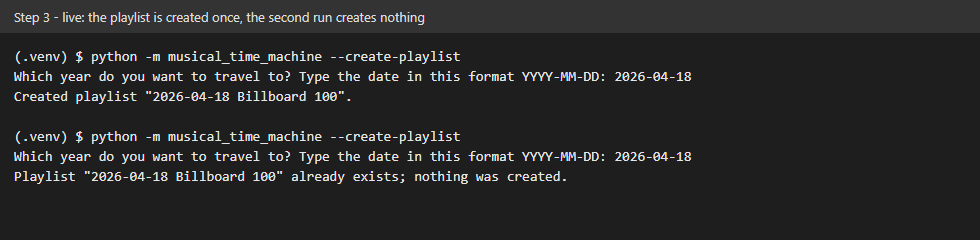
The program creates a private playlist named `{date} Billboard 100`, for example `2026-04-18 Billboard 100`, with `yt.create_playlist(title, description, privacy_status="PRIVATE")`. Before it creates anything it loops through `yt.get_library_playlists()`; if a playlist with the same title exists, it uses that one.
|
|
|
|
```bash
|
|
python -m musical_time_machine --create-playlist
|
|
```
|
|
|
|
A live run with the author's `browser.json`: the first run creates the playlist, the second run creates nothing:
|
|
|
|
|
|
|
|
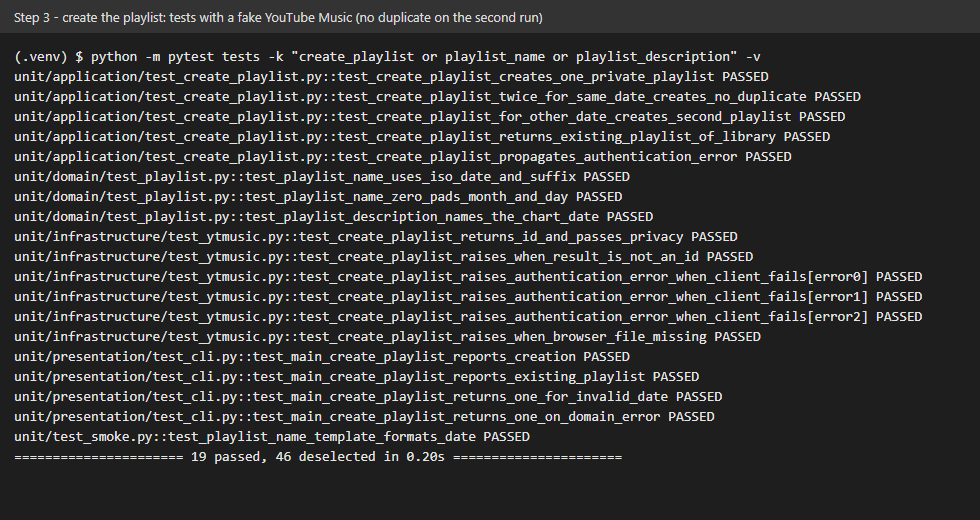
The screenshot shows the tests of this step with a fake YouTube Music: the first call creates one playlist, the second call for the same date creates none.
|
|
|
|
|
|
|
|
## What we gained
|
|
|
|
- **Idempotence.** An operation you can run twice with the same result is safe to repeat. Checking for an existing playlist first means a crash or a second run never fills the library with duplicates.
|
|
- **One place for a name.** The playlist title and description are built from templates in `constants.py` by one function, so the check and the creation can never disagree about the title.
|
|
- **Reading an API's real answer.** `create_playlist` returns the playlist id on success but an error dictionary on failure; the adapter checks which one it got and raises a clear error.
|
|
- **Privacy by default.** Creating the playlist as `PRIVATE` means a test run never publishes anything.
|