
48 lines
2.9 KiB
Markdown
48 lines
2.9 KiB
Markdown
> This page is generated from README.md and wiki/. Changes made here are overwritten the next time the wiki is published.
|
|
|
|
English | [Dansk](Home.da) | [Bahasa Melayu](Home.ms)
|
|
|
|
# Weather Data (Day 25)
|
|
|
|
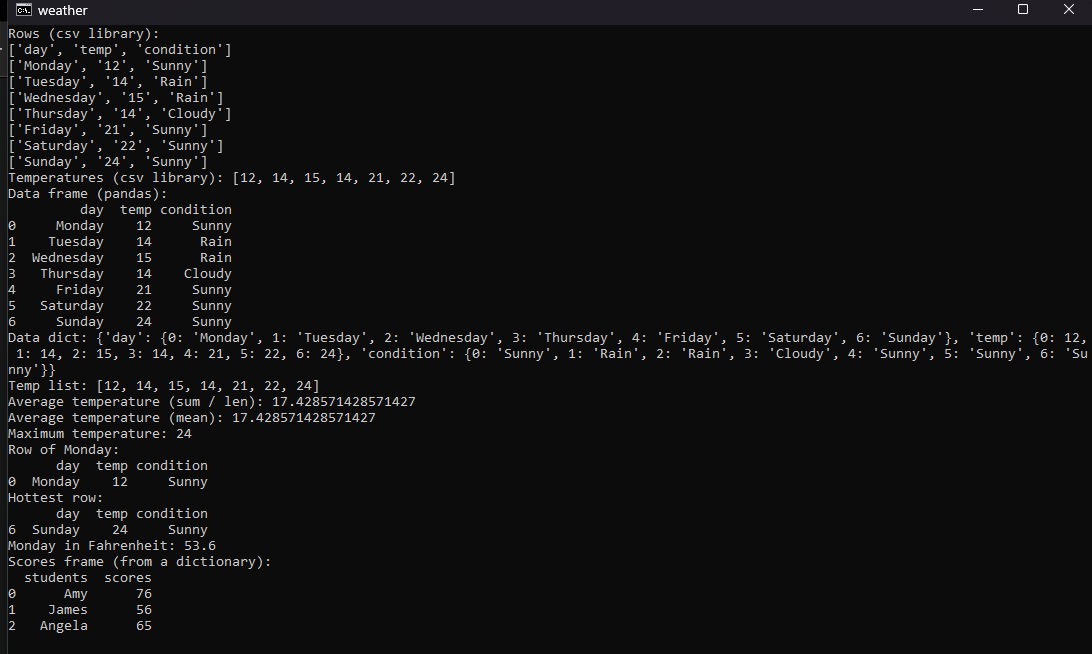
Reading CSV weather data in Python. It is the day-25 assignment of Udemy's *100 Days of Code: The Complete Python Pro Bootcamp*. The lectures read the weather of one week from `weather_data.csv` with Python's built-in `csv` library and collect the temperatures as whole numbers, and then show how the `pandas` library does the same in one line. A table is a `DataFrame` and a column of it is a `Series`; both can be converted to a dictionary and a list, the average and the maximum temperature can be computed, rows can be selected by a condition, and a `DataFrame` can be created from a dictionary and exported to a CSV file.
|
|
|
|
|
|
|
|
*`python -m weather` in a terminal: the csv part first, then the pandas part.*
|
|
|
|
## What the program prints
|
|
|
|
| Part | Result |
|
|
| --- | --- |
|
|
| `csv` library | The rows of the file and the temperatures `[12, 14, 15, 14, 21, 22, 24]` |
|
|
| `pandas` | The `DataFrame`, the dictionary and the list of temperatures |
|
|
| Statistics | Average 17.43 (by hand and with `mean`) and maximum 24 |
|
|
| Row selection | The row of Monday, the row of the hottest day (Sunday), Monday in Fahrenheit (53.6) |
|
|
| Create and export | A `DataFrame` of students and scores made from a dictionary; written to a file only with `--export` |
|
|
|
|
## Functions
|
|
|
|
| Function | Module | Lecture |
|
|
| --- | --- | --- |
|
|
| `read_rows`, `read_temperatures` | `weather.csv_reader` | Reading with the `csv` library |
|
|
| `read_data` | `weather.analysis` | `pandas.read_csv` |
|
|
| `to_data_dict`, `to_temp_list` | `weather.analysis` | `to_dict`, `to_list` |
|
|
| `average_temp`, `average_temp_mean`, `max_temp` | `weather.analysis` | Sum and length, `mean`, `max` |
|
|
| `row_for_day`, `hottest_row`, `day_in_fahrenheit` | `weather.analysis` | Selecting rows |
|
|
| `create_scores_frame`, `export_frame` | `weather.export` | `DataFrame` from a dictionary, `to_csv` |
|
|
|
|
## Run
|
|
|
|
Python 3.13 or newer is needed. The `csv` part has no runtime dependencies; `pandas` is an optional extra that the `dev` extra installs.
|
|
|
|
```bash
|
|
git clone https://git.tirsystem.com/Tirsvad-Udemy-100-days-of-code/025-weather.git
|
|
cd 025-weather
|
|
python -m venv .venv
|
|
python -m pip install --upgrade pip
|
|
python -m pip install -e ".[dev]"
|
|
python -m weather
|
|
```
|
|
|
|
Add `--export new_data.csv` to also write the scores table to a file. The README of the repository has the full set-up for Windows, Linux and macOS.
|