
1.7 KiB
1.7 KiB
English | Dansk | Bahasa Melayu
Install
Create a local virtual environment named .venv, upgrade pip and install the project with its test tool.
Requirements
- Python 3.13 or newer, with
tkinter(Turtle needs it) git- Optional: Doxygen to build the source documentation
Windows PowerShell
git clone https://git.tirsystem.com/Tirsvad-Udemy-100-days-of-code/025-us-states-game.git
cd 025-us-states-game
python -m venv .venv
.\.venv\Scripts\Activate.ps1
python -m pip install --upgrade pip
python -m pip install -e ".[dev]"
Linux Debian
sudo apt install python3 python3-venv python3-tk git
git clone https://git.tirsystem.com/Tirsvad-Udemy-100-days-of-code/025-us-states-game.git
cd 025-us-states-game
python3 -m venv .venv
source .venv/bin/activate
python -m pip install --upgrade pip
python -m pip install -e ".[dev]"
MacOS
git clone https://git.tirsystem.com/Tirsvad-Udemy-100-days-of-code/025-us-states-game.git
cd 025-us-states-game
python3 -m venv .venv
source .venv/bin/activate
python -m pip install --upgrade pip
python -m pip install -e ".[dev]"
Run
python -m us_states_game
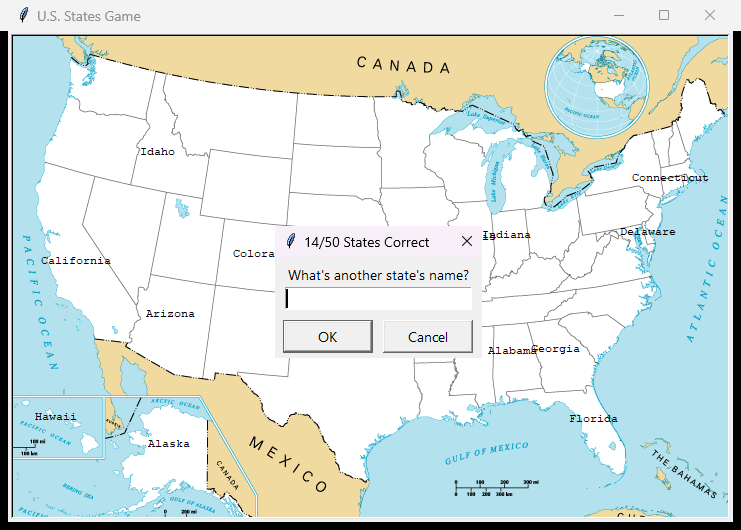
Type a state name in the prompt; case does not matter. Type exit (or press Cancel) to quit. The states you did not name are written to states_to_learn.csv in the current folder. Add --show-coordinates to print the coordinates of mouse clicks.
Run the tests
python -m pytest
The tests need no display.