MIL-006 wiki in three languages #38
@@ -15,7 +15,7 @@ A Python bot for Day 47 of Udemy's "100 Days of Code: The Complete Python Pro Bo
|
|||||||
|
|
||||||
## 🧭 Overview
|
## 🧭 Overview
|
||||||
|
|
||||||
The assignment is built in four lecture steps. Each step was delivered on its own branch and pull request, and each has a screenshot and a wiki page in English, Danish and Bahasa Malaysia that explains what it teaches.
|
The assignment is built in four lecture steps. Each step was delivered on its own branch and pull request, and each has a screenshot and a [wiki](#-links) page in English, Danish and Bahasa Malaysia that explains what it teaches.
|
||||||
|
|
||||||
| Step | What it adds | Status |
|
| Step | What it adds | Status |
|
||||||
| --- | --- | --- |
|
| --- | --- | --- |
|
||||||
@@ -163,6 +163,7 @@ GNU Affero General Public License v3.0, see [LICENSE](LICENSE).
|
|||||||
- [Repository][repository]
|
- [Repository][repository]
|
||||||
- [Documentation][documentation]
|
- [Documentation][documentation]
|
||||||
- [Issue tracker][issues]
|
- [Issue tracker][issues]
|
||||||
|
- [Wiki in English, Danish and Bahasa Malaysia][wiki] (what we gained in each lecture step; the pages are in [`docs/wiki/`](docs/wiki/))
|
||||||
|
|
||||||
## 📎 Appendix: Project documents
|
## 📎 Appendix: Project documents
|
||||||
|
|
||||||
@@ -184,6 +185,7 @@ The documents a newcomer needs, in reading order.
|
|||||||
[repository]: https://git.tirsystem.com/Tirsvad-Udemy-100-days-of-code/047-amazon-price-tracker
|
[repository]: https://git.tirsystem.com/Tirsvad-Udemy-100-days-of-code/047-amazon-price-tracker
|
||||||
[documentation]: ./docs/
|
[documentation]: ./docs/
|
||||||
[issues]: https://git.tirsystem.com/Tirsvad-Udemy-100-days-of-code/047-amazon-price-tracker/issues
|
[issues]: https://git.tirsystem.com/Tirsvad-Udemy-100-days-of-code/047-amazon-price-tracker/issues
|
||||||
|
[wiki]: https://git.tirsystem.com/Tirsvad-Udemy-100-days-of-code/047-amazon-price-tracker/wiki
|
||||||
[agents]: ./AGENTS.md
|
[agents]: ./AGENTS.md
|
||||||
[BC-001]: ./docs/business-case.md
|
[BC-001]: ./docs/business-case.md
|
||||||
[SA-001]: ./docs/stakeholder-analysis.md
|
[SA-001]: ./docs/stakeholder-analysis.md
|
||||||
|
|||||||
@@ -0,0 +1,14 @@
|
|||||||
|
# Amazon Price Tracker
|
||||||
|
|
||||||
|
🌐 [English](Home) · **Dansk** · [Bahasa Melayu](Home-ms)
|
||||||
|
|
||||||
|
En Python-bot til dag 47 af Udemys "100 Days of Code: The Complete Python Pro Bootcamp". Den læser en produktside, finder prisen og sender en e-mail, når prisen er under en målpris. Opgaven har fire trin; hvert trin har en side her med det, vi byggede, et skærmbillede og **det, vi lærte**.
|
||||||
|
|
||||||
|
| Trin | Side | Det vi lærte |
|
||||||
|
| --- | --- | --- |
|
||||||
|
| 1 | [Find prisen](Step-1-Scrape-the-Price-da) | At læse HTML med BeautifulSoup og gøre `$99.99` til et decimaltal |
|
||||||
|
| 2 | [E-mail-alarm](Step-2-Email-Alert-da) | At sende mail med `smtplib` og holde hemmeligheder i `.env` |
|
||||||
|
| 3 | [Request headers](Step-3-Request-Headers-da) | Hvorfor et script skal ligne en browser |
|
||||||
|
| 4 | [Live Amazon-side](Step-4-Live-Amazon-da) | Hvad der sker på et rigtigt websted, og hvordan man fejler tydeligt |
|
||||||
|
|
||||||
|
Kør den: se [README](https://git.tirsystem.com/Tirsvad-Udemy-100-days-of-code/047-amazon-price-tracker#-setup) (virtuelt miljø, `python -m pip install --upgrade pip`, `.env`). Kode, plan og reviews: [repository](https://git.tirsystem.com/Tirsvad-Udemy-100-days-of-code/047-amazon-price-tracker).
|
||||||
@@ -0,0 +1,14 @@
|
|||||||
|
# Amazon Price Tracker
|
||||||
|
|
||||||
|
🌐 [English](Home) · [Dansk](Home-da) · **Bahasa Melayu**
|
||||||
|
|
||||||
|
Bot Python untuk Hari ke-47 kursus Udemy "100 Days of Code: The Complete Python Pro Bootcamp". Ia membaca halaman produk, mengambil harga dan menghantar e-mel apabila harga berada di bawah harga sasaran. Tugasan ini mempunyai empat langkah; setiap langkah ada halaman di sini yang menunjukkan apa yang dibina, tangkapan skrin dan **apa yang kita perolehi**.
|
||||||
|
|
||||||
|
| Langkah | Halaman | Apa yang kita perolehi |
|
||||||
|
| --- | --- | --- |
|
||||||
|
| 1 | [Ambil harga](Step-1-Scrape-the-Price-ms) | Membaca HTML dengan BeautifulSoup dan menukar `$99.99` kepada nombor perpuluhan |
|
||||||
|
| 2 | [Amaran e-mel](Step-2-Email-Alert-ms) | Menghantar e-mel dengan `smtplib` dan menyimpan rahsia dalam `.env` |
|
||||||
|
| 3 | [Header permintaan](Step-3-Request-Headers-ms) | Mengapa skrip perlu kelihatan seperti pelayar |
|
||||||
|
| 4 | [Halaman Amazon sebenar](Step-4-Live-Amazon-ms) | Apa yang berlaku di laman sebenar, dan cara gagal dengan jelas |
|
||||||
|
|
||||||
|
Jalankan: lihat [README](https://git.tirsystem.com/Tirsvad-Udemy-100-days-of-code/047-amazon-price-tracker#-setup) (persekitaran maya, `python -m pip install --upgrade pip`, `.env`). Kod, pelan dan semakan: [repositori](https://git.tirsystem.com/Tirsvad-Udemy-100-days-of-code/047-amazon-price-tracker).
|
||||||
@@ -0,0 +1,14 @@
|
|||||||
|
# Amazon Price Tracker
|
||||||
|
|
||||||
|
🌐 **English** · [Dansk](Home-da) · [Bahasa Melayu](Home-ms)
|
||||||
|
|
||||||
|
A Python bot for Day 47 of Udemy's "100 Days of Code: The Complete Python Pro Bootcamp". It reads a product page, extracts the price and sends an e-mail when the price is below a target. The assignment has four lecture steps; each has a page here that shows what we built, a screenshot and **what we gained**.
|
||||||
|
|
||||||
|
| Step | Page | What we gained |
|
||||||
|
| --- | --- | --- |
|
||||||
|
| 1 | [Scrape the price](Step-1-Scrape-the-Price) | Reading HTML with BeautifulSoup and turning `$99.99` into a float |
|
||||||
|
| 2 | [E-mail alert](Step-2-Email-Alert) | Sending mail with `smtplib` and keeping secrets in `.env` |
|
||||||
|
| 3 | [Request headers](Step-3-Request-Headers) | Why a script should look like a browser |
|
||||||
|
| 4 | [Live Amazon page](Step-4-Live-Amazon) | What happens on a real site, and how to fail clearly |
|
||||||
|
|
||||||
|
Run it: see the [README](https://git.tirsystem.com/Tirsvad-Udemy-100-days-of-code/047-amazon-price-tracker#-setup) (virtual environment, `python -m pip install --upgrade pip`, `.env`). Code, plan and reviews: [repository](https://git.tirsystem.com/Tirsvad-Udemy-100-days-of-code/047-amazon-price-tracker).
|
||||||
@@ -0,0 +1,18 @@
|
|||||||
|
# Trin 1: find prisen
|
||||||
|
|
||||||
|
🌐 [English](Step-1-Scrape-the-Price) · **Dansk** · [Bahasa Melayu](Step-1-Scrape-the-Price-ms)
|
||||||
|
|
||||||
|
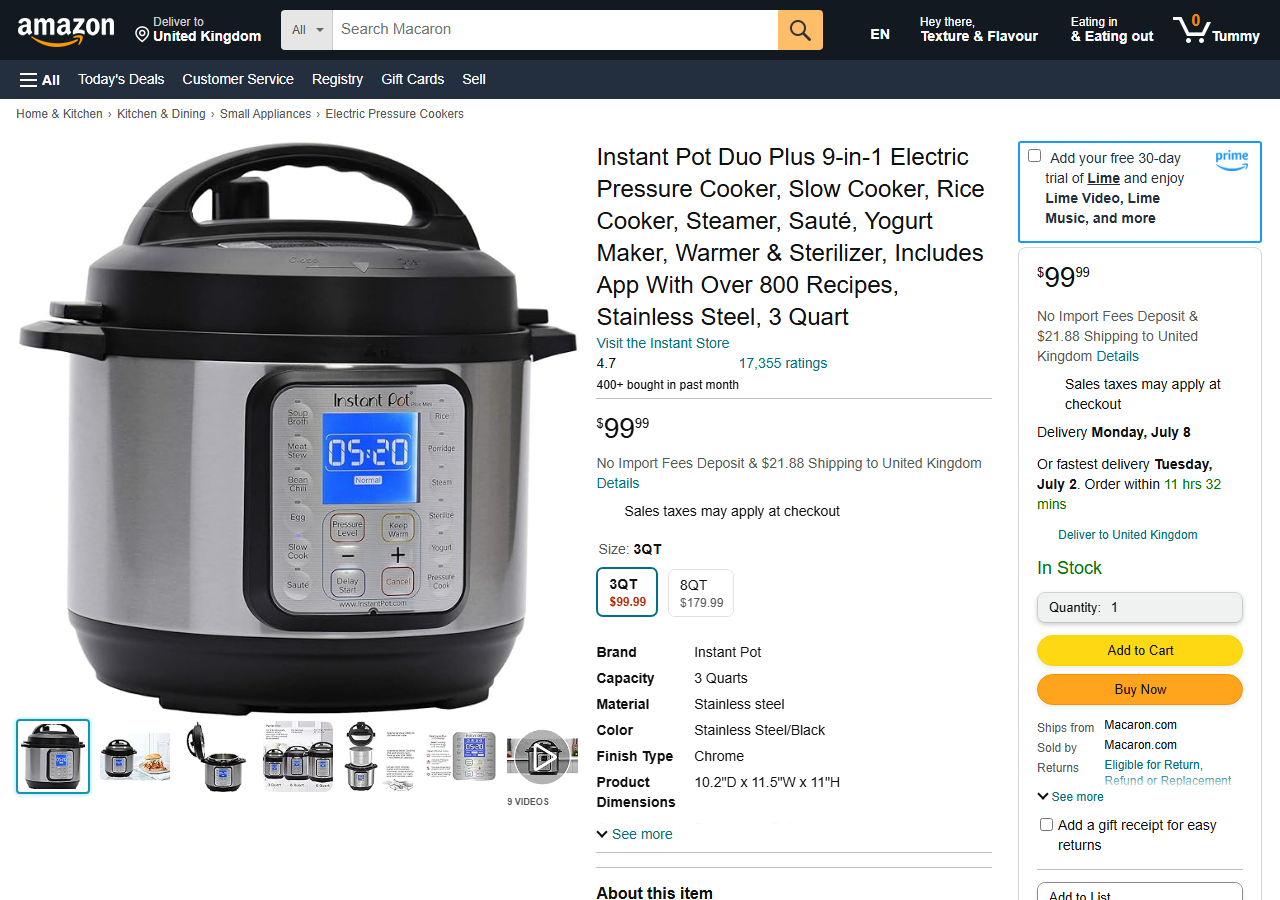
**Opgave.** Brug BeautifulSoup til at hente prisen på Instant Pot på øvesiden som et decimaltal og udskriv den.
|
||||||
|
|
||||||
|
**Det vi byggede.** `get_title(html)` og `get_price(html)` i `infrastructure/scraper.py`. Prisen står i det første element med klassen `a-offscreen`; teksten er `$99.99`. `split("$")` fjerner valutategnet, og `float()` laver tallet.
|
||||||
|
|
||||||
|
|
||||||
|
|
||||||
|

|
||||||
|
|
||||||
|
**Det vi lærte**
|
||||||
|
|
||||||
|
- At finde et element i browserens inspektør og vælge det med BeautifulSoup (`select_one`).
|
||||||
|
- At rense hentet tekst (`strip`, `split`), før den gøres til tal med `float()`.
|
||||||
|
- Tests, der bruger en gemt kopi af siden og derfor kører uden netværk.
|
||||||
|
- En tydelig fejl (`PriceNotFoundError`), når elementet mangler.
|
||||||
@@ -0,0 +1,18 @@
|
|||||||
|
# Langkah 1: ambil harga
|
||||||
|
|
||||||
|
🌐 [English](Step-1-Scrape-the-Price) · [Dansk](Step-1-Scrape-the-Price-da) · **Bahasa Melayu**
|
||||||
|
|
||||||
|
**Tugasan.** Gunakan BeautifulSoup untuk mendapatkan harga Instant Pot di halaman latihan sebagai nombor perpuluhan dan cetaknya.
|
||||||
|
|
||||||
|
**Apa yang dibina.** `get_title(html)` dan `get_price(html)` dalam `infrastructure/scraper.py`. Harga berada dalam elemen pertama dengan kelas `a-offscreen`; teksnya `$99.99`. `split("$")` membuang simbol mata wang dan `float()` menghasilkan nombor.
|
||||||
|
|
||||||
|

|
||||||
|
|
||||||
|

|
||||||
|
|
||||||
|
**Apa yang kita perolehi**
|
||||||
|
|
||||||
|
- Cara mencari elemen dalam pemeriksa pelayar dan memilihnya dengan BeautifulSoup (`select_one`).
|
||||||
|
- Cara membersihkan teks yang diambil (`strip`, `split`) sebelum menukarnya dengan `float()`.
|
||||||
|
- Ujian yang menggunakan salinan halaman yang disimpan, jadi ia berjalan tanpa rangkaian.
|
||||||
|
- Ralat yang jelas (`PriceNotFoundError`) apabila elemen tiada.
|
||||||
@@ -0,0 +1,18 @@
|
|||||||
|
# Step 1: scrape the price
|
||||||
|
|
||||||
|
🌐 **English** · [Dansk](Step-1-Scrape-the-Price-da) · [Bahasa Melayu](Step-1-Scrape-the-Price-ms)
|
||||||
|
|
||||||
|
**Assignment.** Use BeautifulSoup to get the price of the Instant Pot on the practice page as a floating point number and print it.
|
||||||
|
|
||||||
|
**What we built.** `get_title(html)` and `get_price(html)` in `infrastructure/scraper.py`. The price is in the first element with class `a-offscreen`; its text is `$99.99`. `split("$")` drops the currency sign and `float()` makes the number.
|
||||||
|
|
||||||
|

|
||||||
|
|
||||||
|

|
||||||
|
|
||||||
|
**What we gained**
|
||||||
|
|
||||||
|
- How to find an element in the browser's inspector and select it with BeautifulSoup (`select_one`).
|
||||||
|
- How to clean scraped text (`strip`, `split`) before converting it with `float()`.
|
||||||
|
- Tests that use a saved copy of the page, so they run without the network.
|
||||||
|
- A clear error (`PriceNotFoundError`) when the element is missing.
|
||||||
@@ -0,0 +1,20 @@
|
|||||||
|
# Trin 2: e-mail-alarm
|
||||||
|
|
||||||
|
🌐 [English](Step-2-Email-Alert) · **Dansk** · [Bahasa Melayu](Step-2-Email-Alert-ms)
|
||||||
|
|
||||||
|
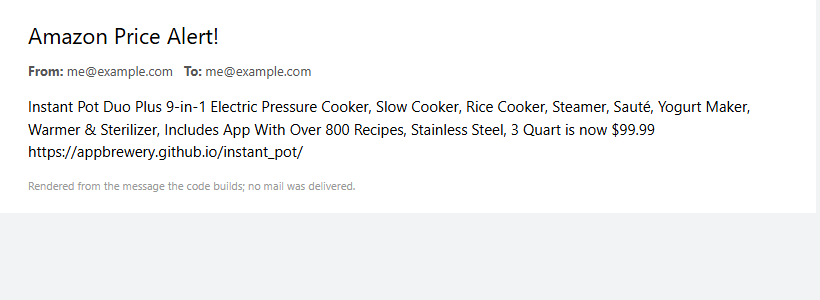
**Opgave.** Når prisen er under en målpris (100), send en e-mail til dig selv med produktets titel, prisen og et link til at købe det. Hold e-mailadresse og adgangskode ude af koden.
|
||||||
|
|
||||||
|
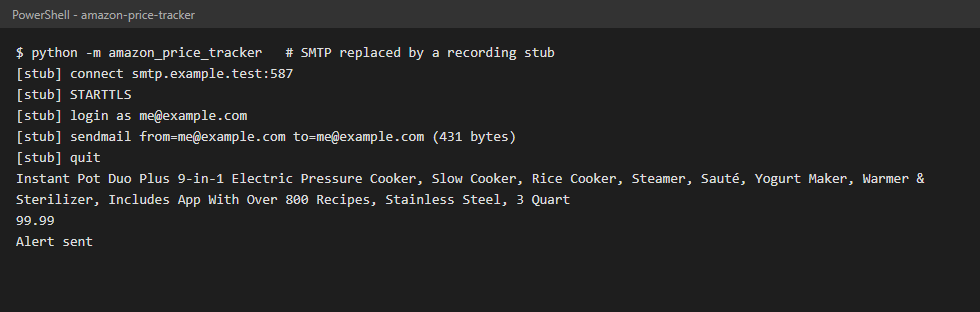
**Det vi byggede.** `check_price` sammenligner prisen med `TARGET_PRICE`. `SmtpNotifier` forbinder med `smtplib` på port 587, starter TLS, logger ind og sender beskeden. `SMTP_ADDRESS`, `EMAIL_ADDRESS` og `EMAIL_PASSWORD` læses fra `.env` med `python-dotenv`; `.env.example` viser nøglerne.
|
||||||
|
|
||||||
|
Skærmbillederne stammer fra en kørsel, hvor SMTP-forbindelsen er erstattet af en stub, så der blev ikke sendt mail; det andet er tegnet ud fra den besked, koden bygger.
|
||||||
|
|
||||||
|
|
||||||
|
|
||||||
|
|
||||||
|
|
||||||
|
**Det vi lærte**
|
||||||
|
|
||||||
|
- SMTP-samtalen: connect, `starttls()`, `login()`, `sendmail()`; Gmail kræver en app-adgangskode.
|
||||||
|
- Miljøvariabler og `.env`-filer holder hemmeligheder ude af repositoryet (`.env` står i `.gitignore`).
|
||||||
|
- Reglen "under målet" er en lille ren funktion, der er let at teste (under, lig med, over).
|
||||||
|
- Tests med en falsk SMTP-klasse: testene sender aldrig rigtig mail.
|
||||||
@@ -0,0 +1,20 @@
|
|||||||
|
# Langkah 2: amaran e-mel
|
||||||
|
|
||||||
|
🌐 [English](Step-2-Email-Alert) · [Dansk](Step-2-Email-Alert-da) · **Bahasa Melayu**
|
||||||
|
|
||||||
|
**Tugasan.** Apabila harga di bawah sasaran (100), hantar e-mel kepada diri sendiri dengan tajuk produk, harga dan pautan untuk membelinya. Jauhkan alamat e-mel dan kata laluan daripada kod.
|
||||||
|
|
||||||
|
**Apa yang dibina.** `check_price` membandingkan harga dengan `TARGET_PRICE`. `SmtpNotifier` menyambung dengan `smtplib` pada port 587, memulakan TLS, log masuk dan menghantar mesej. `SMTP_ADDRESS`, `EMAIL_ADDRESS` dan `EMAIL_PASSWORD` dibaca daripada `.env` dengan `python-dotenv`; `.env.example` menunjukkan kuncinya.
|
||||||
|
|
||||||
|
Tangkapan skrin datang daripada larian yang sambungan SMTP-nya diganti dengan stub, jadi tiada e-mel dihantar; yang kedua dilukis daripada mesej yang dibina oleh kod.
|
||||||
|
|
||||||
|

|
||||||
|
|
||||||
|

|
||||||
|
|
||||||
|
**Apa yang kita perolehi**
|
||||||
|
|
||||||
|
- Perbualan SMTP: connect, `starttls()`, `login()`, `sendmail()`; Gmail memerlukan kata laluan aplikasi.
|
||||||
|
- Pemboleh ubah persekitaran dan fail `.env` menjauhkan rahsia daripada repositori (`.env` ada dalam `.gitignore`).
|
||||||
|
- Peraturan "di bawah sasaran" ialah fungsi tulen yang kecil dan mudah diuji (bawah, sama, atas).
|
||||||
|
- Ujian dengan kelas SMTP palsu: ujian tidak pernah menghantar e-mel sebenar.
|
||||||
@@ -0,0 +1,20 @@
|
|||||||
|
# Step 2: e-mail alert
|
||||||
|
|
||||||
|
🌐 **English** · [Dansk](Step-2-Email-Alert-da) · [Bahasa Melayu](Step-2-Email-Alert-ms)
|
||||||
|
|
||||||
|
**Assignment.** When the price is below a target (100), send an e-mail to yourself with the product title, the price and a link to buy it. Keep the e-mail address and password out of the code.
|
||||||
|
|
||||||
|
**What we built.** `check_price` compares the price with `TARGET_PRICE`. `SmtpNotifier` connects with `smtplib` on port 587, starts TLS, logs in and sends the message. `SMTP_ADDRESS`, `EMAIL_ADDRESS` and `EMAIL_PASSWORD` are read from `.env` with `python-dotenv`; `.env.example` shows the keys.
|
||||||
|
|
||||||
|
The screenshots come from a run where the SMTP connection is replaced by a stub, so no mail was sent; the second one is rendered from the message the code builds.
|
||||||
|
|
||||||
|

|
||||||
|
|
||||||
|

|
||||||
|
|
||||||
|
**What we gained**
|
||||||
|
|
||||||
|
- The SMTP conversation: connect, `starttls()`, `login()`, `sendmail()`; Gmail needs an App Password.
|
||||||
|
- Environment variables and `.env` files keep secrets out of the repository (`.env` is in `.gitignore`).
|
||||||
|
- A "below the target" rule that is a tiny pure function and easy to test (below, equal, above).
|
||||||
|
- Tests with a fake SMTP class: no real mail is ever sent by the tests.
|
||||||
@@ -0,0 +1,20 @@
|
|||||||
|
# Trin 3: request headers
|
||||||
|
|
||||||
|
🌐 [English](Step-3-Request-Headers) · **Dansk** · [Bahasa Melayu](Step-3-Request-Headers-ms)
|
||||||
|
|
||||||
|
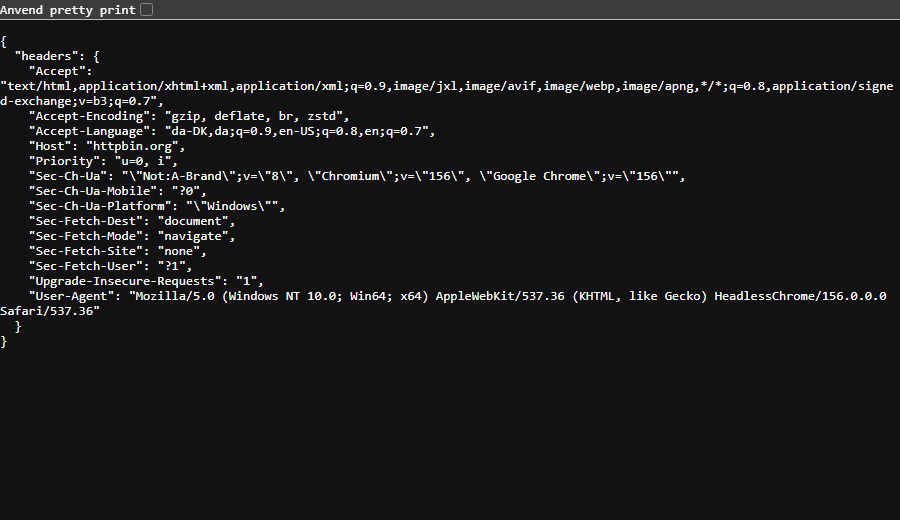
**Opgave.** Send browser-lignende headers med forespørgslen: mindst `User-Agent` og `Accept-Language`.
|
||||||
|
|
||||||
|
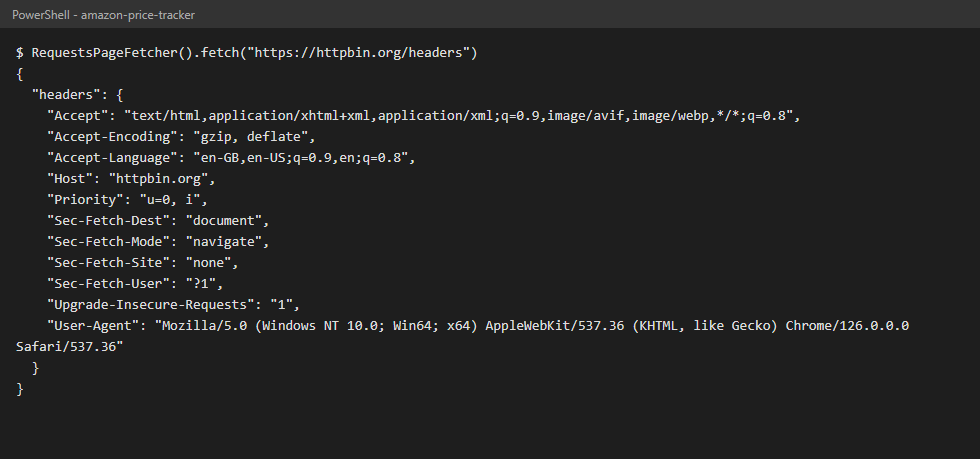
**Det vi byggede.** `DEFAULT_HEADERS` i `constants.py` (uden `Host` og `X-Amzn-Trace-Id`) og `RequestsPageFetcher`, der sender dem som `headers=` til `requests.get`.
|
||||||
|
|
||||||
|
Det en browser sender til httpbin.org/headers, og det botten sender (`Host` tilføjes af `requests`):
|
||||||
|
|
||||||
|
|
||||||
|
|
||||||
|
|
||||||
|
|
||||||
|
**Det vi lærte**
|
||||||
|
|
||||||
|
- En forespørgsel rummer mere end adressen: browser, system og sprog rejser med i headers.
|
||||||
|
- Med de rette headers kan en server svare på dit sprog og i din valuta.
|
||||||
|
- Et script uden headers ligner en bot, og mange servere blokerer bots.
|
||||||
|
- Én skrivebeskyttet definition af headers og tests, der kontrollerer, hvad der sendes.
|
||||||
@@ -0,0 +1,20 @@
|
|||||||
|
# Langkah 3: header permintaan
|
||||||
|
|
||||||
|
🌐 [English](Step-3-Request-Headers) · [Dansk](Step-3-Request-Headers-da) · **Bahasa Melayu**
|
||||||
|
|
||||||
|
**Tugasan.** Hantar header seperti pelayar bersama permintaan: sekurang-kurangnya `User-Agent` dan `Accept-Language`.
|
||||||
|
|
||||||
|
**Apa yang dibina.** `DEFAULT_HEADERS` dalam `constants.py` (tanpa `Host` dan `X-Amzn-Trace-Id`) dan `RequestsPageFetcher`, yang menghantarnya sebagai `headers=` kepada `requests.get`.
|
||||||
|
|
||||||
|
Apa yang pelayar hantar ke httpbin.org/headers, dan apa yang bot hantar (`Host` ditambah oleh `requests`):
|
||||||
|
|
||||||
|

|
||||||
|
|
||||||
|

|
||||||
|
|
||||||
|
**Apa yang kita perolehi**
|
||||||
|
|
||||||
|
- Permintaan membawa lebih daripada URL: pelayar, sistem dan bahasa dihantar dalam header.
|
||||||
|
- Dengan header yang betul, pelayan boleh menjawab dalam bahasa dan mata wang anda.
|
||||||
|
- Skrip tanpa header kelihatan seperti bot, dan banyak pelayan menyekat bot.
|
||||||
|
- Satu takrifan header yang baca sahaja, dan ujian yang menyemak apa yang dihantar.
|
||||||
@@ -0,0 +1,20 @@
|
|||||||
|
# Step 3: request headers
|
||||||
|
|
||||||
|
🌐 **English** · [Dansk](Step-3-Request-Headers-da) · [Bahasa Melayu](Step-3-Request-Headers-ms)
|
||||||
|
|
||||||
|
**Assignment.** Send browser-like headers with the request: at least `User-Agent` and `Accept-Language`.
|
||||||
|
|
||||||
|
**What we built.** `DEFAULT_HEADERS` in `constants.py` (without `Host` and `X-Amzn-Trace-Id`) and `RequestsPageFetcher`, which passes them as `headers=` to `requests.get`.
|
||||||
|
|
||||||
|
What a browser sends to httpbin.org/headers, and what the bot sends (`Host` is added by `requests`):
|
||||||
|
|
||||||
|

|
||||||
|
|
||||||
|

|
||||||
|
|
||||||
|
**What we gained**
|
||||||
|
|
||||||
|
- A request carries more than the URL: the browser, the system and the language travel in headers.
|
||||||
|
- With the right headers a server can answer in your language and currency.
|
||||||
|
- A script without headers looks like a bot, and many servers block bots.
|
||||||
|
- One read-only definition of the headers, and tests that check what is sent.
|
||||||
@@ -0,0 +1,20 @@
|
|||||||
|
# Trin 4: den levende Amazon-side
|
||||||
|
|
||||||
|
🌐 [English](Step-4-Live-Amazon) · **Dansk** · [Bahasa Melayu](Step-4-Live-Amazon-ms)
|
||||||
|
|
||||||
|
**Opgave.** Ret koden mod den rigtige Amazon-produktside, og udskriv pris og titel.
|
||||||
|
|
||||||
|
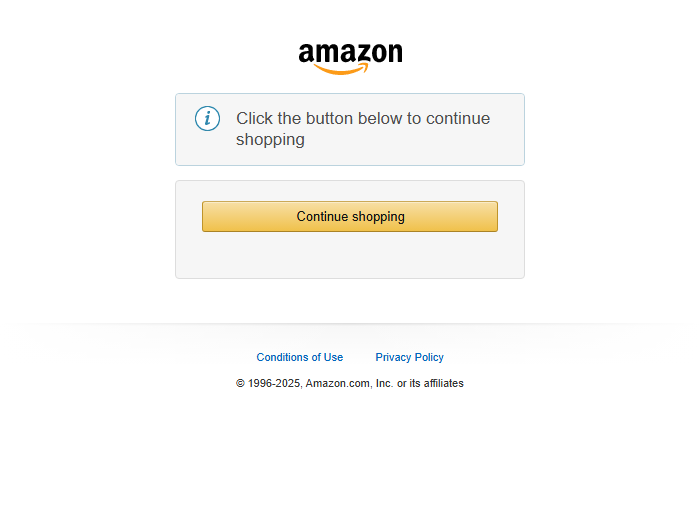
**Hvad der skete.** Den 2026-10-28 svarede Amazon botten med HTTP 200 og en robotkontrol-side ("Click the button below to continue shopping") i stedet for produktet. Der var ingen pris at læse.
|
||||||
|
|
||||||
|
|
||||||
|
|
||||||
|
**Det vi byggede.** `is_robot_check` genkender siden, og botten stopper med en tydelig besked. Den forsøger **ikke** at løse eller omgå kontrollen. Selektorer og markører står i `constants.py`; `PRODUCT_URL` i `.env` vælger en anden side, fx øvesiden.
|
||||||
|
|
||||||
|

|
||||||
|
|
||||||
|
**Det vi lærte**
|
||||||
|
|
||||||
|
- Levende websteder ændrer sig og kan afvise scripts; øvesiden er den pålidelige basis.
|
||||||
|
- At fejle tydeligt er en del af arbejdet: en præcis fejl slår et traceback eller et forkert tal.
|
||||||
|
- Respekt for webstedet: ingen omveje uden om en botkontrol.
|
||||||
|
- Selektorer som data, så en ændring i markup er en enkelt linje.
|
||||||
@@ -0,0 +1,20 @@
|
|||||||
|
# Langkah 4: halaman Amazon sebenar
|
||||||
|
|
||||||
|
🌐 [English](Step-4-Live-Amazon) · [Dansk](Step-4-Live-Amazon-da) · **Bahasa Melayu**
|
||||||
|
|
||||||
|
**Tugasan.** Halakan kod ke halaman produk Amazon yang sebenar dan cetak harga serta tajuk.
|
||||||
|
|
||||||
|
**Apa yang berlaku.** Pada 2026-10-28 Amazon menjawab bot dengan HTTP 200 dan halaman semakan robot ("Click the button below to continue shopping"), bukan produk. Tiada harga untuk dibaca.
|
||||||
|
|
||||||
|

|
||||||
|
|
||||||
|
**Apa yang dibina.** `is_robot_check` mengenali halaman itu dan bot berhenti dengan mesej yang jelas. Ia **tidak** cuba menyelesaikan atau melepasi semakan itu. Pemilih dan penanda ada dalam `constants.py`; `PRODUCT_URL` dalam `.env` memilih halaman lain, contohnya halaman latihan.
|
||||||
|
|
||||||
|

|
||||||
|
|
||||||
|
**Apa yang kita perolehi**
|
||||||
|
|
||||||
|
- Laman sebenar berubah dan boleh menolak skrip; halaman latihan ialah asas yang boleh dipercayai.
|
||||||
|
- Gagal dengan jelas ialah sebahagian daripada kerja: ralat khusus lebih baik daripada traceback atau nombor yang salah.
|
||||||
|
- Menghormati laman: tiada jalan pintas untuk semakan bot.
|
||||||
|
- Pemilih disimpan sebagai data, jadi perubahan markup hanyalah satu baris.
|
||||||
@@ -0,0 +1,20 @@
|
|||||||
|
# Step 4: the live Amazon page
|
||||||
|
|
||||||
|
🌐 **English** · [Dansk](Step-4-Live-Amazon-da) · [Bahasa Melayu](Step-4-Live-Amazon-ms)
|
||||||
|
|
||||||
|
**Assignment.** Point the code at the real Amazon product page and print the price and the title.
|
||||||
|
|
||||||
|
**What happened.** On 2026-10-28 Amazon answered the bot with HTTP 200 and a robot-check page ("Click the button below to continue shopping"), not the product. There was no price to read.
|
||||||
|
|
||||||
|

|
||||||
|
|
||||||
|
**What we built.** `is_robot_check` recognises that page and the bot stops with a clear message. It does **not** try to solve or get past the check. Selectors and markers are in `constants.py`; `PRODUCT_URL` in `.env` chooses another page, for example the practice page.
|
||||||
|
|
||||||
|

|
||||||
|
|
||||||
|
**What we gained**
|
||||||
|
|
||||||
|
- Live sites change and may refuse scripts; the practice page is the reliable baseline.
|
||||||
|
- Failing clearly is part of the job: a specific error beats a traceback or a wrong number.
|
||||||
|
- Respect for the site: no workarounds for a bot check.
|
||||||
|
- Selectors kept as data, so a markup change is a one-line edit.
|
||||||
@@ -0,0 +1,13 @@
|
|||||||
|
**Amazon Price Tracker**
|
||||||
|
|
||||||
|
- [Home](Home)
|
||||||
|
- [Step 1: scrape the price](Step-1-Scrape-the-Price)
|
||||||
|
- [Step 2: e-mail alert](Step-2-Email-Alert)
|
||||||
|
- [Step 3: request headers](Step-3-Request-Headers)
|
||||||
|
- [Step 4: live Amazon page](Step-4-Live-Amazon)
|
||||||
|
|
||||||
|
**Languages**
|
||||||
|
|
||||||
|
- English: [Home](Home)
|
||||||
|
- Dansk: [Hjem](Home-da)
|
||||||
|
- Bahasa Melayu: [Utama](Home-ms)
|
||||||
Reference in New Issue
Block a user