
2.1 KiB
2.1 KiB
Step 2 - YouTube Music Authentication
🌐 English · Dansk · Bahasa Melayu
What the step does
YouTube Music has no simple API key. The ytmusicapi library works by borrowing the login of your browser: you copy the request headers of a logged-in Firefox session once (see Setup and Run), and ytmusicapi browser turns them into browser.json. The program then opens YTMusic("browser.json") and counts your library playlists.
python -m musical_time_machine --check-login
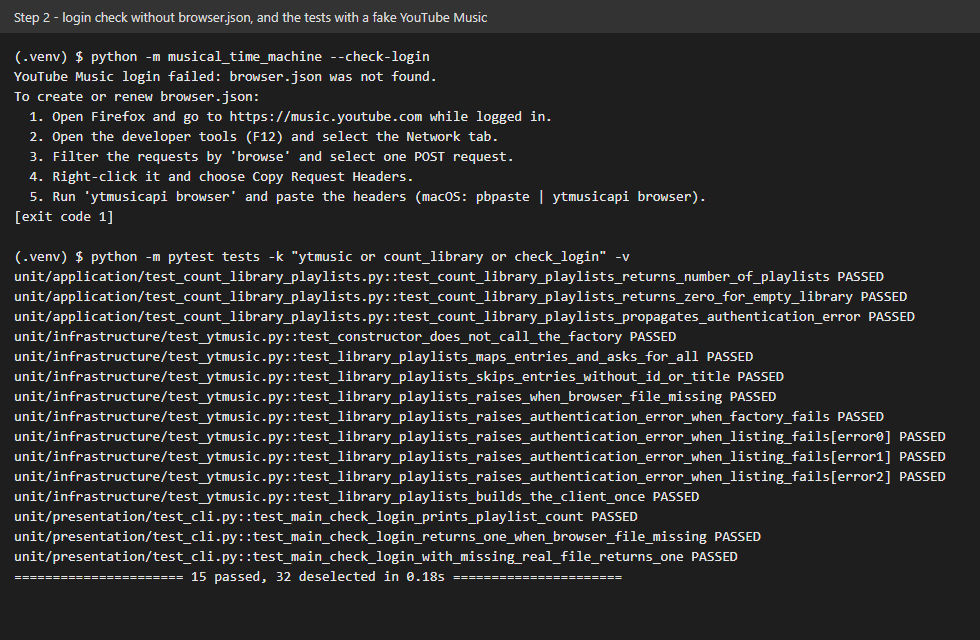
On success it prints Found N playlists in your library. Without a valid browser.json it prints the renewal steps and exits with code 1, instead of a stack trace.
A live run with the author's browser.json (the output shows only the count, never the names of the playlists):

The screenshot shows the run without browser.json and the tests that use a fake YouTube Music.
What we gained
- How cookie-based authentication works. Your browser proves who you are with cookies and headers on every request; copying them lets a script act as that session. That is also why
browser.jsonis a secret, is ignored by git and expires after a while. - Hiding a library behind a port. The program talks to a
MusicServiceinterface; onlyinfrastructure/ytmusic.pyimportsytmusicapi. The tests use a fake, and a different music service could replace it. - Failing helpfully. A missing or expired file becomes a clear message that says how to renew it, because the error a user sees is part of the product.
- A lazy connection. The client is created on first use, so building the service never touches the network.